
react-native

react-native copied to clipboard
 facebook
Android Text lineWrap and letterSpacing causes incorrect line break
Description
On an Android Pixel 6 pro device, discovered a text measuring bug when setting both lineHeight and letterSpacing.
This specific combination reproduces no matter the lineHeight, just the fact that you set it with letterSpacing of 1.6 causes it to line wrap when it should not.
<View style={{flexDirection: 'row'}}>
  <Text
    style={{
      letterSpacing: 1.6,
      lineHeight: 21,
    }}>
    0123456789
  </Text>
</View>
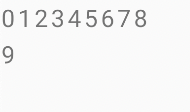
Version
0.70.3
Output of npx react-native info
System:
    OS: macOS 12.6
    CPU: (10) arm64 Apple M1 Max
    Memory: 923.13 MB / 64.00 GB
    Shell: 5.8.1 - /bin/zsh
  Binaries:
    Node: 16.15.1 - ~/Library/Caches/fnm_multishells/1361_1666232181169/bin/node
    Yarn: 1.22.19 - /opt/homebrew/bin/yarn
    npm: 8.11.0 - ~/Library/Caches/fnm_multishells/1361_1666232181169/bin/npm
    Watchman: 2022.09.26.00 - /opt/homebrew/bin/watchman
  Managers:
    CocoaPods: 1.11.3 - /opt/homebrew/bin/pod
  SDKs:
    iOS SDK:
      Platforms: DriverKit 21.4, iOS 16.0, macOS 12.3, tvOS 16.0, watchOS 9.0
    Android SDK:
      API Levels: 26, 28, 29, 30, 31, 32, 33
      Build Tools: 30.0.2, 30.0.3, 31.0.0, 32.0.0, 33.0.0
      System Images: android-29 | ARM 64 v8a, android-29 | Google APIs ARM 64 v8a, android-32 | Google APIs ARM 64 v8a
      Android NDK: Not Found
  IDEs:
    Android Studio: 2021.3 AI-213.7172.25.2113.9123335
    Xcode: 14.0.1/14A400 - /usr/bin/xcodebuild
  Languages:
    Java: 11.0.12 - /usr/bin/javac
  npmPackages:
    @react-native-community/cli: Not Found
    react: 18.1.0 => 18.1.0
    react-native: 0.70.3 => 0.70.3
    react-native-macos: Not Found
  npmGlobalPackages:
    *react-native*: Not Found
Steps to reproduce
Create new react-native app npx react-native init AwesomeProject
Copy App.js in description or at gist https://gist.github.com/jsonxr/073a1f08ab3f99554035707233423811
Run on an Android Pixel 6 Pro emulator (or real device).
Snack, code example, screenshot, or link to a repository
This only shows up for me on a Pixel6 Pro emulator or device.
import React from 'react';
import {Text, View} from 'react-native';

export default () => (
  <View style={{flexDirection: 'row'}}>
    <Text
      style={{
        letterSpacing: 1.6,
        lineHeight: 21,
      }}>
      0123456789
    </Text>
  </View>
);
