

 facebook
Full Color Palette Not Available
Description
I'm trying to render a color that I like from another app. When I try that color for text or as a border to a View, React Native isn't rendering the same color.
The color I'd like is: #fe1384 The color it's actually rendering is: #e93883
It's not my Mac or the eyedropper in Photoshop that's the issue. With the same iPhone and viewing the color on the other app, then on my app - it's visibly not as bright and not the same color to the naked eye. (I've taken several screenshots of each app and compared them with Photoshop).
I tried various workarounds such as using a black or white background (which an identical shape) with no luck.
Version
0.67.4
Output of npx react-native info
info Fetching system and libraries information... System: OS: macOS 12.0.1 CPU: (16) x64 Intel(R) Core(TM) i9-9980HK CPU @ 2.40GHz Memory: 26.66 MB / 32.00 GB Shell: 5.8 - /bin/zsh Binaries: Node: 16.14.0 - /usr/local/bin/node Yarn: 1.22.17 - /usr/local/bin/yarn npm: 8.5.4 - /usr/local/bin/npm Watchman: 2022.02.14.00 - /usr/local/bin/watchman Managers: CocoaPods: 1.11.2 - /usr/local/bin/pod SDKs: iOS SDK: Platforms: DriverKit 21.2, iOS 15.2, macOS 12.1, tvOS 15.2, watchOS 8.3 Android SDK: API Levels: 28, 29, 30 Build Tools: 28.0.3, 29.0.2, 29.0.3, 30.0.2, 30.0.3 System Images: android-30 | Google APIs Intel x86 Atom Android NDK: Not Found IDEs: Android Studio: 4.1 AI-201.8743.12.41.7199119 Xcode: 13.2.1/13C100 - /usr/bin/xcodebuild Languages: Java: 1.8.0_282 - /usr/bin/javac npmPackages: @react-native-community/cli: Not Found react: 17.0.2 => 17.0.2 react-native: 0.67.4 => 0.67.4 react-native-macos: Not Found npmGlobalPackages: react-native: Not Found
Steps to reproduce
Use style around a View like: width: 100, height: 100, borderWidth: 5, borderColor: '#fe1384'
Then take a screenshot and view it using Photoshop or another graphics package. The color will be a dulled version of #fe1384. In my case it's rendering as #e93883, which is quite a bit a different color.
Snack, code example, screenshot, or link to a repository
I took a screenshot inside Photoshop, which demonstrates it the best. The left is the color I'd like to achieve, it really pops off the screen. The right is the React Native rendering of the same color.
https://pasteboard.co/sRWW35IgfTxa.png

I've heard of similar issues with the Simulator not showing the same colours (assuming this issue thread is talking about simulator colours) and they usually relate to Colour Spaces, not a specific issue with React Native. You can verify this build building a basic iOS App (non-rn) and testing on the same simulator. This medium post may help too.

Thanks for your reply. This is happening on a real device. I have an iPhone 7. I've tried HSL and RGB/RGBA also with the same results.
Interesting, in that case I'm not sure 🤔. Does this occur for all rendering, or just certain things like borders and text?
I'm now starting to suspect it's for images as well. I'll test with a PNG tonight. But for sure borders and text. If my color isn't rendering correctly, that means other colors aren't rendering correctly as well. I'm going to try a different device tonight as well.
Hi, @joshwinter. Thanks for reporting the issue. Is this still relevant?
I think that @tj-mc is on the right path. It could be a color space issue: the app you are trying to copy from may use the Display P3-wide gamut space to render its UIColors, while we are still using a plain RGB approach.

I can confirm the issue still exists. You can see it on the same device with both apps running switching between the two apps (one native rendering #fe1384 and the other with React Native trying to render #fe1384).
The color difference is very noticeable with the human eye. It's as noticeable as the difference in the screenshot I attached. React Native doesn't seem capable of rendering anything in the #fe1384 range.
If it's happening with this color, chances are it's not able to render other colors in this same range as well.
@cipolleschi Are you saying a native app renders it's colors differently than React Native?
@cipolleschi Are you saying a native app renders it's colors differently than React Native?
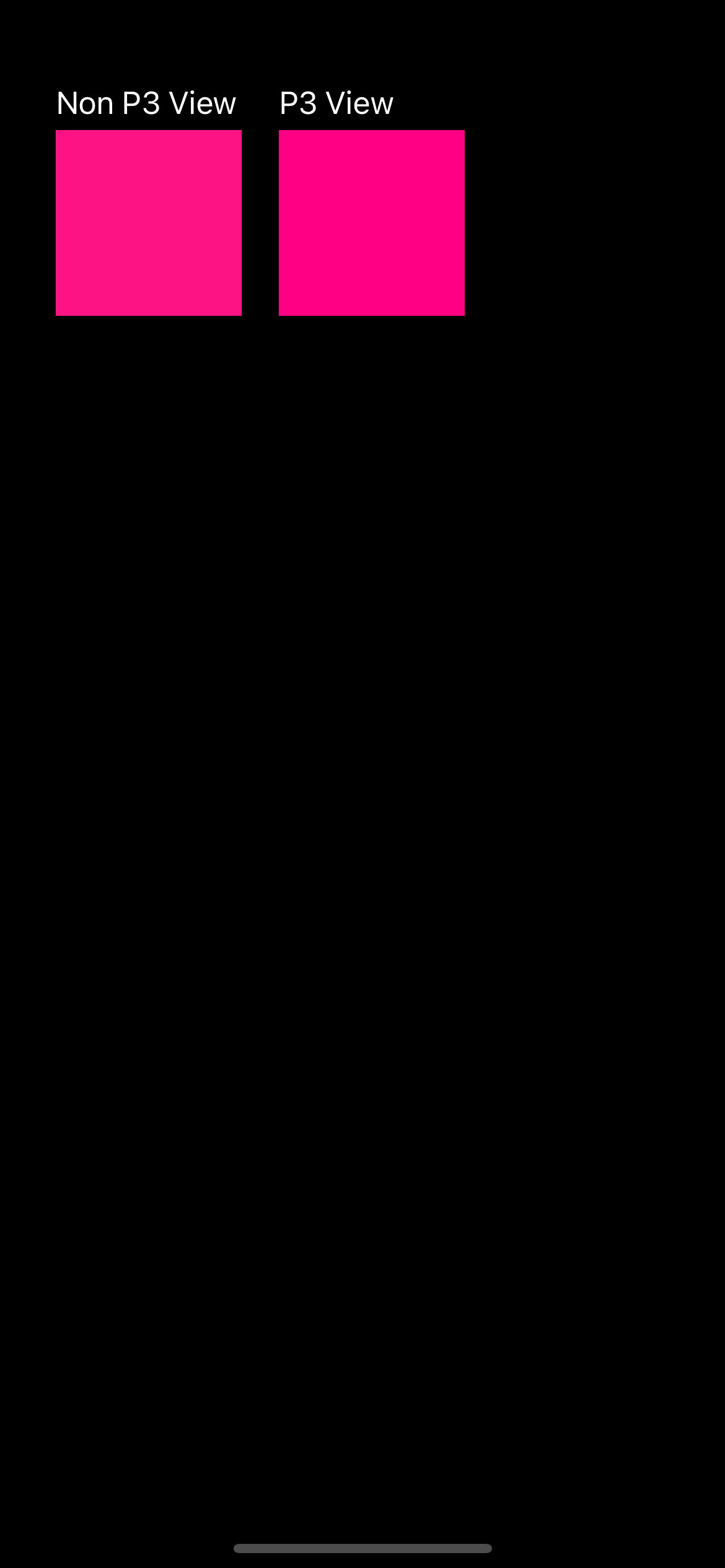
Yes, that's possible. Once Apple released the retina display, it also introduced the displayP3 API to take advantage of them. Retina display are brighter and can render more colors than standard RGB.
For example, this native iOS code:
class ViewController: UIViewController {
  override func viewDidLoad() {
    super.viewDidLoad()

    self.view.backgroundColor = .black
    // Non P3 Text and View
    let nonP3Text = UILabel()
    nonP3Text.text = "Non P3 View"
    nonP3Text.textColor = .white
    nonP3Text.frame = CGRect(x: 30, y: 40, width: 100, height: 30)

    let nonP3View = UIView()
    nonP3View.backgroundColor = UIColor(
      red: 254.0/255.0, // fe
      green: 19.0/255.0, // 13
      blue: 132.0/255.0, //84
      alpha: 1
    )
    nonP3View.frame = CGRect(x: 30, y: 70, width: 100, height: 100)

    // P3 Text and view
    let p3Text = UILabel()
    p3Text.text = "P3 View"
    p3Text.textColor = .white
    p3Text.frame = CGRect(x: 150, y: 40, width: 100, height: 30)

    let p3View = UIView()
    p3View.backgroundColor = UIColor(
      displayP3Red: 254.0/255.0, // fe
      green: 19.0/255.0, // 13
      blue: 132.0/255.0, //84
      alpha: 1
    )
    p3View.frame = CGRect(x: 150, y: 70, width: 100, height: 100)

    // Add Views
    self.view.addSubview(nonP3Text)
    self.view.addSubview(nonP3View)
    self.view.addSubview(p3Text)
    self.view.addSubview(p3View)
  }
}
generates this screenshot. On a Retina display, you can appreciate the differences in the color you want to achieve.
@cipolleschi Thank you very much for looking into this for me/anyone else seeing this. I didn't know about this about retina + the native feature with displayP3. This explains it then. I'll close this ticket. Perhaps one day RN can support this - a full palette feels pretty valuable.
I do wonder what an API for this would look like. Maybe some kind of custom string format to show RN that this should be shown in P3 would work? Eg p3:rgb(255,35,26)
Hi, @tj-mc, sorry for the late reply.
To be honest, I think that the displayP3 APIs already falls back to the standard RGB for those devices where it is not supported. The API is around since iOS 10 and React Native supports now iOS 12.4.
I think that the best way to leverage this is to make sure that every time the framework initialize a UIColor, it uses the init(displayP3Red:green:blue:alpha:) API instead of the standard one. Consider that colors in the enum (like UIColor.redColor) should already using these APIs internally.
I won't add an extra API which requires some parsing in this case.
Thanks for the reply. If we were to make this change, do you think that this would need to be configurable, so that users can opt in or out of wide gamut colour? If I get time I'll experiment with this and see how it works.
@cipolleschi @tj-mc Just bumping this to see if it could potentially get worked on at some point. I would still love to have this. My colors on a black background aren't popping at all.
I came across this merge elsewhere on Github: https://github.com/irvingchenn/react-native/pull/1/commits/89e98721bee4b3bb100502f37e5d8eb587e85aad
I implemented the same locally just as a test. It's working great for font colors! Unfortunately, for border colors there must be more to it as those aren't working. I'll see if I can find out more.
Related: #41517.
@joshwinter, did you make any progress other than what you reported? We are about to devote some engineering time to implementing this (Infinite Red) and any direction would help. Thank you!

just to be clear: we can't accept that change in core as:
- it works only for iOS
- it will break all our internal snapshots tests (and probably some partner's tests that are doing snapshot testing).
We want to support the feature, but we have to come up with a different solution, @jamonholmgren.
Related: #41517.
@joshwinter, did you make any progress other than what you reported? We are about to devote some engineering time to implementing this (Infinite Red) and any direction would help. Thank you!
I ended up implementing this: https://gist.github.com/canpoyrazoglu/e85a47701a7be291dbd05372e8e5f76f
Which covers everything except for borders, I believe(?). It was an iOS only app, so that's as far I took things.
This issue is stale because it has been open 180 days with no activity. Remove stale label or comment or this will be closed in 7 days.
![github-actions[bot] avatar](https://avatars.githubusercontent.com/in/15368?v=4 "Published by a pub.dev verified publisher")
This issue was closed because it has been stalled for 7 days with no activity.