

 facebook
Application crashes when notification receive in background
Description
Hi Folks!
I have been facing this issue for very long time. When notification is received in background, application crashes. We are using Rn FIrebase FCM
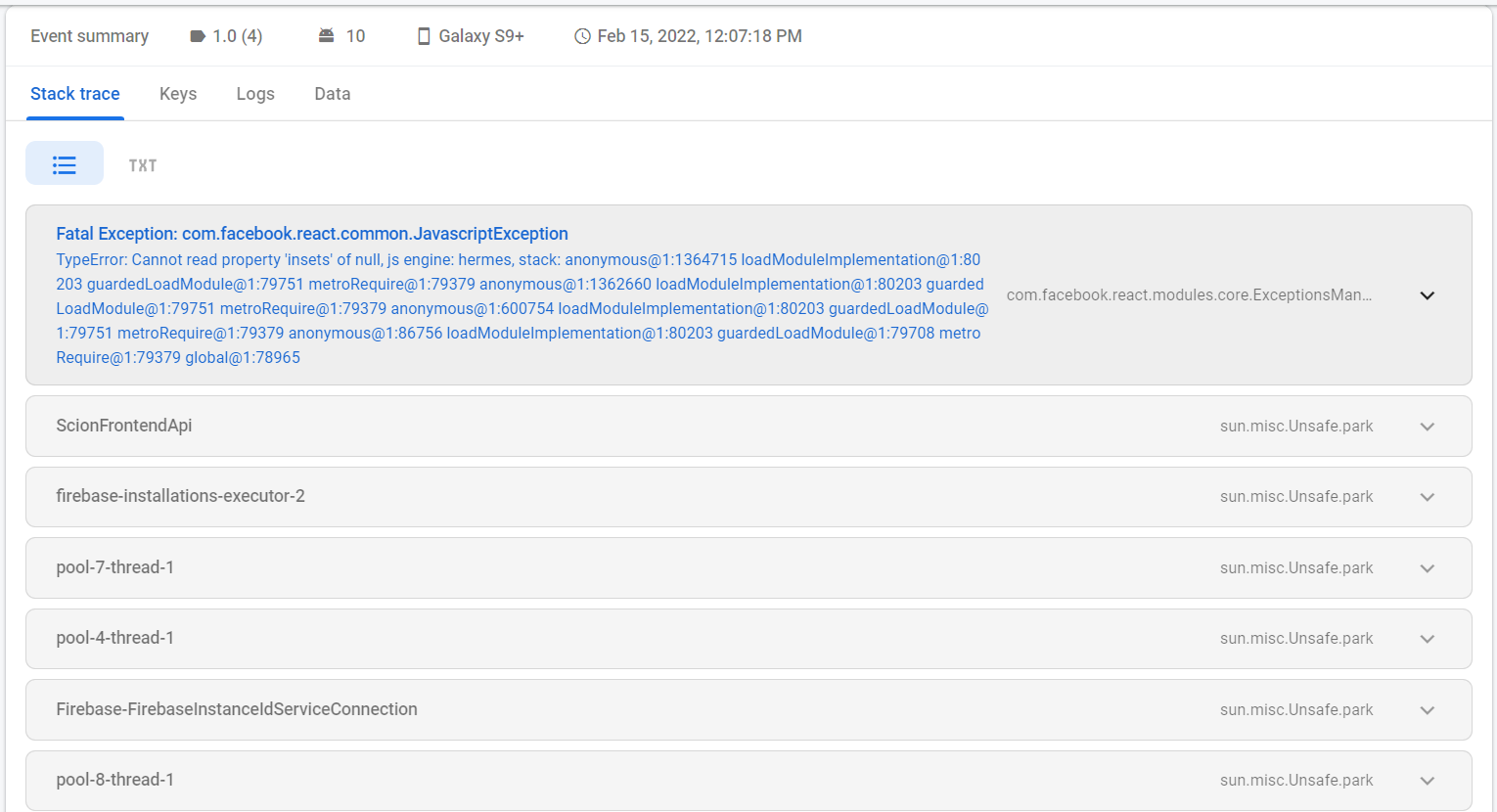
App only crashes in quit state. It works fine in background and foreground. I am attaching the log from Crashlytics of firebase.
Fatal Exception: com.facebook.react.common.JavascriptException
TypeError: Cannot read property 'insets' of null, js engine: hermes, stack: anonymous@1:1364715 loadModuleImplementation@1:80203 guardedLoadModule@1:79751 metroRequire@1:79379 anonymous@1:1362660 loadModuleImplementation@1:80203 guardedLoadModule@1:79751 metroRequire@1:79379 anonymous@1:600754 loadModuleImplementation@1:80203 guardedLoadModule@1:79751 metroRequire@1:79379 anonymous@1:86756 loadModuleImplementation@1:80203 guardedLoadModule@1:79708 metroRequire@1:79379 global@1:78965
Version
0.67.2
Output of npx react-native info
System: OS: Windows 10 10.0.22000 CPU: (12) x64 Intel(R) Core(TM) i7-10750H CPU @ 2.60GHz Memory: 1.97 GB / 15.84 GB Binaries: Node: 16.13.0 - C:\Program Files\nodejs\node.EXE Yarn: 1.22.17 - ~\AppData\Roaming\npm\yarn.CMD npm: 8.1.0 - C:\Program Files\nodejs\npm.CMD Watchman: Not Found SDKs: Android SDK: API Levels: 29, 30, 32 Build Tools: 30.0.2, 30.0.3, 32.0.0, 32.1.0 System Images: android-30 | Google Play Intel x86 Atom Android NDK: Not Found Windows SDK: Not Found IDEs: Android Studio: Not Found Visual Studio: Not Found Languages: Java: Not Found npmPackages: @react-native-community/cli: Not Found react: 17.0.2 => 17.0.2 react-native: 0.67.2 => 0.67.2 react-native-windows: Not Found npmGlobalPackages: react-native: Not Found
Steps to reproduce
- Quit app from minimized tray.
- Receive notification in quit state.
- Tap or receive more notifications.
Application crashes.
Snack, code example, screenshot, or link to a repository
https://user-images.githubusercontent.com/88422920/154014406-c919e646-c7bb-4998-81ec-674906c979c7.mp4

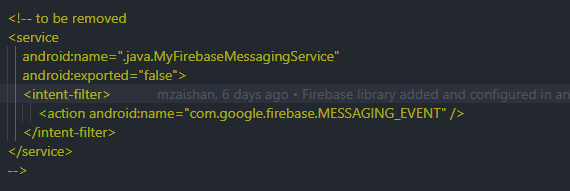
I faced the same issue. then I tried removing the above line from my android/app/src/main/AndroidManifest.xml file and it worked without any issues

I faced the same issue. then I tried removing the above line from my android/app/src/main/AndroidManifest.xml file and it worked without any issues
I dont use this line inside AndroidManifest.xml
Here is AndroidManifest.xml
<manifest xmlns:android="http://schemas.android.com/apk/res/android" package=XXXXXX">
  <uses-permission android:name="android.permission.INTERNET" />
  <!-- <uses-permission android:name="com.google.android.c2dm.permission.RECEIVE" /> -->
  <uses-permission android:name="android.permission.ACCESS_COARSE_LOCATION"/>
   <uses-permission android:name="android.permission.READ_EXTERNAL_STORAGE" />
   <uses-permission android:name="android.permission.WRITE_EXTERNAL_STORAGE" />
  <uses-permission android:name="android.permission.DOWNLOAD_WITHOUT_NOTIFICATION" />
   <uses-permission android:name="android.permission.ACCESS_NETWORK_STATE" />
  <application
  android:name=".MainApplication" android:label="@string/app_name" android:icon="@mipmap/ic_launcher" android:roundIcon="@mipmap/ic_launcher_round" android:allowBackup="false" android:theme="@style/AppTheme">
     <meta-data
     android:name="com.google.android.geo.API_KEY"
     android:value="XXXXXXX"/>
   <!-- You will also only need to add this uses-library tag -->
   <uses-library android:name="org.apache.http.legacy" android:required="false"/>
    <activity android:name=".MainActivity" android:label="@string/app_name" android:configChanges="keyboard|keyboardHidden|orientation|screenSize|uiMode" android:launchMode="singleTask" android:windowSoftInputMode="adjustPan" android:screenOrientation="portrait">
      <intent-filter>
        <action android:name="android.intent.action.MAIN" />
        <category android:name="android.intent.category.LAUNCHER" />
        <action android:name="android.intent.action.DOWNLOAD_COMPLETE"/>
      </intent-filter>
    </activity>
  </application>
</manifest>
There will be two AndroidManifest.xml one will be in android/app/src/main and another in android/app/src/debug. have you checked both. for me it was in main
There will be two AndroidManifest.xml one will be in android/app/src/main and another in android/app/src/debug. have you checked both. for me it was in main
Yes, I have checked. There was nothing relevant to firebase services.
This issue is stale because it has been open 180 days with no activity. Remove stale label or comment or this will be closed in 7 days.
![github-actions[bot] avatar](https://avatars.githubusercontent.com/in/15368?v=4 "Published by a pub.dev verified publisher")
This issue was closed because it has been stalled for 7 days with no activity.