

 facebook
Font won't scale properly when changing the font size and display size in settings
Description
[ANDROID ONLY] On some Android devices, when font size is changed (usually increased), the fonts are updated, but not accordingly to other apps. After trying to find a pattern, I've noticed that changing the display size scales the texts, but changing the font size doesn't have the same effect . More and more users report this issue, mostly users that increase their font size and find a discrepancy between other native apps and ours.
React Native version:
System:
    OS: macOS 11.1
    CPU: (12) x64 Intel(R) Core(TM) i7-8750H CPU @ 2.20GHz
    Memory: 964.77 MB / 16.00 GB
    Shell: 5.8 - /bin/zsh
  Binaries:
    Node: 16.3.0 - /usr/local/bin/node
    Yarn: 1.22.10 - /usr/local/bin/yarn
    npm: 7.15.1 - /usr/local/bin/npm
    Watchman: 2021.06.07.00 - /usr/local/bin/watchman
  Managers:
    CocoaPods: 1.10.1 - /usr/local/bin/pod
  SDKs:
    iOS SDK:
      Platforms: iOS 14.3, DriverKit 20.2, macOS 11.1, tvOS 14.3, watchOS 7.2
    Android SDK:
      API Levels: 23, 28, 29, 30
      Build Tools: 28.0.3, 29.0.2, 30.0.3
      System Images: android-28 | Intel x86 Atom, android-28 | Google APIs Intel x86 Atom, android-30 | Google APIs Intel x86 Atom, android-30 | Google APIs Intel x86 Atom_64
      Android NDK: Not Found
  IDEs:
    Android Studio: 4.1 AI-201.8743.12.41.7042882
    Xcode: 12.3/12C33 - /usr/bin/xcodebuild
  Languages:
    Java: 1.8.0_282 - /usr/bin/javac
  npmPackages:
    @react-native-community/cli: Not Found
    react: 17.0.1 => 17.0.1
    react-native: 0.64.0 => 0.64.0
    react-native-macos: Not Found
  npmGlobalPackages:
    *react-native*: Not Found
Steps To Reproduce
This behaviour happens only on specific devices. Android devices with this issue found by now: Huawei Y6 (Android 9), Motorola Moto G8 Power (Android 11).
Inside our app, which contains text encapsulated inside multiple views, the issue happens as followed:
- Surf through the app, having default settings for font size and display size
- Go to Android Device Settings, change the font size or display size
- Come back to the app, surf again, see the differences
- Go to a native app, see the discrepancies between the React-Native app and a native app
Actual examples would be:
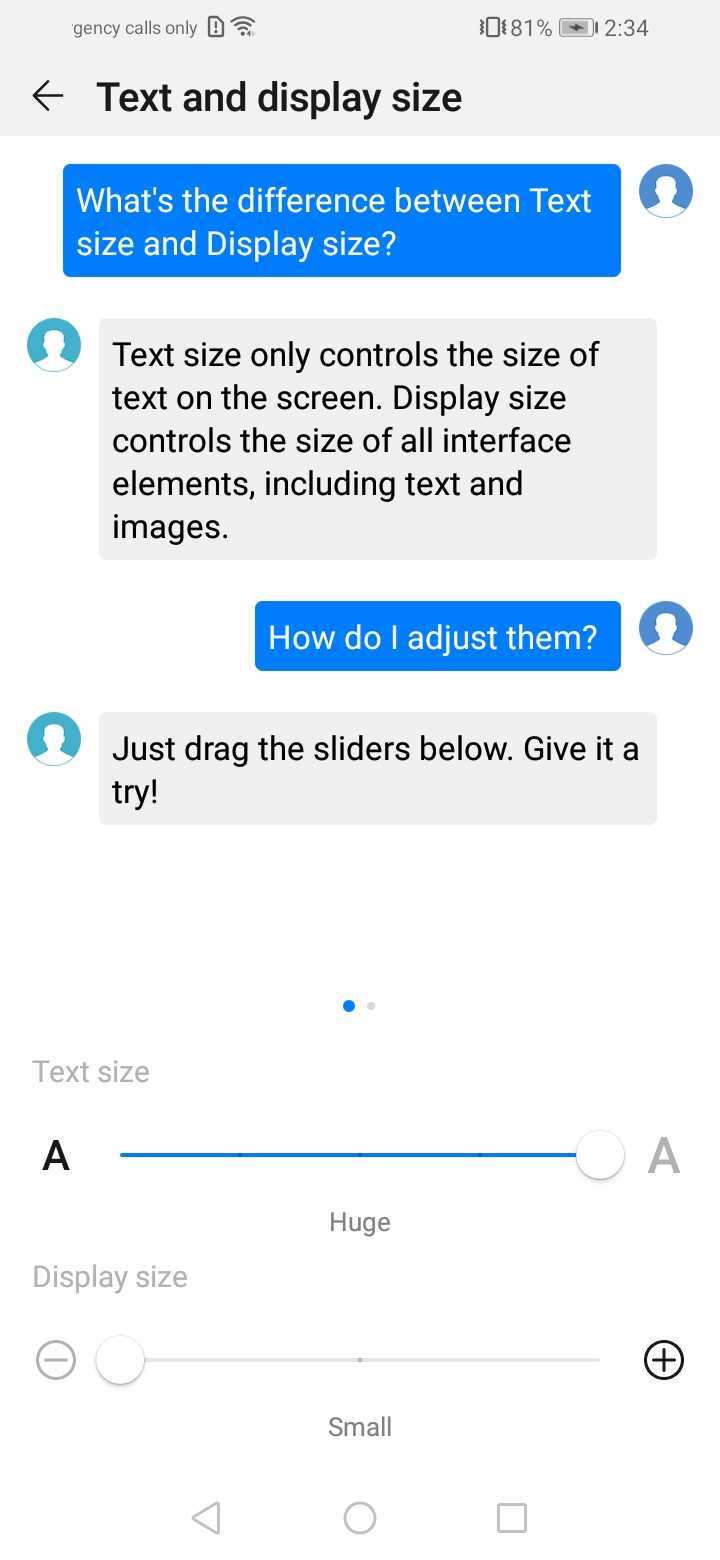
- setting the font size to max and display size to min => small font
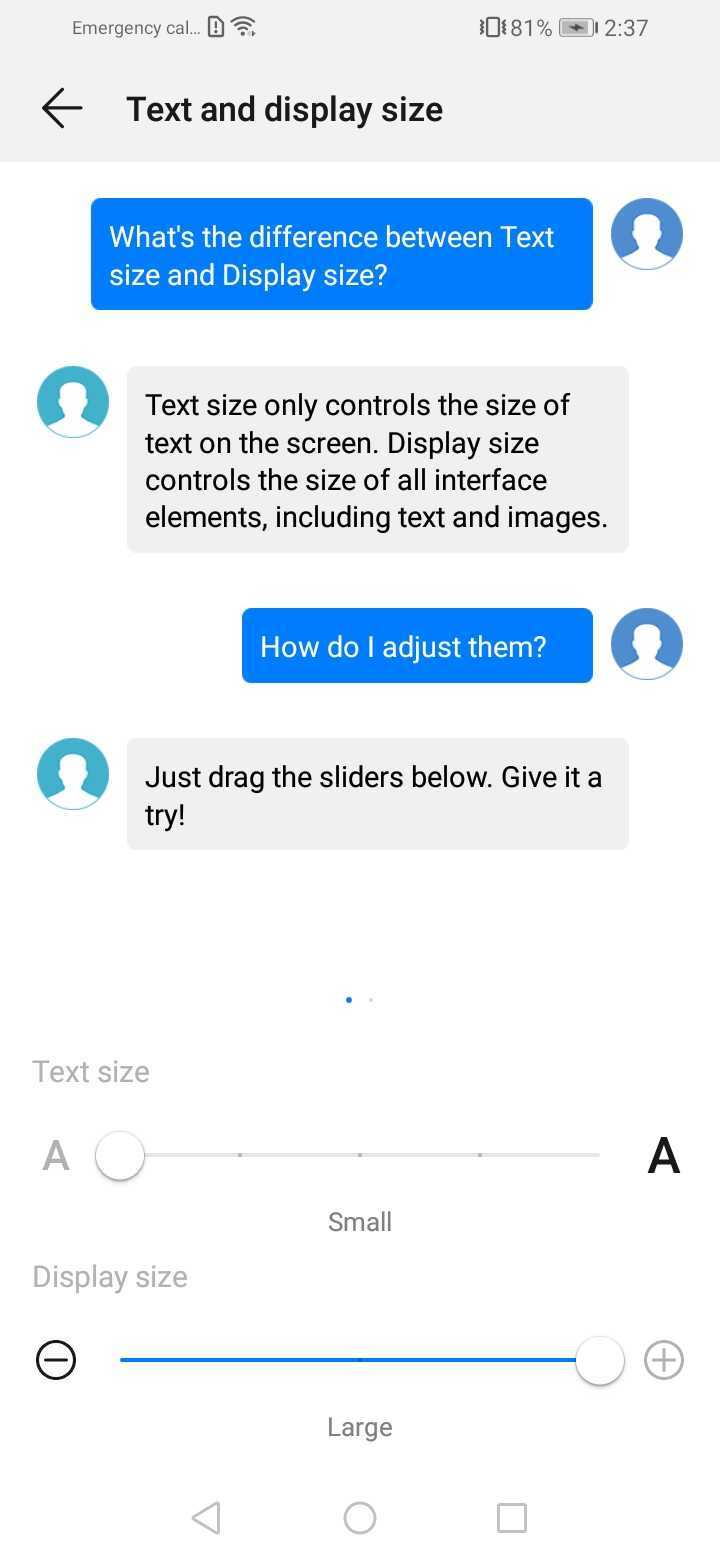
- setting the font size to min and display size to max => huge font
When I say small and huge, i compare the fonts to the native apps.
Expected Results
Scaling the font based on both the display size and font size inside settings. Expected results for the 2 examples above: the text should be somewhere in the middle, being dependent to each setting, not just the display size.
Snack, code example, screenshot, or link to a repository:
Case 1:
Values inside of settings:
 Screenshot inside other app:

Case 2:
Values inside of settings:
 Screenshot inside the app:

Screenshot inside other app:


This issue is stale because it has been open 180 days with no activity. Remove stale label or comment or this will be closed in 7 days.
![github-actions[bot] avatar](https://avatars.githubusercontent.com/in/15368?v=4 "Published by a pub.dev verified publisher")
This issue was closed because it has been stalled for 7 days with no activity.