

 exceptionless
Promoting a tab named the same as default tabs causes it to be unselectable via UI
Description When promoting extended data to a tab, the tab cannot be selected via the UI.
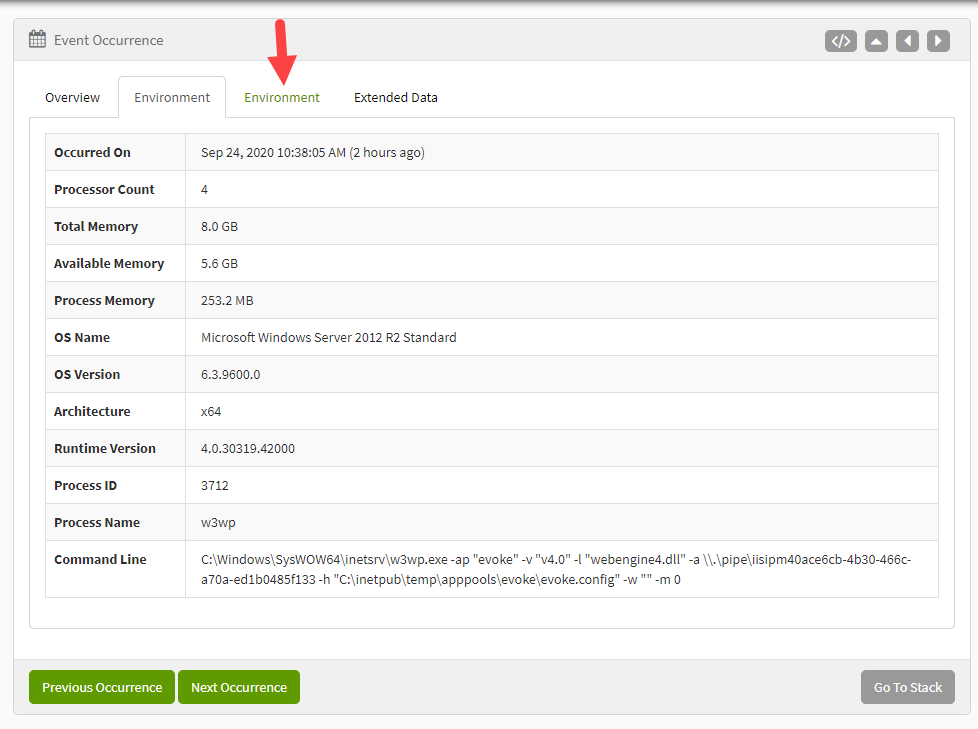
Investigation
Digging into the source it looks like Angular is targeting the tab by its name with ng-click="vm.activateTab(tab.title)", which there is two of. The tab is not selectable because the extended data tab title is named the same as one of the default Exceptionless tabs.
Workaround Find the HTML for demoting the tab that is non-selectable, assign it a CSS ID so that it is selectable by JavaScript:
<a ng-click="vm.demoteTab()" id="demote">Demote Tab</a>
Then, in the web console, execute the command to mimic a click to demote the tab.
console.dir(document.getElementById("demote").click());
Then, don't name extended data objects the same as the default ones. Would be better to have tabs selectable by id rather than title?
Hopefully this is useful to any who encounter this. Thanks.

Thanks for reporting this. We could take a look at how these get promoted. I thought when I wrote it I gave tab titles and ids so we could activate by id. But I'm guessing you would have saw that if I did that. I know we only store the name in project settings of promoted tabs. Maybe we could give an id behind the scenes and special case first class ones. Any chance you could take a stab at this?

There are several scenarios we are going to have to think through for this because extended data items all share the same template key so we can't just activate the tab by that.