

 evnbr
evnbr
Regionize redesign
Preface / context
- This is one of the best libraries for paginating books. I tried Weasyprint, paged.js, etc. This is by far the easiest and simplest implementation. It also has the best results. Thank you.
- I'm interested in printing PDFs.
- You can ignore this issue. I'm writing here because I thought it'd be interesting to discuss, but I don't expect a response or a full or partial redesign as a consequence of this ticket.
What happened
I dived into the code for regionize because I found a few edge cases while printing PDFs with Bindery.js. In particular:
Sometimes blocks are not split properly:

I believe I'm hitting this code block: https://github.com/evnbr/regionize/blob/master/src/flowIntoRegions.ts#L129 Please notice that I have ~30-40 similar blocks and this issue happens only once.
It's not possible to keep title + text on the same page or any other component:

This is tricky because we have no control over how the elements are split: https://github.com/evnbr/regionize/blob/master/src/tryInNextRegion.ts#L24
Lastly, the code is written to be recursive. It's rather hard to reason about the flow and it's hard to include more complex rules (i.e. if you split a text after the header, move both to the new page).
Proposal
I tried to play with the code and come up with a way to extend it to cater for:
- keeping elements next to each other.
- deciding how to split elements.
I found it very hard with the current design. There's a lot of complexity in the tryInNextRegion function and the code caters for a lot of edge cases already.
So I tried to come up with an alternative implementation.
I designed a function that given a Region and an element, it can return 3 states:
- the element fit in the region.
- the element does not fit at all in the region.
- the element fits in the region, but it should be split.
The function signature is the following:
type HTMLOperation =
  | { type: 'nospace' }
  | { type: 'split'; split: { left: Element; right: Element }[] }
  | { type: 'fit' };

function Paginate(region: Region, content: Element): HTMLOperation
I originally designed the split object to be {left: Element, right: Element} to indicate that the element can only fit partially in the page. It became apparent very quickly that this has the same limitation of nearestMovableElement. So I refactored the code to return all possible splits for the element (hence the array of left, right elements { left: Element; right: Element }[]).
Let me explain with an example.
Imagine having an unordered list with 4 elements. Only 3 elements fit, the fourth has to be moved to a new page.
The Paginate function returns a split element with an array that has:
-
{left: ['<li>','<li>','<li>'], right: ['<li>']} -
{left: ['<li>','<li>'], right: ['<li>','<li>']} -
{left: ['<li>'], right: ['<li>','<li>','<li>']} -
{left: [], right: ['<li>','<li>', '<li>','<li>']}(all items to the new page)
How can I choose the best option?
By default, we can fall back to the nearestMoveAbleElement, but now that we have all four combinations, we can ask the user to score them and we select the one with the highest score.
function scoreSplits(splits: { left: Element; right: Element }[]): number[]

const [bestSplit] = scoreSplits(splits).sort((a, b) => b - a)
This should solve the problem of deciding if an element is worth splitting and how many elements it should contain.
As an example, I could decide to split the list to have 2+2 <li> elements because I don't want a single element on a new page.
The other benefit of the Paginate function is that we only check one element at the time. There is no recursion (apart from the split part that has been encapsulated in the function itself).
So in theory, the new code could be:
const allElementsToPaginate = [...document.querySelector('main').childNodes]
for (const element of allElementsToPaginate) {

  const operation = Paginate(region, element)

  if (operation.type === 'fit') {
    // add to current page
  }
  if (operation.type === 'nospace') {
   // move to next page
  }
  if (operation.type === 'split') {
   // add to current page, and move to the next one
  }
}
However, because allElementsToPaginate is a list of elements, it's easy to look ahead and decide if an element should stay next to another. Example:
function checkIfElementShouldStaytogether(currentElement: Element, nextElement: Element): boolean

const allElementsToPaginate = [...document.querySelector('main').childNodes]
for (let i =0; i <  allElementsToPaginate.length i++) {
  const element = allElementsToPaginate[i]

  const operation = Paginate(region, element)

  if (operation.type === 'fit') {
    // add to current page
  }
  if (operation.type === 'nospace') {
    // look to the next element
   const nextElement = allElementsToPaginate[i+1]
   if (checkIfElementShouldStaytogether(element, nextElement)) {
     // move this element to the next page
   } else {
    // keep element in the current page
   }
  }
  if (operation.type === 'split') {
   // add to current page, and move to the next one
  }
}
Since the Paginate function does not change the region (only checks if the element fits) we can write a scheduler that takes into account of the splits, the current, previous and next elements.
Show me the code
the following code implements a broken version of the algorithm above for demo purposes:
type HTMLOperation =
  | { type: 'nospace' }
  | { type: 'split'; split: { left: Element; right: Element }[] }
  | { type: 'fit' };

type TextOperation =
  | { type: 'nospace' }
  | { type: 'split'; left: Text; right: Text }
  | { type: 'fit' };

export class Region {
  constructor(
    private box: Element,
    private innerContainer: Element,
    private maxHeight: number,
  ) {}
  appendChild(node: Node): void {
    this.innerContainer.appendChild(node);
  }
  removeLastChild(): void {
    if (this.innerContainer.childNodes.length === 0) {
      return;
    }
    const [lastChild] = Array.from(this.innerContainer.childNodes).slice(-1);
    this.innerContainer.removeChild(lastChild);
  }
  hasOverflowed(): boolean {
    const { height } = this.box.getBoundingClientRect();
    return height > this.maxHeight;
  }
  enter(): Region {
    if (this.innerContainer.childNodes.length === 0) {
      throw `Cannot enter an empty node`;
    }
    const [lastChild] = Array.from(this.innerContainer.childNodes).slice(-1);
    if (lastChild.nodeType !== Node.ELEMENT_NODE) {
      throw `Cannot enter a ${lastChild.nodeType} node`;
    }
    return new Region(this.box, lastChild as Element, this.maxHeight);
  }
}

export function Paginate(region: Region, content: Element): HTMLOperation {
  region.appendChild(content);

  if (!region.hasOverflowed()) {
    region.removeLastChild();
    return { type: 'fit' };
  }

  region.removeLastChild();

  const childNodes = [...content.childNodes].filter(
    (it) => it.nodeType === Node.TEXT_NODE || it.nodeType === Node.ELEMENT_NODE,
  ) as Array<Element | Text>;

  function cloneEmpty(element: Element): Element {
    const copy = element.cloneNode() as Element;
    copy.innerHTML = '';
    return copy;
  }

  for (let i = 0; i < childNodes.length; i++) {
    const child = childNodes[i];
    switch (child.nodeType) {
      case Node.TEXT_NODE: {
        const operation = addText(region, (child as Text).cloneNode() as Text);
        switch (operation.type) {
          case 'fit': {
            continue;
          }
          case 'nospace': {
            if (i === 0) {
              return { type: 'nospace' };
            }
            const split = range(0, i).map((index) => {
              const right = cloneEmpty(content);
              const left = cloneEmpty(content);
              childNodes
                .slice(0, i)
                .forEach((it) => left.appendChild(it.cloneNode()));
              childNodes
                .slice(i)
                .forEach((it) => right.appendChild(it.cloneNode()));
              return { left, right };
            });
            return { type: 'split', split };
          }
          case 'split': {
            const split = range(0, i).map((index) => {
              const right = cloneEmpty(content);
              const left = cloneEmpty(content);
              if (childNodes.length === 1) {
                left.appendChild(operation.left);
                right.appendChild(operation.right);
                return { left, right };
              }
              childNodes.slice(0, i).forEach((it) => {
                if (index === i) {
                  left.appendChild(operation.left);
                } else {
                  left.appendChild(it.cloneNode());
                }
              });
              childNodes.slice(i).forEach((it) => {
                if (index === i) {
                  right.appendChild(operation.right);
                } else {
                  right.appendChild(it.cloneNode());
                }
              });
              return { left, right };
            });
            region.removeLastChild()
            return { type: 'split', split };
          }
          default:
            break;
        }
      }
      case Node.ELEMENT_NODE: {
        const operation = Paginate(region.enter(), child as Element);
        switch (operation.type) {
          case 'fit':
            continue;
          case 'nospace': {
            if (i === 0) {
              return { type: 'nospace' };
            }
            const split = range(0, i).map((index) => {
              const right = cloneEmpty(content);
              const left = cloneEmpty(content);
              childNodes
                .slice(0, i)
                .forEach((it) => left.appendChild(it.cloneNode()));
              childNodes
                .slice(i)
                .forEach((it) => right.appendChild(it.cloneNode()));
              return { left, right };
            });
            return { type: 'split', split };
          }
          case 'split': {
            const split = range(0, i)
              .map((index) => {
                const right = cloneEmpty(content);
                const left = cloneEmpty(content);
                childNodes.slice(0, i).forEach((it) => {
                  left.appendChild(it.cloneNode());
                });
                childNodes.slice(i).forEach((it) => {
                  right.appendChild(it.cloneNode());
                });
                const splits = operation.split.map((it) => {
                  const l = left.cloneNode().appendChild(it.left);
                  const r = right.cloneNode().appendChild(it.right);
                  return { left: l, right: r };
                });
                return splits;
              })
              .reduce((acc, it) => acc.concat(it), []);
            return { type: 'split', split };
          }
        }
      }
      default:
        throw 'Did not expect to get here';
    }
  }

  return { type: 'nospace' };

  function addText(region: Region, textNode: Text): TextOperation {
    region.appendChild(textNode);
    if (!region.hasOverflowed()) {
      return { type: 'fit' };
    }
    const originalText = textNode.nodeValue ?? '';
    const chunks = originalText.split(' ');
    let currentChunk = chunks.length;
    while (region.hasOverflowed() && currentChunk >= 0) {
      textNode.nodeValue = chunks.slice(0, currentChunk).join(' ');
      currentChunk--;
    }
    if (currentChunk < 0 && region.hasOverflowed()) {
      return { type: 'nospace' };
    }
    return {
      type: 'split',
      left: document.createTextNode(
        chunks.slice(0, currentChunk + 1).join(' '),
      ),
      right: document.createTextNode(
        chunks.slice(currentChunk + 1, chunks.length).join(' '),
      ),
    };
  }
}

function range(start: number, end: number) {
  return [...Array.from(Array(1 + end - start).keys())].map((v) => start + v);
}
Thanks for reading till the end.

Wow, thanks for spending the time on this! Reading it over now. Initial reaction is that there's a lot I like about this proposal. As you touched on, the tryInNextRegion function is pretty inscrutable and the overall flow is really hard to follow.
The approach of returning some type (you are calling it HTMLOperation/TextOperation) for each step makes sense to me. I have a stale branch with a similar return type approach from an unfinished refactor, though not addressing the split customization problem specifically. https://github.com/evnbr/regionize/blob/317498566c6e2f94060266dfc9c290de1665706e/src/types.ts#L7-L16
I'm still trying to wrap my head around if the "array of all potential splits" is the right way to customize the split behavior. (Just to clarify, you're using "left" and "right" here to mean "portion that fits in this region" and "remainder for next region", respectively?). I don't necessarily have a different proposal, but thinking it through.

An element might fit a region partially. To indicate that, the function returns { type: 'split'; split: { left: Element; right: Element }[] }.
-
leftis the part of the element that fits in the current page. -
rightis the part of the element that does not fit.
The left, right pair is an array because I decided to return all splittable combinations, instead of returning a single partial element that fits the most.
The array is convenient for things such as the code block here:
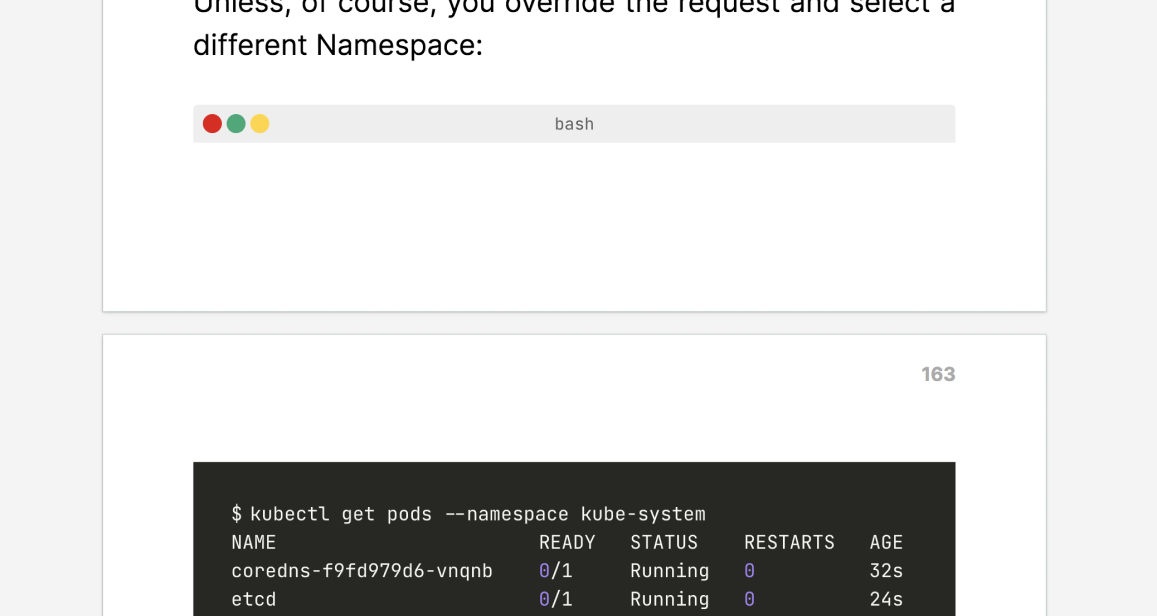
But also:
- You might not want a table that has just the header on one page and the body on another (I'd much prefer to jump to the other page).
- You might want a table with a single row on a new page (maybe 2 is the minimum).
- You might not want to have a single
<li>on a page. - More in general, you might have a splittable element, but you don't want it to split it too early/too late.
Another example I noticed is this:
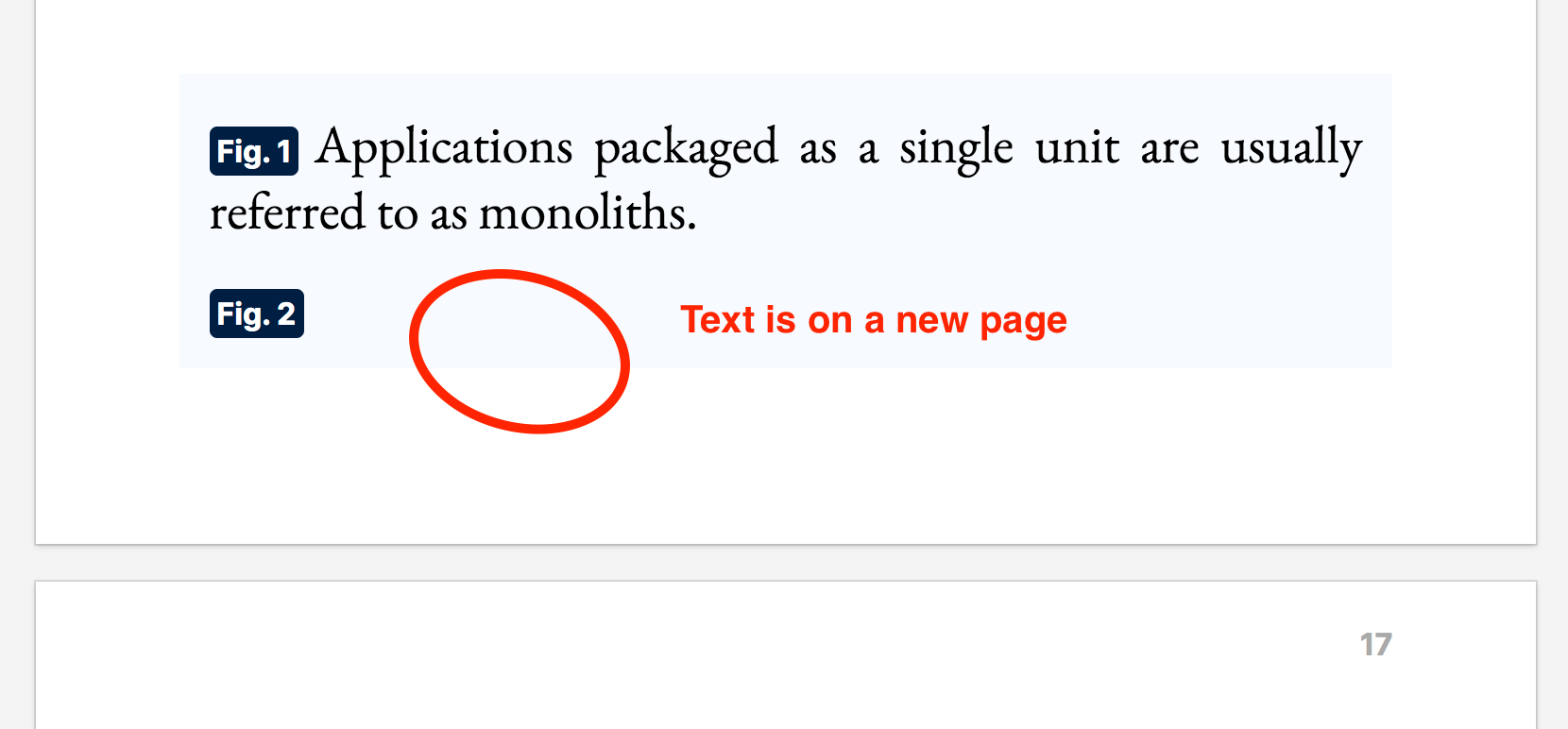
The split is good for the algorithm that is greedy but it doesn't make sense.
(yep, that all makes sense, was just thrown off by the name "left" and "right" given those words have specific meaning in bindery / in a printed book)