

 evnbr
evnbr
Index example searching itself
When I use the following code (taken from your example in the docs) to create an index, it is matching the words in the index itself. I have the index at the end of the book. Does that make a difference?
Bindery.PageReference({
  selector: ".index-section li",
  createTest: (el) => {
    const searchTerm = el.textContent.toLowerCase().trim();
    return (pageEl) => {
      const textToSearch = pageEl.textContent.toLowerCase();
      return textToSearch.includes(searchTerm);
    }
  },
})

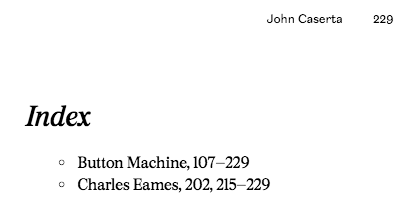
Seems like there should be an easier way to set a selector for what should be searched instead of putting in a querySelector.
Using this code, I'm some getting weird page number results.
Bindery.PageReference({
  selector: ".index-section li",
  createTest: (el) => {
    const term = el.textContent.toLowerCase().trim();
    return (pageEl) => {
      const query = pageEl.querySelector(".content-section");
      return query ? query.textContent.toLowerCase().includes(term) : false;
    }
  },
})
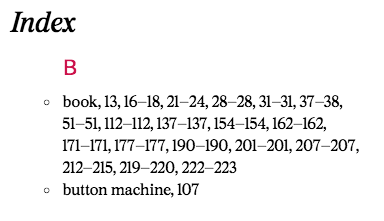
Page ranges like 207-207
Also, is there a way to automatically wrap the term in a span for styling purposes?
Yeah it would, the example might be too contrived. I'm not sure string matching works great in a real-world index. Is this a fair summary or am I missing anything?
Bugs:
- Some page ranges are missing end page (ie 107 - 229)
- Some page ranges with 0 length are not displayed correctly (ie 112-112)
Enhancements
- Make it easier to text for text within a specific element

Also, is there a way to wrap the term in a span for styling purposes?
Yes, although I did not include it in the example, you can pass in a 'replace' function just like for TOCs or footnotes. The function just needs to return an HTML element.
The default replace function inserts a comma and then the pageranges, so if you replace it you can choose to include the comma or not.
Binder.PageReference({
  replace: (el, pageRanges) => {
    el.insertAdjacentHTML('beforeend', `, <span>${pageRanges}</span>`);
    return el;
  }
});
Question: Is it sufficient to receive the pageRanges as a string with commas and dashes (ie '1, 3, 5-7') or would you prefer an array of pageNumbers or something? (Assume I've fixed the comma and dash ranges by then)
I think returning a string is fine as a basic option, but also having an option to return an array could be useful for more advanced styling.