

 eugenp
Origin header is null on CORS redirects when using Spring Cloud Gateway as an OAuth 2.0 client
Hi, i followed this tutorial https://www.baeldung.com/spring-cloud-gateway-oauth2 on how to set up a Spring Cloud Gateway as an OAuth 2.0 client.
All compontents - SPA, gateway, IDP and backend - run on the same host on different ports (8080, 8087, 8083, 8085).
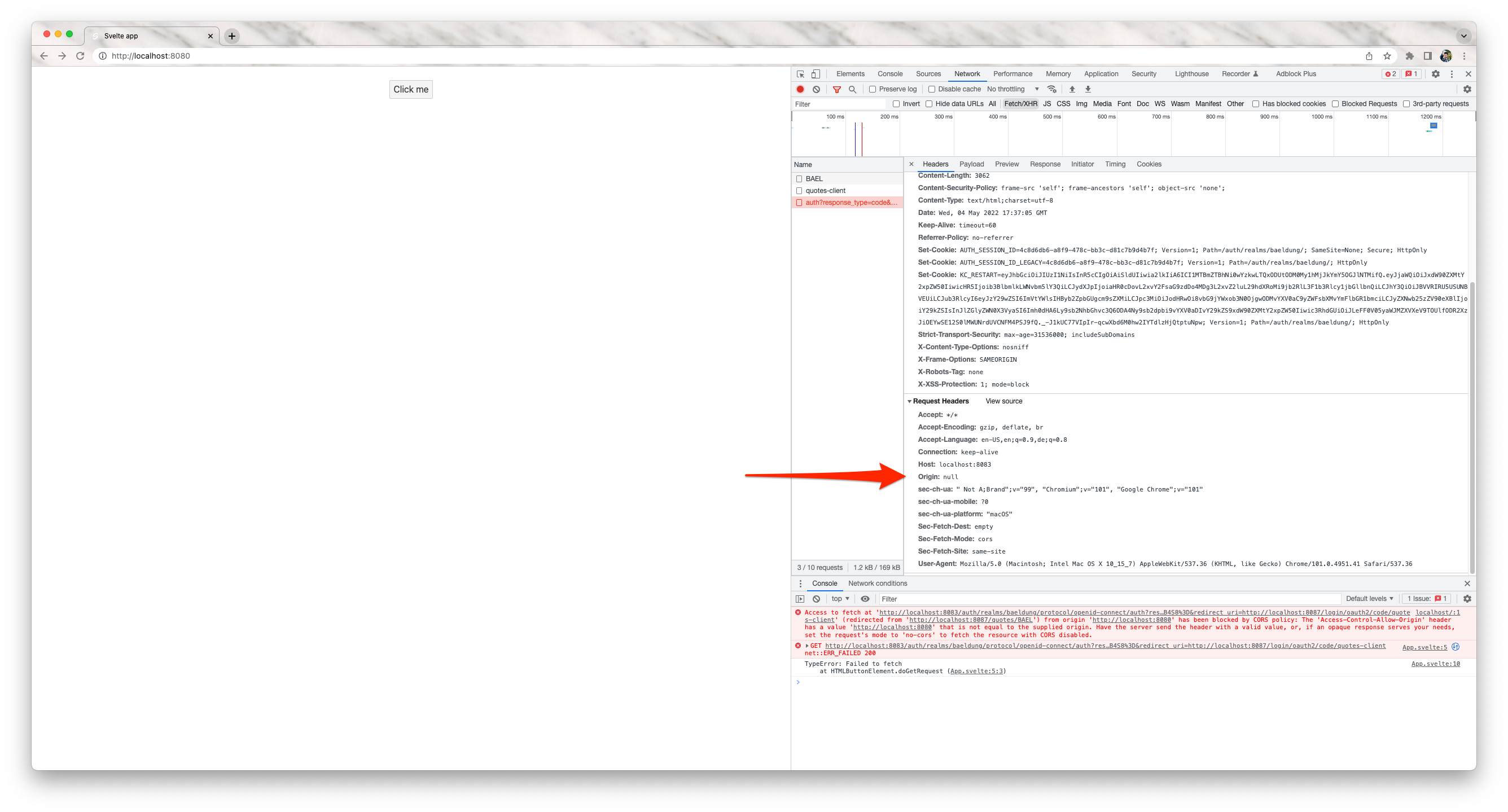
I realised that when the browser is following a redirect during a CORS request, if the request is redirected to a URL on a different server, the Origin header will be changed to "null" as discussed for example here: https://stackoverflow.com/questions/22397072/are-there-any-browsers-that-set-the-origin-header-to-null-for-privacy-sensitiv.
This results in the following error:
Access to fetch at 'http://localhost:8083/auth/realms/baeldung/protocol/openid-connect/auth?response_type=code&client_id=quotes-client&scope=email%20profile%20roles&state=Quybewj1TSGOkK5PgWYgQt8ClkegA8wzCZeGMfC1pE0%3D&redirect_uri=http://localhost:8087/login/oauth2/code/quotes-client' (redirected from 'http://localhost:8087/quotes/BAEL') from origin 'http://localhost:8080' has been blocked by CORS policy: The 'Access-Control-Allow-Origin' header has a value 'http://localhost:8080' that is not equal to the supplied origin. Have the server send the header with a valid value, or, if an opaque response serves your needs, set the request's mode to 'no-cors' to fetch the resource with CORS disabled.
How to deal with this circumstance?

Not to leave it unmentioned, SPA initializes the flow this way, just a button that requests data when clicking on it:
<script>
	function doGetRequest() {
		fetch("http://localhost:8087/quotes/BAEL")
				.then(response => response.json())
				.then(data => {
					console.log(data);
				}).catch(error => {
			console.log(error);
		});
	}
</script>

<main>
	<button on:click={doGetRequest}>Click me</button>
</main>
I have a similar problem. When the Spring-gateway application sends a request to the authorization server with origin=null, I get a cors error as a result. Is this problem still not solved? How did you solve it?

The tutorial says that you can use Spring Cloud Gateway as an OAuth 2.0 client with an SPA.
As a result, the frontend – usually a SPA application built with Angular, React, or similar UI frameworks – can seamlessly access data on those networks on behalf of the end-user.
I think this is not possible because of the way this flow works.
Think of this: The SPA makes a request to http://localhost:8087/quotes/BAEL. The backend responses with redirects until we are at the login form in Keycloak. This is a GET which means that the initial request is finished. When submitting the login form the SPA lost the context of the initial request. The SPA gets the HTML from the login form as a response from http://localhost:8087/quotes/BAEL.
This is why accessing http://localhost:8085/quotes/BAEL directly in the browser workes, but not when requesting from a SPA.
There HAS to be additional logic in the SPA. Using the gateway as an OAuth 2.0 Resource Server should work, using it as client with a SPA is impossible.
This "null" Origin header is due to security reasons and is an expected behaviour and only occurs with SPA's.
I'm not totally in this topic anymore, this was a few months ago. Maybe anyone else is more expert then we are and can check this.
I have no such problem with authorization. There's always an Origin header: http://localhost:4200 . Although redirects are also present. And the problem arises when sending a GET request, that's when a request with Origin: null goes to the authorization server
@fafeichter the recommendation is to set mode: "no-cors" in your client SPA, that should fix this issue.

@fafeichter the recommendation is to set mode: "no-cors" in your client SPA, that should fix this issue.
How do I enable this mode? Should it be enabled on Spring-GateWay?
If I do like this @Bean public Security Web Filter Chain springSecurityFilterChain(Server Http Security http, ServerLogoutSuccessHandler handler) { http.cors().disable()
then I immediately get a cors error.

Same issue here @dkapil it's not happening on a client SPA side, but on the Keycloak login page itself (after entering username/pass)

@fafeichter the recommendation is to set mode: "no-cors" in your client SPA, that should fix this issue.
is there no other way around it? no-cors will give opaque response no?
