

 ethercreative
SEO failed to retrieve entry preview
Description
When loading or saving an entry that has content within the SEO field's 'Focus Keywords' area we see the error 'SEO failed to retrieve entry preview'. This seems to have only become a problem since an update to Craft 3.5
Additional info
- Craft version: 3.5.11.1 (Pro)
- SEO version: 3.6.6
- PHP version: 7.2.33
- Database driver & version: MySQL 5.5.62
I haven't been able to see anything related in the log files but there are Javascript errors showing the developer tools console.


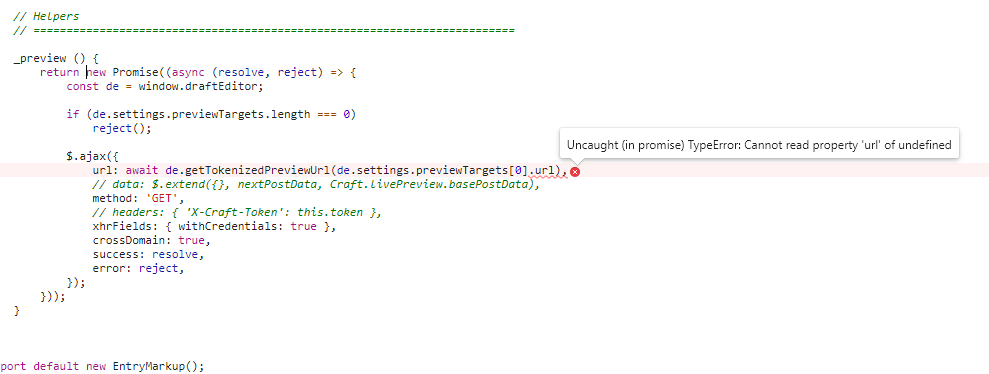
To update on this I set 'Preview Target' URLs for each of the sections on my site which has now fixed this problem. But I don't think Preview Targets are a requirement in Craft so this plugin needs to bail out before trying to ajax for a preview target URL if none exists.
I'm currently seeing this same issue and I have Preview Targets set for all sections.
Craft version: 3.5.11.1 (Pro)
SEO version: 3.6.6
PHP version: 7.4.9
Database driver & version: MySQL 5.7.31
I'm able to see a Preview of the content from my control panel when I'm managing an entry but I still get this same failure message from the SEO plugin.

The issue appears to be here. When I step through, I see that window.draftEditor produces an object but de remains undefined for some reason.

Stack Trace
SEO:  Failed to retrieve entry preview fail.js:4:33
    r fail.js:4
    update EntryMarkup.js:86
    update EntryMarkup.js:40
    calculate KeywordChecklist.js:54
    b FocusKeywords.js:182
    setActiveKeyword FocusKeywords.js:164
    initKeywords FocusKeywords.js:82
    b FocusKeywords.js:39
    <anonymous> SeoField.js:56
    <anonymous> 2-landing-page:1526
    jQuery 13
undefined KeywordChecklist.js:138:11
    calculate KeywordChecklist.js:138
    (Async: promise callback)
    calculate KeywordChecklist.js:136
    b FocusKeywords.js:182
    setActiveKeyword FocusKeywords.js:164
    initKeywords FocusKeywords.js:82
    b FocusKeywords.js:39
    <anonymous> SeoField.js:56
    <anonymous> 2

Have the same issue.
Craft CMS 3.5.11.1 (Pro)
SEO version 3.6.6
PHP version 7.3.14
Database driver & version MySQL 5.7.31
Screenshot from console

Same issue on v3.6.6 with craft v3.4.30
SEO:  Failed to retrieve entry preview fail.js:4:33
    r fail.js:4
    update SeoField.min.js:1
    update SeoField.min.js:1
    calculate SeoField.min.js:1
    b SeoField.min.js:1
    setActiveKeyword SeoField.min.js:1
    initKeywords SeoField.min.js:1
    b SeoField.min.js:1
    <anoniem> SeoField.min.js:1
    <anoniem> 768937

@alexjcollins thanks for working through some of the recent issues. Is there any sort of ETA of fixes on those you've labelled as bugs? Cheers.
The JS source files doesn't exits on this repos, there is only the compiled files. There is a pull request that resolve the issue. While waiting for the pull request to be merged, this is a workaround to bypass the bug.
Simply add <!--<svg></svg>--> anywhere in the template.

Thanks @masix ! I just tried that out and it gets me around the issue. Plugin works like a charm now.
@masix, @architech99 what do you mean "anywhere in the template"? A plugin template?

@geenious I added the tag to my base twig template for the frontend of the website and it fixed the error message. @masix Your fix worked, but I have no idea why. Would you be able to explain how adding this tag to the template fixes the issue? I'm really curious! :-)
@mtnorthrop the problem was that in EntryMarkup.js the script is looking for svg using match() and looping over the result without checking if there is none (the match() return null is there is no result), so looping using (forEach) on a null variable throws an exception. In the workaround we add svg inside html comment (so it will not affect the page rendering) and then the js will find at least one result, so it will not crashes.
@masix Thanks for the explanation, and for digging into the problem; it's great having a workaround!


The issue for me was a missing "Preview Targets" row entry in the Section's Settings tab.
