

 esm7
esm7
FR: Ability to embed a map into another note like an image
I'd love to be able to embed a map in a note like an image... something to the effect of:

...I'm sure there's problems with this syntax, but I hope it describes it well enough. This would create a map named Embedded Map View, size 100x100 with all the geo locations tagged with #tag_name.
Thanks again for the wonderful plugin!

I totally agree with the need and have actually completed a few months ago most of the work required to support that. Happy to see it's a wanted feature. Will add it back to my todo.

This would be such a nice feature! I'm currently using the leaflet plugin, but it's so limited in comparison...

Thanks for giving this another vote, it's an important indication to me. Since writing that last comment on August I progressed a great deal, I'd say 80% of the work is complete and already included (as behind-the-scenes infrastructure) in v2.2 of the plugin :sunglasses: There are a few work hours left to connect some ends and provide some related useful UI features, which I'm hoping to get to within the next weeks.
That's awesome to hear!
On Wed, Oct 5, 2022, 10:09 AM esm7 @.***> wrote:
Thanks for giving this another vote, it's an important indication to me. Since writing that last comment on August I progressed a great deal, I'd say 80% of the work is complete and already included (as behind-the-scenes infrastructure) in v2.2 of the plugin 😎 There are a few work hours left to connect some ends and provide some related useful UI features, which I'm hoping to get to within the next weeks.
— Reply to this email directly, view it on GitHub https://github.com/esm7/obsidian-map-view/issues/118#issuecomment-1268704141, or unsubscribe https://github.com/notifications/unsubscribe-auth/AATCDVRCUX4LAV5BTV55LTDWBWY5NANCNFSM57JTFPBA . You are receiving this because you authored the thread.Message ID: @.***>
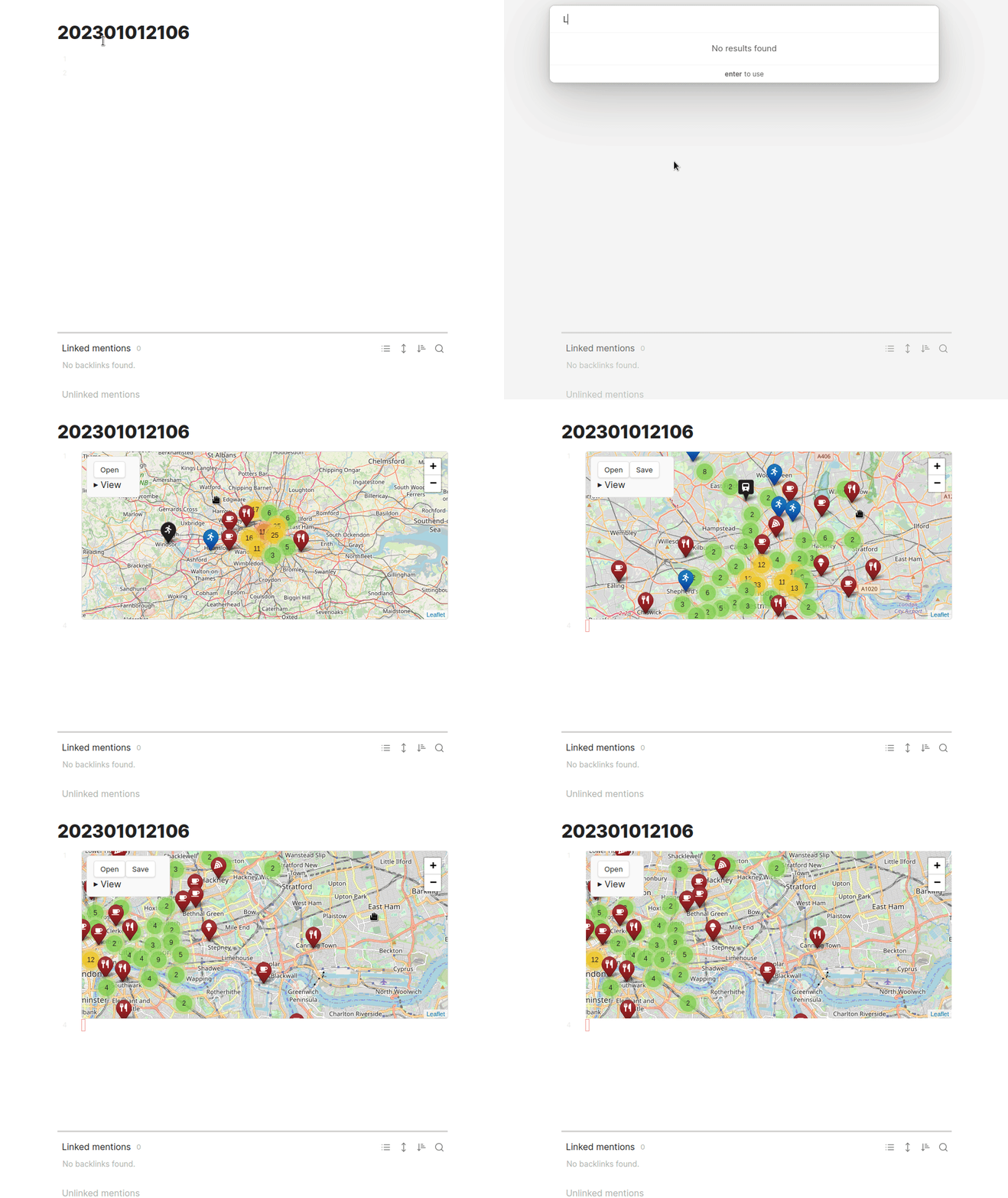
If anyone would like to experiment with an almost-finished Map View with embedded maps, I'm attaching a beta build. (Extract it to VAULT/.obsidian/plugins/obsidian-map-view, overwriting 3 files. Back up this folder first!). I didn't write documentation for it yet, but basically you can embed a map by one of the following:
- From an existing Map View, in the Presets section of the controls choose Copy Block and paste it into a note.
- From inside a note, right-click anywhere, choose "Embed a Map View" and search for something that would be the center of your map.
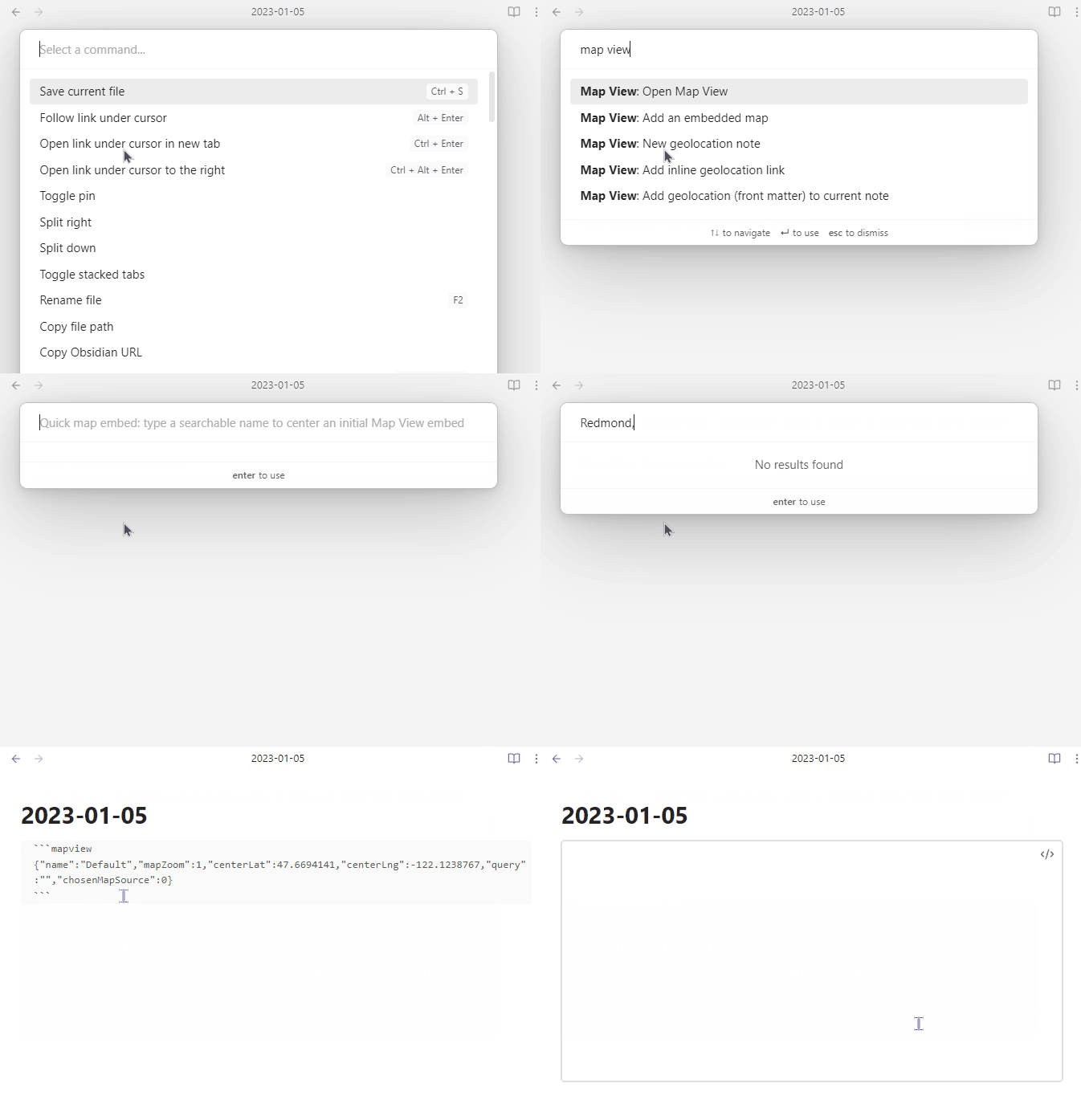
- From inside a note, launch the command palette and choose "Map View: add an embedded map".
Since I'm not a heavy user of embeds myself, and not 100% sure how most users will use this feature, I'd love to hear some early feedbacks. map-view.zip (EDIT: please grab the fixed version in a newer comment below)
I give the beta build a try, but for some reason, it's not rendering the map.
Personally, I'm more interested in the feature you touched on in https://github.com/esm7/obsidian-map-view/issues/50#issuecomment-1038647270. I don't want to embed a viewport and query of the Map View, but instead embed an unrelated map. For example, I might want to capture important locations for this year's big tech conference, or the route for next summer's big road trip. It's less about the geo-metadata of my notes and more just about embedding a map.

Regarding the failing embed, do you mind opening the console (Ctrl+Shift+I) and copying any errors if any?
About embedding an unrelated map, putting aside the topic of a route (which is a generic GeoJSON as you linked), what prevents you from having a note of multiple notes for locations related to a conference and then mapping them with queries around "focus note in Map View" (that can show a map of all the locations in a note and optionally also notes linked to it)?
BTW, I think this Reddit post I wrote discusses a similar flow to what you've mentioned, and now you can embed that too. (Once we figure out why it doesn't render for you :) )
If anyone would like to experiment with an almost-finished Map View with embedded maps, I'm attaching a beta build. (Extract it to VAULT/.obsidian/plugins/obsidian-map-view, overwriting 3 files. Back up this folder first!). I didn't write documentation for it yet, but basically you can embed a map by one of the following:
Thank you for asking! I tried it out and I'm super excited for this as I'm planning a trip to Amsterdam, France, and Germany in a few months.
- From an existing Map View, in the Presets section of the controls choose Copy Block and paste it into a note.
The copy and past works and inserts a reasonable looking code block:
```mapview {"name":"Default","mapZoom":13,"centerLat":47.65010733838,"centerLng":-122.34910948974051,"query":"","chosenMapSource":0} ``` ..but the map doesn't render in editing or reading modes. I have also tried turning off live preview but that didn't work.
- From inside a note, right-click anywhere, choose "Embed a Map View" and search for something that would be the center of your map.
The right click and embed worked, but made basically the same exact insert as copy block with the same error and didn't render. PS, I find the instructions a little hard to parse:
 ...also, UX feedback, something like: "Quick map embed: Search for an address (123 Main Street) or landmark (Eiffel Tower), to center the map on." might be easier to understand.
- From inside a note, launch the command palette and choose "Map View: add an embedded map". Same problem again... good news is I think all three have the exact same issue.
What a silly bug, thank you @monomolecular for providing all the details that made it possible to catch it! Here's a fixed version. map-view.zip (also improved the message box message, thanks for that too.) @bricelam this probably fixes the issue you encountered too, it's likely the same.