

 elvirbrk
An Exception: Unspecified error
using (PXRecord rec = PXBase.SelectSingle<APSetup>( new PXField("Param"))) { Param = false; }
When I select that code to convert I get the error:


I'm receiving the same error, but not the same way.
I just highlighted 1 line in OneNote and attempted to set to PHP, then received the error
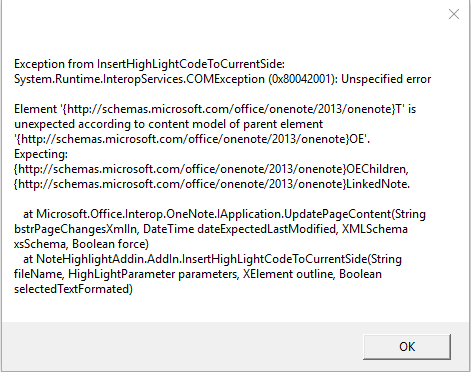

Did some further troubleshooting and this issue seems to occur only when using Shift+Enter to continue on to the next line rather than just Enter. E.g. $foo = 'bar';(Shift+Enter) content not to be highlighted
Will throw an error when attempting to highlight, doesn't change whether there is content on the next line or not. Seems to be the Shift+Enter character that's causing the issues in my case. (maybe the character is \r instead of \r\n)
@ryleeferguson Thanks for detailed analysis, that's probably why I couldn't reproduce issue with sample provided by @mrsWolowitz because those special characters were lost during process.
Should be fixed in v3.3. It was not an issue with Shift+Enter character, problem was that in OneNote words separated with Shift+Enter are still considered as part of same sentence, and this plugin didn't support formating only part of sentence, only whole lines. In v3.3 it is supported to format only couple of words from line, so it should also fix this issue.
same error occurs when there is a TAB used during writing code (not when it is pasted).


Please provide sample text or sample OneNote page that is triggering this issue, because I cannot find a way to reproduce it.
The issue is with the \t tab character. When I switch to spaces it works fine. You probably need to do the same in a decorator.
Still didn't manage to reproduce, no matter where I enter TAB or \t everything works fine. Please describe step by step what I need to do to get this error.
 Same issue. I was able to fix it by changing the code that I would highlight to being tabless, then adding my indentation within the dialogue.

If you can provide sample page that is causing this error, that would be great. I was trying to fix this, but I just coudn't reproduce this issue myself.
Lab 5.zip A reproduction of it, manually going through and replacing the tabs with spaces again fixes it
