

 eligrey
saveAs with url fails with HEAD request
I'm trying to save a file from a signed URL from AWS S3.
However when the HEAD request is sent, the xhr throws an error:
HEAD 403

Access to XMLHttpRequest at 'my-aws-url' from origin 'http://localhost:3000' has been blocked by CORS policy: No 'Access-Control-Allow-Origin' header is present on the requested resource.
However, the file is accessible if it would just continue and run click() on an a tag. Should the xhr HEAD call be put in a try-catch block?

I have the same issue. Wondering if there's a solution yet.
I see a HEAD request in the network logs to which S3 responds 403 Forbidden. The url is then opened up in a new tab, which does appear to work in most browsers.
I do see a further issue in IOS. IOS opens up a new tab in which I see the text "Downloading...". This never actually downloads though...not sure if that's a file saver issue or an IOS issue though.
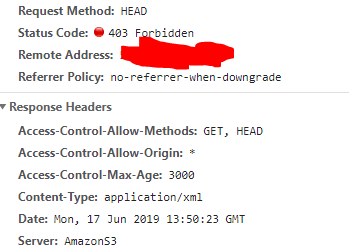


I am having the same issue. As pointed out in this StackOverflow thread, the issue may be that the Signed URL for a GET request is different from the Signed URL for a HEAD request.
I worked around the error by first fetching the signed URL as a blob with a separate HTTP GET request (in my case, with Angular HttpClient), then calling saveAs(new Blob[fetchedBlob]) instead of passing saveAs the signed URL directly.

I am having the same issue. As pointed out in this StackOverflow thread, the issue may be that the Signed URL for a
GETrequest is different from the Signed URL for aHEADrequest.I worked around the error by first fetching the signed URL as a blob with a separate HTTP GET request (in my case, with Angular HttpClient), then calling
saveAs(new Blob[fetchedBlob])instead of passingsaveAsthe signed URL directly.
Thanks for the idea, this worked for me as well. For some reason, I was not able to get it working with Axios request library. Using Fetch API did the trick, here is some sample code for others who encounter the issue!
fetch('S3_URL_ADDRESS')
        .then(res => res.blob())
        .then((blob) => {
            FileSaver.saveAs(blob, 'my-file-label.pdf');
        })

The function corsEnabled(url) should use the correct pre-flight method - OPTIONS instead of HEAD. Of course this would require proper composing of the OPTIONS request and then parsing of the response.

I am having the same issue, as the corsEnabled(url) issues a HEAD request without the appropriate headers, so it gets rejected.

I, too, had this exact same issue. The solution provided by @sakalauskas fixed the problem for me, so thank you very much for that. It's easy to implement and solves the problem.
I am not intimately familiar with the fileSaver codebase, I use it as a dependency. However, my understanding is that the HEAD request is used to procure headers in advance of actually download the file with GET (e.g. so you can figure out the filesize or filetype before committing to download it). So it's probably a good thing that FileSaver initiates the HEAD request before the GET request.
- Perhaps one could try to create a presigned HEAD request with AWS and then a presigned GET request which are both used in tandem? Sounds incredibly complicated.
- Perhaps FileSaver could be updated to allow the developer to opt out of the HEAD if they wanted? Sounds simpler in theory, but would only be pertinent to people using AWS presigned URLs.
- Or one could use the solution from @sakalauskas. https://github.com/eligrey/FileSaver.js/issues/557#issuecomment-573417689 It seems the absolute simplest to me and doesn't add extra code to this project that may not be needed by everyone.
For anyone still having issues, I suggest try the last bullet point. ^^

sometimes S3 can't access HEAD request as preflight request, it should be OPTIONS method, could this corsEnabled function judge condition using OPTIONS method?

The solution provided by @sakalauskas is good for small files, what about large files ? (it's loading in browser before downloading it) it's a disaster for the memory also not friendly for user because he can't see the file downloaded....

Same problem for me... I need a quick and reasonable solution for downloading large files...


I eventually ended up with a simpler solution, (without using FileSaver.js to reduce the bundle size) - I was having many problems with larger files, and computers running low on disk space:
function download(url) {
    const link = document.createElement("a");
    link.target = "_blank";
    link.href = url;
    link.click();
}

download(<S3_SIGNED_URL_WITH_RCD_HEADER>)
The key here is to set the 'Response-Content-Disposition' header when generating a signed URL.
With Laravel, this may look like this:
\Storage::disk('s3')->temporaryUrl(<aws-s3-object-key>, now()->addMinutes(60), ['Response-Content-Disposition' => 'attachment; filename="custom-filename.jpg"'])
With Node.js, this could be generated as follows:
const aws = require('aws-sdk');
const s3 = new aws.S3({
  accessKeyId: <aws-access-key>,
  secretAccessKey: <aws-secret-access-key>,
  region: <aws-region>,
  signatureVersion: 'v4'
});

s3.getSignedUrl('getObject', {
    Bucket: <aws-s3-bucket-name>,
    Key: <aws-s3-object-key>,
    Expires: <url-expiry-time-in-seconds>,
    ResponseContentDisposition: `attachment; filename="custom-filename.jpg"`
  })