

 elements-at
Child process failed without reason
I have a command that uses the Listing class and that saves all the dataobjects of a certains type (ex: Product...). I currently have more than 100K Products
When I try to launch this command, it fails "silently", when looking into the Process Log tab of the Process Manager, everything is green. It looks like everything worked but in fact, it didn't. It saved Products for approximately 10-20 minutes, and then stops. When I go to the Application Logger, I see a message "Child process failed", but that's all I get.
I tried to set up the Process Manager maintenance and launch the command again, but the maintenance considers my process to be dead after a few minutes (again, from 10 to 20 minutes).
Am I missing something ?

In case you are wondering, this is the line causing this issue : https://github.com/elements-at/ProcessManager/blob/55b332d3b3b48bb7a59258c361da6b0f177b95fd/src/ExecutionTrait.php#L346
Hi, do you see any errr at the child process? In the logs you can filter for the ID of the process. If you also check the "Show hidden monitoring items" you should also see the child process which failed.

Regards, Christian

Hi,
No, I don't see anything like that when checking "Show hidden monitoring items". I am surprised that when a child process fails, it kills the entire command and not just the process that failed. I tried in both dev and prod environnements and end up with the same results (using Linux as OS).
After retying a few times, I did get this message for one of them :

and this message for all the others

Process PID 6915 being the parent process
Well you could change the error handly to e.g.
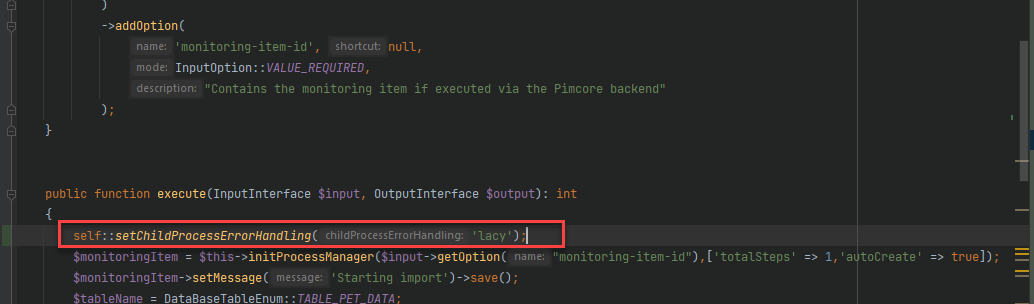
then failing child processes are ignored. But you should at least have a monitoring item wher the parentId ist set to the parent monitoring id.
Could you maybe share some code? Regards, Christian
I tried to add your line of code in the command to see if it solves the problem.
What kind of code would you want me to share ? The one I use in my command ?
An update on this : your workaround worked, my process finished. It saved ~170K DataObjects in 4 hours. In these 4 hours, 6 processes died, but all the DataObjects were still saved somehow.
The logs don't show why these processes failed, but my goal was to save all DataObjects of a certain type and it worked.
Basically, what my command do is :
protected function executeParent(InputInterface $input, OutputInterface $output, MonitoringItem $monitoringItem)
    {
        $monitoringItem->getLogger()->debug('start');

        $productListing = new Product\Listing();
        $productListing->setUnpublished(true);
        $items = $productListing->loadIdList();

        try {
            $this->executeChildProcesses($monitoringItem, $items, 10, 50);
        } catch (\Exception $e) {
            $this->applicationLogger->error($e->getMessage(), [
                'component' => 'App\Command\ProcessManager\SaveProductCommand',
            ]);
            $this->applicationLogger->error('Error while saving Products.');
        }
        $monitoringItem->setMessage('end')->save();
    }

protected function executeChild(InputInterface $input, OutputInterface $output, ProcessManagerBundle\Model\MonitoringItem $monitoringItem)
    {
        $monitoringItem->setMessage('Starting child process');
        $monitoringItem->getLogger()->info('Products : ' . $monitoringItem->getMetaData());

        $workload = json_decode($monitoringItem->getMetaData(), true);

        $monitoringItem->setCurrentWorkload(0)->setTotalWorkload(count($workload))->setMessage('Start saving...')->save();
        foreach ($workload as $i => $productId) {
            try {
                $product = Product::getById($productId);
                $product->save();
                $monitoringItem->setMessage('product saved : ' . $productId)->setCurrentWorkload($i+1)->save();
            } catch (\Exception $e) {
                $monitoringItem->setMessage('saving failed : ' . $productId)->setCurrentWorkload($i+1)->save();

                $this->applicationLogger->error($e->getMessage(), [
                    'component' => 'App\Command\ProcessManager\SaveProductCommand',
                    'relatedObject' => $product,
                ]);
            }
        }

        $monitoringItem->setMessage('End of child process');
    }
Hi @ctippler,
Another update on this issue : my command still stops after a child fails without any particular reason. I have set up the cron maintenance for the process manager and the self::setChildProcessErrorHandling('lacy'); configuration in my command, but it still fails.
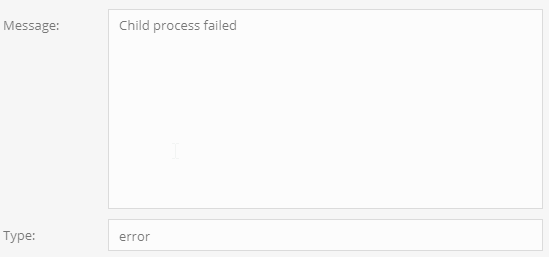
Do you know what caused this and how to solve it ?