
mail

mail copied to clipboard
 elementary
From headers are incorrectly set when editing a reply draft
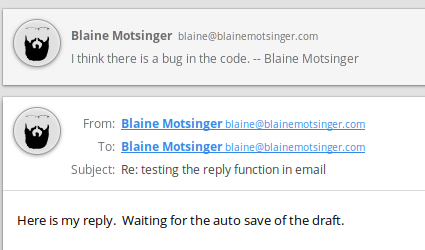
Steps to reproduce: click reply to a message you're received. begin typing so a draft is then autosaved. once autosaved, click on drafts then the pencil icon of the draft to open the message in a detached window. with the detached message now open, wait for the draft to autosave again. close the detached window. notice in the attached message, the from address is now the same as the to address.
below is a screenshot to show the duplicated from, which shows the originator email address for both to and from, not the email address configured in mail.
Want to back this issue? Post a bounty on it! We accept bounties via Bountysource.
