

 elementary
Doesn't select file
I can click to icon (List and Column view), but I want click around a icon(right and left mouse).Sorry for bad english.
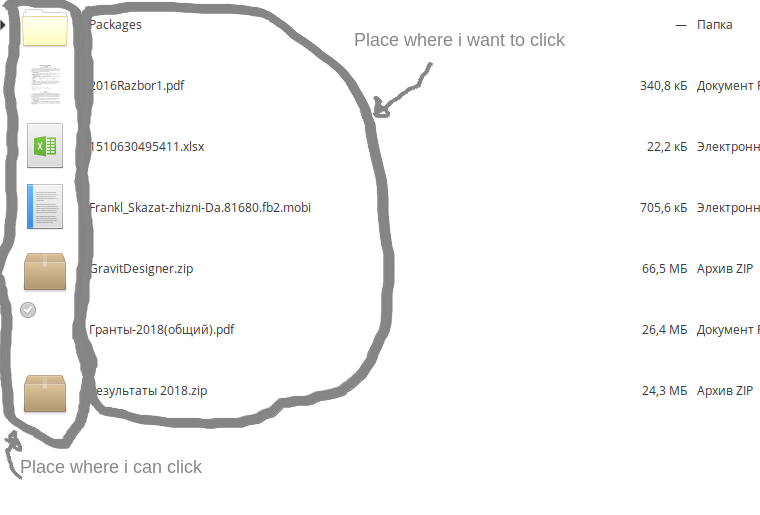

Yep, yep, Update, you can click to text but i want click around text and icon
This is intentional and was intended to fix a previous issue where it was not easy to get the base folder context menu if the view was filled with rows (especially in column view). So the white space around the text acts like the background, not the item. Right-clicking here shows the base folder context menu. Implementing your suggestion would re-introduce the previous issue.


Actually, checking the latest version, left (primary) click does select/activate on the white space in the filename column (and other columns). Its just right (secondary) click that behaves differently.
Right clicking a breadcrumb does produce a context menu for that folder but not as complete as right clicking the background of the view. If you think other items should appear in the pathbar context menu you may wish to raise a separate issue.
It makes sense that at the very least, the file name should be selectable

No, I want normally click to file.I offered where put right click, but i can create new issue for this idea "If you think other items should appear in the pathbar context menu you may wish to raise a separate issue".
@SixFingeredAmish : You can select the filename but only after entering rename mode. Remember that the items in the views are not widgets but are drawn by cell renderers. An editable widget is overlaid when the rename mode is entered.
@ItsPossibleAlready "No, I want normally click to file." Sorry I do not understand this.
@ItsPossibleAlready "No, I want normally click to file." Sorry I do not understand this.
Okey, forget that. Let's talk about how to solve this problem. I don't see problem to put other items in the pathbar context menu and disable right clicking on base folder.
@danrabbit @cassidyjames we are calling you (Maybe it will work).
I don't think it's as intuitive to only be able to right-click the pathbar instead of empty space in the folder. However, in a list view where there is no clear empty space, maybe that would be reasonable? I agree that right now it's not clear where the different click boundaries are.

You can tell from the cursor whether a right click will give the background folder menu or the item menu. In the former case it is an arrow, in the latter a finger.
I would not be averse to adding some actions to the pathbar context menu but am not sure about removing them form the view background context menu.
@jeremypw
You can tell from the cursor whether a right click will give the background folder menu or the item menu. In the former case it is an arrow, in the latter a finger.
Right, and that's a tiny and not super discoverable distinction. And goes out the window on touch devices where there is no cursor. So I'm not super satisfied with the current state.
I would not be averse to adding some actions to the pathbar context menu but am not sure about removing them form the view background context menu.
Yeah that's kind of where I am right now. I think the distinction between the background and items is a little messy already, but I don't know that it means we should remove the folder actions from there.
It is difficult to know what more can be done for touch devices - all white space in the FileName column and in IconView already behaves the same. The only difference is that other columns in ListView select on left click rather than activate. There is a PR awaiting review that implements select on long-click but I am not sure how that will work with touch devices which presumably uses long press for the context menu?
I don't have an elementary computer with me right now. What does double-clicking on the file name do?
I think, we need keep like in windows, but user can change it in setting.
@SixFingeredAmish Double-clicking the filename activates the item in both single and double click modes. For folders that means opening in a new view; for files that means opening in the default app for that file type.
iirc there have been PRs that used double-click or long-press on the name text to enter rename mode but these were not accepted. It is technically possible anyway.
@danirabbit I think we need a final design adjudication as to whether to extend the area in ListView that behaves like a file item rather than the background folder. I have some sympathy with the idea that the whole of the row behave as a file item and restrict the background folder context items to the column headers and pathbar. The Gtk4 version naturally behaves like this as the rows are widgets and it would add complexity to try and reproduce the current behaviour. Probably not worth implemening in the Gtk3 version though.