

 elementary
Do not automatically select files created outside of application
Problem
When you have a folder open and a file is created, it is automatically selected no matter the origin of the files.
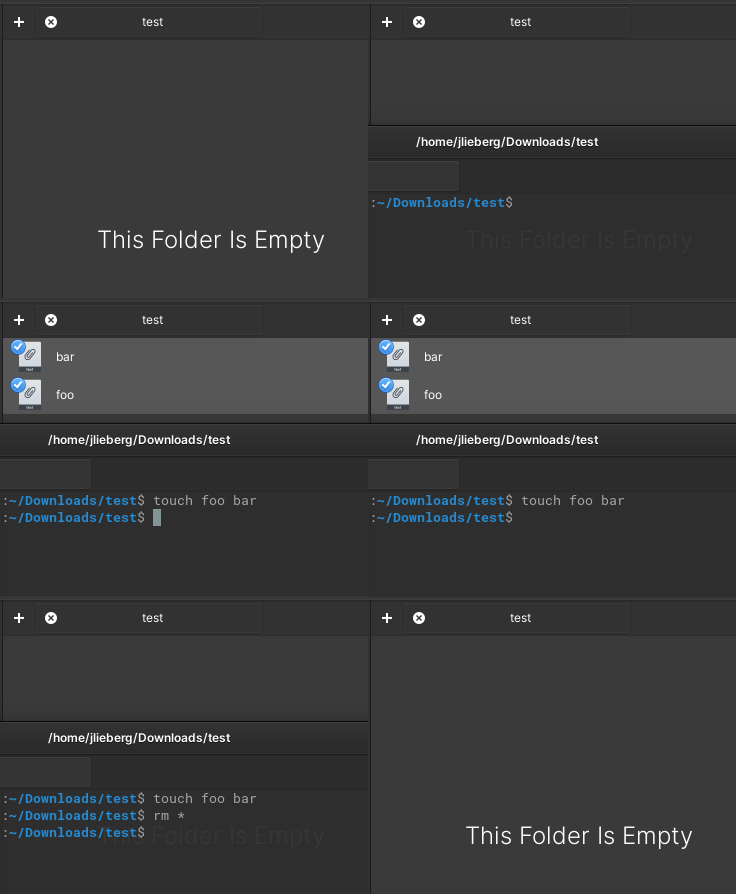
As said by @HansCronau on #1539:
It may seem just a minor annoyance, but this is actually very tricky/risky default behaviour.
Today I was minding my own business, cleaning out a folder. It turned out that this folder was actively being written (synced) to by another application. All the new files had been (invisibly!) added to my selection of files to delete. Since I hadn't counted my selection, the confirmation dialogue could not warn me. Luckily I noticed that something was off and I could retrieve the unintentionally lost files from the trash.Most of the time when I've come the window already did have focus. They have in common that an application is actively writing files to a folder and I want to process these files. Currently I have to be very careful to only process those files I have intentionally selected myself instead of also files that just happened to pop in. Currently the safest (and least frustration) option is to simply go do something else, wait for the writing to stop, and only then process all files.
Common example: process files synced by Syncthing or Nextcloud. (This example also shows how it can be hard to know when the writing has "stopped" and it's safe to start doing things. You may not be the only person doing things.)
Proposal
Do not automatically select files that have been created external to the application

This is not as easy as it sounds as I am unaware of a method to identify which application created a file that is detected by a FileMonitor (if someone knows better please enlighten me). But maybe Files can maintain a list of files it expects to appear in a directory as a result of its own file operations and check newly appearing files against that??

Another band-aid we could apply to this would be to show the status bar that shows "X selected files" at all times. This wouldn't fix the issue directly and would require that the user always pays attention to the number there, but it would help in obvious cases. Say you select two files next to each other to copy and then a third file is selected programmatically outside of the viewport. As it stands the status bar probably won't help you learn that there is a third file selected, since it only appears when you hover over a selected file, which you won't do very often.

See #2034. With this if there is a selection then (and only then) the status bar will show.