

 elementary
Launch commands in terminal so can see output
May address #2010
- Always execute files other than desktop files in terminal so can see any output.
- Launch with context like Nautilus
- Set PWD of context to executable's folder
For simplicity all executables are launched in terminal. If required a dialog could be thrown asking whether to launch in terminal (like Nautilus).
To be considered - any possible security implications - warning required? Note that activating the item will not run it automatically - this requires choice from the context menu. However, at the moment, dropping a file onto a script does run it so that probably needs some user input to confirm.

Hmm it now opens in terminal but has some errors and the game doesn't launch
[DEBUG 17:43:18.662765] [GLib] setenv()/putenv() are not thread-safe and should not be used after threads are created
[DEBUG 17:43:18.662801] [GLib] setenv()/putenv() are not thread-safe and should not be used after threads are created
/home/allie/.local/share/godot/app_userdata/Luck be a Landlord/install folder/Luck be a Landlord.x86_64: error while loading shared libraries: libsteam_api.so: cannot open shared object file: No such file or directory
[DEBUG 17:43:18.706093] [GLib] setenv()/putenv() are not thread-safe and should not be used after threads are created
[DEBUG 17:43:18.706137] [GLib] setenv()/putenv() are not thread-safe and should not be used after threads are created
allie@elementary-os-desktop-39fa46e2:/mnt/hdd/code/clones/files/build$
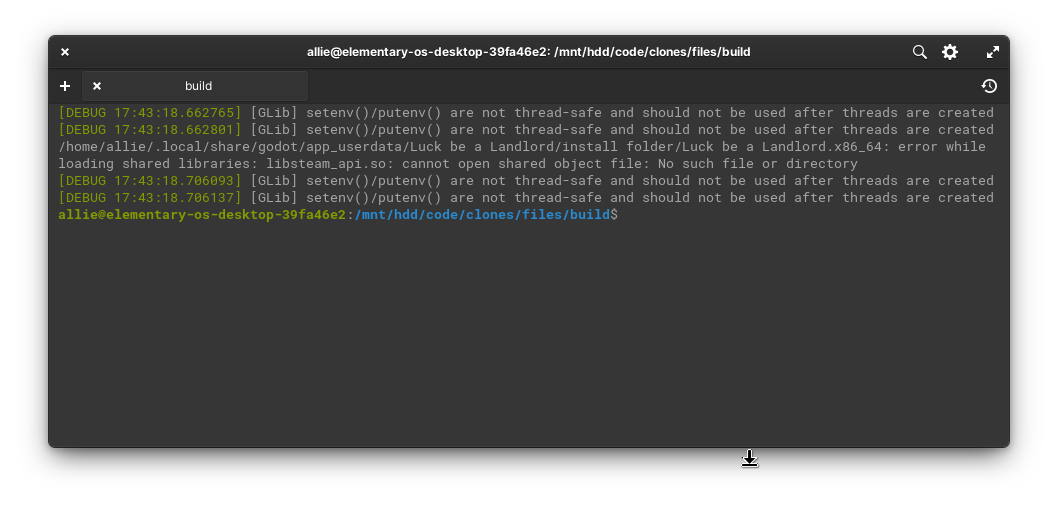 It seems that the cwd still isn't being set to where the executable is but rather where files was launched from?

Thanks for trying! The PWD should be set to the location of the executable at least until the process ends by the line context.setenv ("PWD", FileUtils.get_parent_path_from_path (path)); but maybe that is not working. That should not cause the library not being found though, if it is in one of the folders listed in your PATH variable. Do you know where libsteam_api.so is stored on your computer? If you open a terminal in the executable folder and launch the executable manually does it work?
Yeah, launching through the terminal in the executable folder works. libsteam_api.so is located next to the executable but because it's not being launched from the pwd it can't be found.
OK, so a workround would be to customise your PATH variable to include the folder containing your Steam executables I guess.
I think this problem with this PR is at least partially due to a bug in elementary Terminal. See https://github.com/elementary/terminal/pull/477/ It might be necessary for that PR to be merged for this solution to work.
@ChildishGiant I have reworked this and it seems to work for me with a test script and the current version of Terminal. If you could try it out that would be very helpful.
Ignore the "thread-safe" and other warnings - they seem to be due to upstream bugs, not this PR.
Well it's not working but I think for a valid reason? the folder path has spaces in so it failed
Failed to execute child process “/home/allie/.local/share/godot/app_userdata/Luck” (No such file or directory)

allie@elementary-os-desktop-39fa46e2:~/.local/share/godot/app_userdata/Luck be a Landlord/install folder$
Good news though: it is working as long as there's no spaces :smile:
Hmm, I put both the executable and path in quotes so the spaces should not have been a problem but admittedly my test script/path did not have spaces. I'll test again with spaces. Thanks for testing again - we are making progress!
@ChildishGiant I have made a workround for the spaces issue so that this PR works with the existing Terminal. It would be better fixed by improving the way Terminal runs programs but it is hard to get Terminal PRs reviewed.
@zeebok Thanks for having a look at this! It occurs to me now I have looked at it again after a break that it assumes that io.elementary.terminal is installed. While this is usually the case I guess it is possible that the user has replaced it with a different terminal. I should provide a fallback for that situation.
Marked as blocked as changes to Terminal seem to prevent work around for spaces in path from working at the moment and no alternative work around immediately obvious. Will probably require a fix to Terminal to be merged first.
I do not think there is a way of getting Terminal to tolerate executables with spaces in the name (indistinguishable from arguments) so now these are never launched in Terminal.
Some scripts require a terminal to run properly while others do not run properly in a terminal and require launching directly. There is no way for Files to distinguish these and the long term solution is to offer the user a choice. That is left for a future PR though. I think this PR offers an improvement meanwhile. Needs testing for regressions.

@BAProductions The problem seems to lie in Shell.parse_argv (program_string, out program_with_args); in Terminal. This interprets backslashes literally. However, if you have a more detailed solution please advise.