elementary
Smart copy info widget: provide alternative to tooltips for viewing information
Problem
Code currently has a widget next to the "Smart cut/copy lines:" option explaining this option in more detail: https://github.com/elementary/code/blob/ceb3b1f34f6ab4d8ea242c0c46e5a126d48846f8/src/Dialogs/PreferencesDialog.vala#L46-L48 This additional information can currently only be viewed by hovering over this widget, meaning that if the user isn't using a mouse/touchpad this information cannot be viewed.
Proposal
Provide a way for the user to get the same information by actively interacting with the widget (clicking on the widget or activating the widget by navigating to it and activating it using a keyboard).
Prior Art
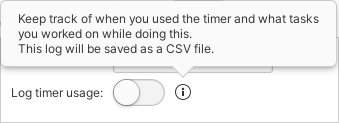
I use a similar widget in Go For It! (Inspired by the current implementation in Code), but made it into a button. This button has the same behavior when hovering over it, but when activating it it shows the same information in a popover: