eldar
eldar
Compile dependencies error, gcc fail exit staus 1 [OSX]
I am a OSX user, everything goes fine util I run
./complie.sh
gcc error occures
warnings and 14 errors generated.
error: command 'gcc' failed with exit status 1
Tried lot of way on internet nth works, found some mention change had to be made from the source, therefore I open this issue I have checked all the pip3 dependency are installed and so as gcc (version 4.2) Building log is attached here build_log.txt
(p3) Mac-mini:pose-tensorflow Andy$ pip show scipy
Name: scipy
Version: 0.19.1
Summary: SciPy: Scientific Library for Python
Home-page: https://www.scipy.org
Author: SciPy Developers
Author-email: [email protected]
License: BSD
Location: /Users/andytsang/anaconda/envs/p3/lib/python3.6/site-packages
Requires: numpy
(p3) Mac-mini:pose-tensorflow Andy$ pip show scikit-image
Name: scikit-image
Version: 0.13.0
Summary: Image processing routines for SciPy
Home-page: http://scikit-image.org
Author: Stefan van der Walt
Author-email: [email protected]
License: Modified BSD
Location: /Users/andytsang/anaconda/envs/p3/lib/python3.6/site-packages
Requires: six, networkx, pillow, PyWavelets
(p3) Mac-mini:pose-tensorflow Andy$ pip show matplotlib
Name: matplotlib
Version: 2.0.2
Summary: Python plotting package
Home-page: http://matplotlib.org
Author: John D. Hunter, Michael Droettboom
Author-email: [email protected]
License: BSD
Location: /Users/andytsang/anaconda/envs/p3/lib/python3.6/site-packages
Requires: numpy, six, python-dateutil, pytz, cycler, pyparsing
(p3) Mac-mini:pose-tensorflow Andy$ pip show pyyaml
Name: PyYAML
Version: 3.12
Summary: YAML parser and emitter for Python
Home-page: http://pyyaml.org/wiki/PyYAML
Author: Kirill Simonov
Author-email: [email protected]
License: MIT
Location: /Users/andytsang/anaconda/envs/p3/lib/python3.6/site-packages
Requires:
(p3) Mac-mini:pose-tensorflow Andy$ pip show easydict
Name: easydict
Version: 1.7
Summary: Access dict values as attributes (works recursively).
Home-page: https://github.com/makinacorpus/easydict
Author: Mathieu Leplatre
Author-email: [email protected]
License: LPGL, see LICENSE file.
Location: /Users/andytsang/anaconda/envs/p3/lib/python3.6/site-packages
Requires:
(p3) Mac-mini:pose-tensorflow Andy$ pip show cython
Name: Cython
Version: 0.26
Summary: The Cython compiler for writing C extensions for the Python language.
Home-page: http://cython.org/
Author: Robert Bradshaw, Stefan Behnel, Dag Seljebotn, Greg Ewing, et al.
Author-email: [email protected]
License: Apache
Location: /Users/andytsang/anaconda/envs/p3/lib/python3.6/site-packages
Requires:
(p3) Mac-mini:pose-tensorflow Andy$ pip show munkres
Name: munkres
Version: 1.0.12
Summary: munkres algorithm for the Assignment Problem
Home-page: http://software.clapper.org/munkres/
Author: Brian Clapper
Author-email: [email protected]
License: Apache Software License
Location: /Users/andytsang/anaconda/envs/p3/lib/python3.6/site-packages
Requires:
(p3) Mac-mini:pose-tensorflow Andy$ gcc -v
Configured with: --prefix=/Applications/Xcode.app/Contents/Developer/usr --with-gxx-include-dir=/usr/include/c++/4.2.1
Apple LLVM version 8.0.0 (clang-800.0.42.1)
Target: x86_64-apple-darwin15.6.0
Thread model: posix
InstalledDir: /Applications/Xcode.app/Contents/Developer/Toolchains/XcodeDefault.xctoolchain/usr/bin

Hi,
This script builds C++ code written in C++ 11,and from the build log it looks like the compiler on MacOS X does not recognise the C++ 11 switch, specified in cython config file, for instance here: lib/nms_cython/setup.py. I only tested it on Linux and I don't have access to MacOS X right now. You can have a look yourself, if you want. But you'd need to look at Cython documentation.
Cheers, Eldar.

HI, AndyTsangChun. Have you solve this problem? If you did, could you share with us ?

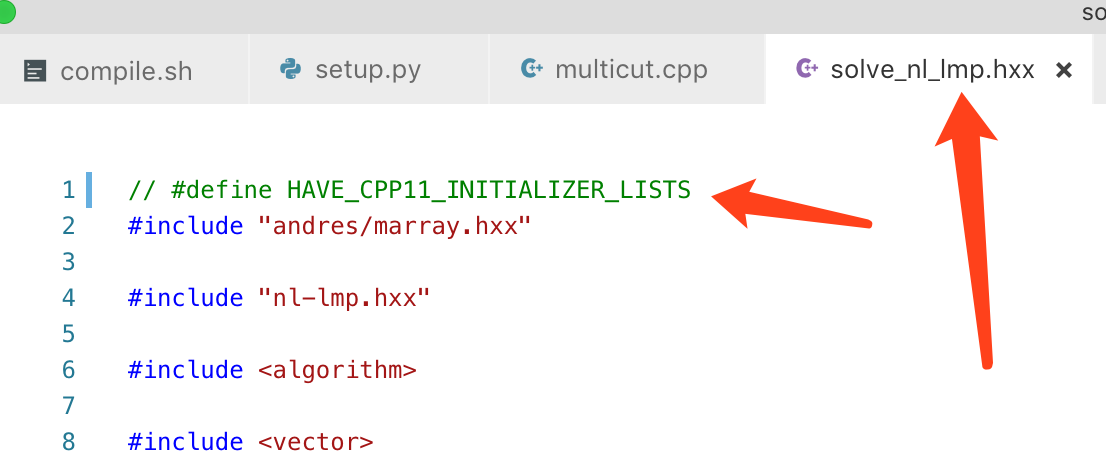
Macro warning can annotate the code in this line in file lib/multicut_cython/solve_nl_lmp.hxx