elcsiga
Dynamically update latitude and longitude.
How can I dynamically update latitude and longitude? I am doing it as follows:
let lat = 46.9171876;
let long = 17.8951832;
if(latitude) {
    lat = latitude;
}
if(longitude) {
    long = longitude;
}
const streetViewPanoramaOptions = {
        position: {lat: lat, lng: long},
        pov: {heading: 100, pitch: 0},
        zoom: 1
 };
But it is not updating despite getting the values of lat and long correctly.

You are right, this component does not support this out of the box.
However you van access the streetView property of the component (with a 'ref') and then call all StreetViewPanorama api methods like https://developers.google.com/maps/documentation/javascript/reference/street-view#StreetViewPanorama.setPosition
class MyComponent extends React.Component {
  constructor(props) {
    super(props);
    this.pano= React.createRef();
  }
  render() {
    return <ReactStreetview ref={this.pano}  ... />;
  }
  setPos(pos) {
    this.pano.current.setPosition( pos );
  }
}
Alternatively, a PR is also welcome which makes this component follow the changes :)

Thanks for the response. What if react version is less than 16.3? createRef will not work in that case.
React had various solutions for refs in the past years. Which version do you use?
As I remember ref={ pano => this.pano = pano; }} works everywhere. In this case you can use the inner streetview object like this :this.pano.setPosition( pos );
You are right, this component does not support this out of the box. However you van access the
streetViewproperty of the component (with a 'ref') and then call allStreetViewPanoramaapi methods like https://developers.google.com/maps/documentation/javascript/reference/street-view#StreetViewPanorama.setPositionclass MyComponent extends React.Component { constructor(props) { super(props); this.pano= React.createRef(); } render() { return <ReactStreetview ref={this.pano} ... />; } setPos(pos) { this.pano.current.setPosition( pos ); } }Alternatively, a PR is also welcome which makes this component follow the changes :)
tried this and it's not working perhaps i'm missing something?? tia

For anyone who still cares, I edited the component by adding another "position" prop with my dynamic coordinates. Then inside the render but not the return statement of the component, I check if the Streetview object has been initialized first, and if it is I set the object's position with .setPosition() to the position.
I'm still fairly new to react so I wasn't exactly sure in which part of the component's lifecycle I could do this in. In the end, I did it this way because its the only thing that worked, but it does trigger that function every time I change any other state in my app. I have a mostly global state, using the Context API, and maybe that's why it happens. In summary, I believe this isn't the most performant way of doing it, but it works.

For anyone who still cares, I edited the component by adding another "position" prop with my dynamic coordinates. Then inside the render but not the return statement of the component, I check if the Streetview object has been initialized first, and if it is I set the object's position with .setPosition() to the position.
I'm still fairly new to react so I wasn't exactly sure in which part of the component's lifecycle I could do this in. In the end, I did it this way because its the only thing that worked, but it does trigger that function every time I change any other state in my app. I have a mostly global state, using the Context API, and maybe that's why it happens. In summary, I believe this isn't the most performant way of doing it, but it works.
hi Nico can you share with me your implementation of what you did? I'm currently dealing with the same issue

I changed the render method and prop types of the component like this:
  render() {
    if (this.streetView) {
      this.streetView.setPosition(this.props.position);
    }
    return (
      <div
        style={{
          height: "100%",
        }}
      ></div>
    );
  }
}

ReactStreetview.propTypes = {
  apiKey: PropTypes.string.isRequired,
  streetViewPanoramaOptions: PropTypes.object.isRequired,
  onPositionChanged: PropTypes.func,
  onPovChanged: PropTypes.func,
  position: PropTypes.object,
};
Then when using the component I pass in an object that looks like this { lat: number, lng: number } to the position prop.
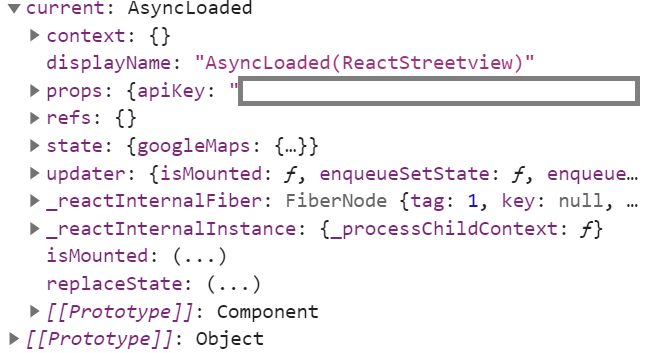
I am not sure if I am doing right or something has changed, it's giving me TypeError: streetViewRef.current.setPosition is not a function error.
streetViewRef.current object contains these:
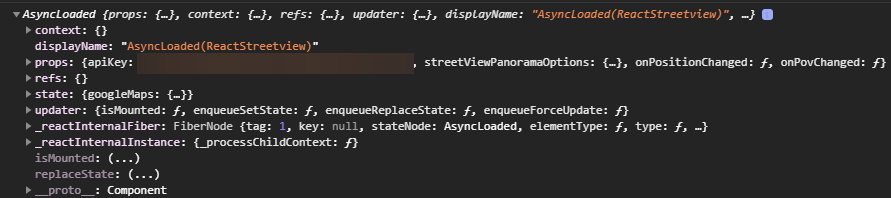

I cannot call this.pano.current.setPosition. It does not find setPosition. If I get help I would appreciate, thanks.