

 elazarcoh
插件不生效


English please Plug-ins do not take effect: I installed the plugin, but it doesn't work, and I also reinstalled vscode,But it doesn't work.May I ask what the cause is?
There might be few reasons. First, I'm advising you to test it in a minimal example:
import numpy as np

# gradient image
N = 100
img = np.arange(N*N).reshape(N,N).astype(np.float32)

print("done")  # put a breakpoint here and try to view `img`
Additionally, look for the logging under Output -> View Image for Python (you might need to enable logging view settings: svifpd.debug). Please attach the log.
There might be few reasons. First, I'm advising you to test it in a minimal example:
import numpy as np

# gradient image
N = 100
img = np.arange(N*N).reshape(N,N).astype(np.float32)

print("done")  # put a breakpoint here and try to view `img`
Additionally, look for the logging under Output -> View Image for Python (you might need to enable logging view settings:
svifpd.debug). Please attach the log.
Error message display:
There might be few reasons. First, I'm advising you to test it in a minimal example:
import numpy as np

# gradient image
N = 100
img = np.arange(N*N).reshape(N,N).astype(np.float32)

print("done")  # put a breakpoint here and try to view `img`
Additionally, look for the logging under Output -> View Image for Python (you might need to enable logging view settings:
svifpd.debug). Please attach the log.Error message display:
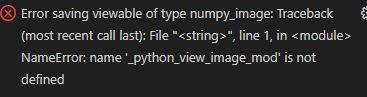
Using your example is fine, but in my own code I get this error and the "yellow bulb" doesn't appear!
Ok. this means the "setup" of the extension in the debug doesn't work. If you can attach the logs, this can be helpful to debug it.
Ok. this means the "setup" of the extension in the debug doesn't work. If you can attach the logs, this can be helpful to debug it.
Thank you for your reply, the log information is below:
Please attach the entire log. There might be a clue of why it's not working. Also, please share more relevant information like: OS Python version etc.
Also, is it remote (e.g. ssh) or locally?
windows11,locally,python version is 3.9.13,log information is below: Uploading test.log…
windows11,locally,python version is 3.9.13,log information is below: Uploading test.log…
I'm not sure if you can see my log file, a screenshot of the full log is below, thanks a lot!
Can you upload the log in a file?
Also, can you change the debug level to verbose?
In the meantime (few days...), I'll try to push a version which might improve the "setup", which is probably the cause.
Can you upload the log in a file? Also, can you change the debug level to
verbose? In the meantime (few days...), I'll try to push a version which might improve the "setup", which is probably the cause.
Can you upload the log in a file? Also, can you change the debug level to
verbose? In the meantime (few days...), I'll try to push a version which might improve the "setup", which is probably the cause.
Also I would like to ask how to set up your plugin not to be able to use this button to save directly as a log?
Can you upload the log in a file? Also, can you change the debug level to
verbose? In the meantime (few days...), I'll try to push a version which might improve the "setup", which is probably the cause.Also I would like to ask how to set up your plugin not to be able to use this button to save directly as a log?
I wasn't aware of this feature. I'll look it out.
Can you upload the log in a file? Also, can you change the debug level to
verbose? In the meantime (few days...), I'll try to push a version which might improve the "setup", which is probably the cause.Also I would like to ask how to set up your plugin not to be able to use this button to save directly as a log?
I wasn't aware of this feature. I'll look it out.
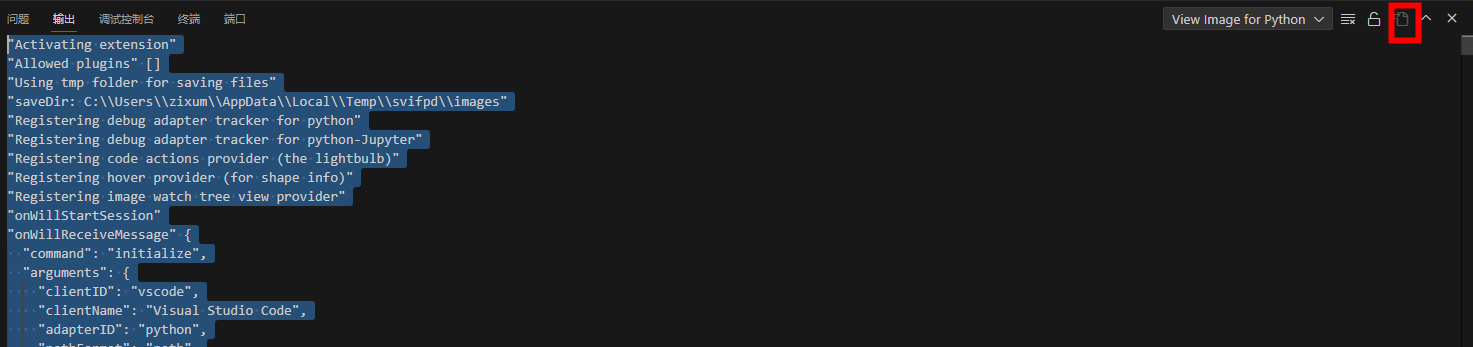
Thanks, looking forward to the results of your troubleshooting
I pushed a pre-release version, 3.0.13. Please check it out. If there are still issues, please let me know. I've added a bit more information to help debug this kind of issues.
I pushed a pre-release version, 3.0.13. Please check it out. If there are still issues, please let me know. I've added a bit more information to help debug this kind of issues.
Is the plugin not updated yet? It looks like version 3.0.12 on my end
use the "switch pre-release version"
It still doesn't seem to work, the output log is as follows test.log
The last line of the log indicates that the setup has succeeded. This means, that if you look in the variables list in VSCode debug view, you should be able to see a variable named _python_view_image_mod (It should be under Global).
You can expand it and inspect it's content. If something isn't right, it's content should be empty. Please check it out and let me know.
Preferably, attach an image with this variable content.
The last line of the log indicates that the setup has succeeded. This means, that if you look in the variables list in VSCode debug view, you should be able to see a variable named
_python_view_image_mod(It should be under Global). You can expand it and inspect it's content. If something isn't right, it's content should be empty. Please check it out and let me know. Preferably, attach an image with this variable content.
unfortunately, under global I don't see the parameter "_python_view_image_mod",and in the log message there is the following error message:
Interesting. Is there anything special about the context which you're using the extension? Can you try to reproduce it in a simple script? The error regarding the thread suggests there's something non-trivial in your use case.
I'm not sure what are all the variables mentioned in the log, e.g. repr_png, so this might be a clue. What kind of variable you're trying to view? maybe it's not supported?