

 easystats
Prediction plots for logistic models: improvements
The current default plot for logistic models is like that:
p <- plot(modelbased::estimate_relation(glm(vs ~ mpg, data = mtcars, family = "binomial")))
p

However, when the outcome variable is not on the 0-1 scale, but is a factor (and thus 1-2 by default), the plot is messed up:
p <- plot(modelbased::estimate_relation(glm(sex ~ body_mass_g, data = palmerpenguins::penguins, family = "binomial")))
p

Created on 2021-06-09 by the reprex package (v1.0.0)
What would be the most elegant solution to plot the line on the outcome's scale?
On a related note, I'm thinking about moving from a pseudo-rug geoms for data points towards maybe something that would look like this:

What's the best way to create something like that? Using ggdists?

However, when the outcome variable is not on the 0-1 scale, but is a factor (and thus 1-2 by default), the plot is messed up:
if (outcome_is_factor) {
  predicted <- predicted + 1
}

@DominiqueMakowski https://github.com/lnalborczyk/lnalborczyk.github.io/blob/e2738530423eb6eb7112d7bd9026151becedbba4/code/logit_dotplot.R

The main issue is fixed using your suggestion Mattan, even though I'm not sure whether it's the best solution to modify the predictions rather than, somehow, the levels. Because, for instance, it also messes up the position of the dotdensity.
On top of that, I'm not sure how to pick the best default values for the dotdensity so that the plots are fairly consistent (the dots have the same size or the same "height" ) in respect to the amount of data.
library(ggplot2)

p <- plot(modelbased::estimate_relation(glm(vs ~ mpg, data = mtcars, family = "binomial")))
p +
  geom_dotplot(
    aes_string(x = "mpg", y = "vs"),
    data = mtcars[mtcars[["vs"]] == 0, ],
    method = "dotdensity",
    binwidth = 1/30 * diff(range(mtcars[["mpg"]])),
    stackdir = "up",
    show.legend = FALSE)

p <- plot(modelbased::estimate_relation(glm(sex ~ body_mass_g, data = palmerpenguins::penguins, family = "binomial")))
p +
  geom_dotplot(
    aes_string(x = "body_mass_g", y = "sex"),
    data = palmerpenguins::penguins[palmerpenguins::penguins[["sex"]] == "female", ],
    method = "dotdensity",
    binwidth = 1/30 * diff(range(palmerpenguins::penguins[["body_mass_g"]], na.rm = TRUE)),
    stackdir = "up",
    show.legend = FALSE)
#> Warning: Removed 11 rows containing non-finite values (stat_bindot).

Created on 2021-06-10 by the reprex package (v1.0.0)
These are the two options I can think of...
library(ggplot2)

fct <- mtcars$am |> factor()
x <- mtcars$mpg
pred <- runif(length(x))

ggplot(mapping = aes(x, fct)) +
  geom_point() +
  geom_point(aes(y = pred + 1), color = "red")

ggplot(mapping = aes(x, as.numeric(fct) - 1)) +
  scale_y_continuous(breaks = c(0, 1), labels = levels(fct)) +
  geom_point() +
  geom_point(aes(y = pred), color = "red")

Created on 2021-06-10 by the reprex package (v2.0.0)
What do you think of the viewport overlay I linked to?
What do you mean?
https://github.com/lnalborczyk/lnalborczyk.github.io/blob/e2738530423eb6eb7112d7bd9026151becedbba4/code/logit_dotplot.R
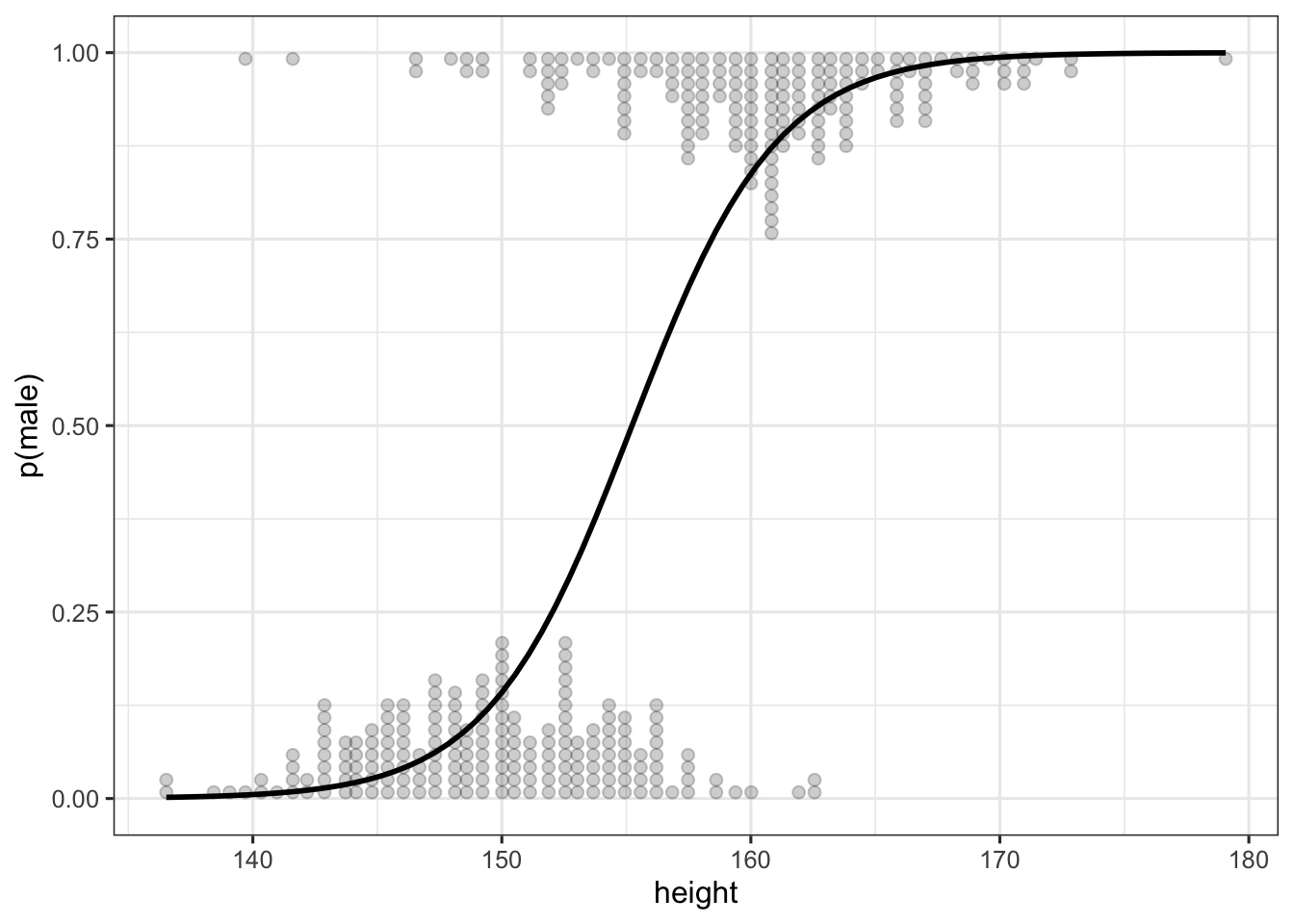
Yes this is my goal, it is the same as above in my example; i.e., it uses ggplot2::geom_dotplot. The problem of that geom is that it doesn't have afaik good default adjustments for the size of the dots, it must be specified manually to look really nice (as in the figure you mention). So my question was whether we can find some rules to adjust the dotplot parameters so that the plots look consistent (so that the user don't have to manually specificy the binwindth / dots-size)
sure, here's a quick example with ggdist::geom_dots, which is designed for exactly this kind of problem :)
# took me a minute to get this working since your master branch appears broken?
p <- plot(modelbased::estimate_relation(glm(sex ~ body_mass_g, data = palmerpenguins::penguins, family = "binomial")))

p +
  ggdist::geom_dots(
    aes_string(x = "body_mass_g", y = "sex"),
    data = na.omit(palmerpenguins::penguins[palmerpenguins::penguins[["sex"]] == "female", ]),
    color = "black",
    fill = "gray50",
    alpha = 0.5,
    scale = 0.45,
    side = "top"
  ) +
  ggdist::geom_dots(
    aes_string(x = "body_mass_g", y = "sex"),
    data = na.omit(palmerpenguins::penguins[palmerpenguins::penguins[["sex"]] == "male", ]),
    color = "black",
    fill = "gray50",
    alpha = 0.5,
    scale = 0.45,
    side = "bottom"
  ) +
  theme_light()

The use of scale = 0.45 here causes it to pick a binwidth that makes the dotplot at most 45% of the space between items on the categorical y axis, so you should be guaranteed at least 10% space between the tips of the dotplots. The binwidth adjusts to maintain this distance if you resize the plot.
Incidentally writing this example this caused me to find a bug (https://github.com/mjskay/ggdist/issues/74) in the NA handling in ggdist::geom_dots() when the y axis has manually-defined limits, so thanks :) (should be a quick fix).

Awesome, thanks a lot for your input! ☺️ Let's go with ggdist's solution then
Happy to help! :)
Incidentally I fixed the NA handling bug in geom_dots, so the github version should now do the correct thing given na.rm = TRUE, which you can use instead of na.omit() as in the example I gave above.
Also, if you find any weird corner cases where the automatic bin width detection doesn't work well, please let me know --- it's a hairy problem and improvements have really been driven by real-world examples of when it doesn't work. I'm happy to make further improvements!
It seems I am late to the party... but in my field (pharmacometrics) the standard diagnostic plot for logistic regressions is an overlay with binned observations (often "quartiles" -- actually fourths, but they're called quartiles....)
plot_logreg(glm(vs ~ mpg, data = mtcars, family = "binomial"),terms='mpg',observed=cut_x(4))

I'm not sure how something like this would work with the dotplots
ds <- mtcars%>%mutate(am=factor(am))
plt_rng <- seq(1,40)
plot_logreg(glm(vs ~ mpg+am, data = ds, family = "binomial"),terms=c('mpg [plt_rng]','am'),observed=cut_x(2),by='am')

they're not strictly goodness of fit plots, but they give some sense of how the model predicts the data, especially if all relevant predictors can be visualized.
Internally, this uses both ggeffects and emmeans, I am not sure if all functionality can be also created with modelbased, but if it could and this type of plot can be natively supported, that would be cool.
maybe a geom_binom_binned()? But I imagine it would be hard to keep track of the facets/groups.
