

 ea4k
ea4k
Different time format
time format has different formats in different places (see attached picture)


The problem with dates and times in Klog seems to be more complex.
- Dates and times shown to the user (GUI) - as the picture above shows, the format is different. It will be quite easy to fix it - leave a time format as is, change a date format for example QLocale::system().dateFormat(QLocale::ShortFormat)
- Dates and times used internally - many of them should remain "as is" - including dates and times used in filename etc.
- Dates and times stored in SQLite - honestly, I don't know what a reason was, but the complication arose at a time when an user was allowed to choose whether QSO time is in UTC or local time. The QSO time is not stored with timezone information in SQLite what means that time can be store in UTC and then in Local time but there is no information in database in which timezone was stored the QSO - as show my next picture. The picture shows two QSOs logged in order OK1EE (logged at 10:49:30) and SP6AA (logged at 10:49:50 but Klog's UTC was active). The result is an incorrect QSO order and no information that the QSOs were logged in different timezones what can cause an issue with export to external services (QRZ, eQSL etc) because the dates and times are exported "as-is". In my opinion, a QSO time should always be logged in UTC timezone.
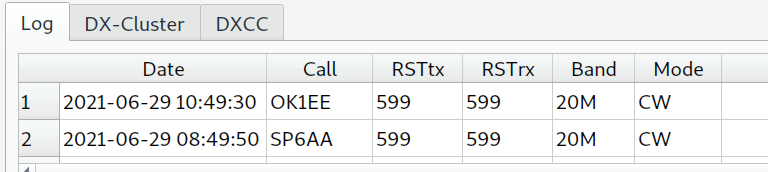
You are right. Unfortunately it will be very difficult to solve this, in general, without data corruption. Maybe a process that reads from the configuration if the user is using or not the UTC time and then modify in the database all the log accordingly. Afterwards, using UTC to store the log, as you propose makes sense.
Any comment?

It is important to note that the data are already corrupted. So this fix can only improve the situation in the future.
I think that KLog internally should store every time and date field in UTC - without any exception - and then if time is shown or inserted then leave it or convert it to UTC based on customer setting. You can do it when time is inserted (via SQL modification) or maybe you can use QStyledItemDelegate to get an unified and correct time format and zone (at this moment I don't know how to do it exactly).