

 dteviot
Add option to remove chapter titles (but keep numbers)
I'm not sure if this is possible or not, but I wish there's an option to remove chapter titles and only keep chapter numbers instead. The reason is more often than not, chapter titles contain blatant spoilers..
(ex: Chapter 22: The Hero Dies? ==> Chapter 22)

@swanknight Not easy to do in the general case, as there's all sorts of chapter names. However, assuming you would be happy with just the titles on the chapters themselves, and not the Table of Contents as well, it should be possible to use EpubEditor to modify them.
- Go to https://drive.google.com/drive/folders/1B_X2WcsaI_eg9yA-5bHJb8VeTZGKExl8 and download EpubEditor.
- Unzip the file and open main.html in Chrome or Firefox.
- Replace the text in the box on the RIGHT with the following
let title = dom.querySelector("h1");
let changed = false
if (title != null) {
    let txt = title.textContent;
    const regexpChapter = new RegExp("Chapter\\s*[0-9]*");
    let match = txt.match(regexpChapter);
    if (match != null) {
        console.log(txt);
        console.log(match[0]);
        title.textContent = match[0];
        changed = true;
    }
}
return changed;
- Drop epub with scrambled text into box on LEFT.
- Click option "Run script above to modify Epub"
- Save result, when it finishes.
Tested with epub from https://www.royalroad.com/fiction/15193/ave-xia-rem-y
For my records: 50 minutes.

@dteviot I followed the steps above but nothing happens when I press "Run script above to modify Epub". Is there supposed to be some sort of progress indicator?
@swanknight There is no progress indicator. Generally, it only takes a few seconds and then the save should appear. I'm guessing you perhaps didn't copy the text in step 3 correctly? I suggest:
- Reload main.html
- Clear all text from the box on the right
- Grab the bottom right corner of the box on the right and drag to enlarge the box.
- Copy the text from step 3 in my previous note.
- Drop the epub into box on LEFT.
Screen should look like this:
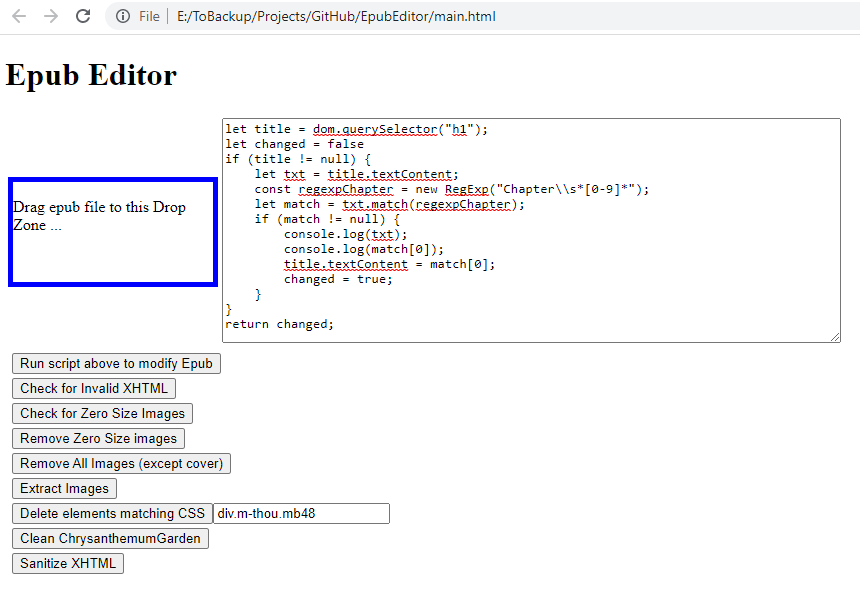
- Click option "Run script above to modify Epub"
If it doesn't work, open the developer tools and look on the console tab, it might show an error.
@dteviot I did copy it and replaced the existing script. I just tried again, I left open for 10~15 mins but still nothing.
@dteviot it seems there was an issue with the script's format. Anyway, it did work. There were some chapters that still had their titles, but there might be an issue with the epub I was working. I'll continue to test it and if an issue arises, I will let you know. Thank you, I appreciate your help.
@swanknight
There were some chapters that still had their titles
You might need to tweak the regex to handle the title of those chapters.