

 drawpile
issue with drawpile interface scaling
is there a way to fix this i haven't really found a way to do so at the moment
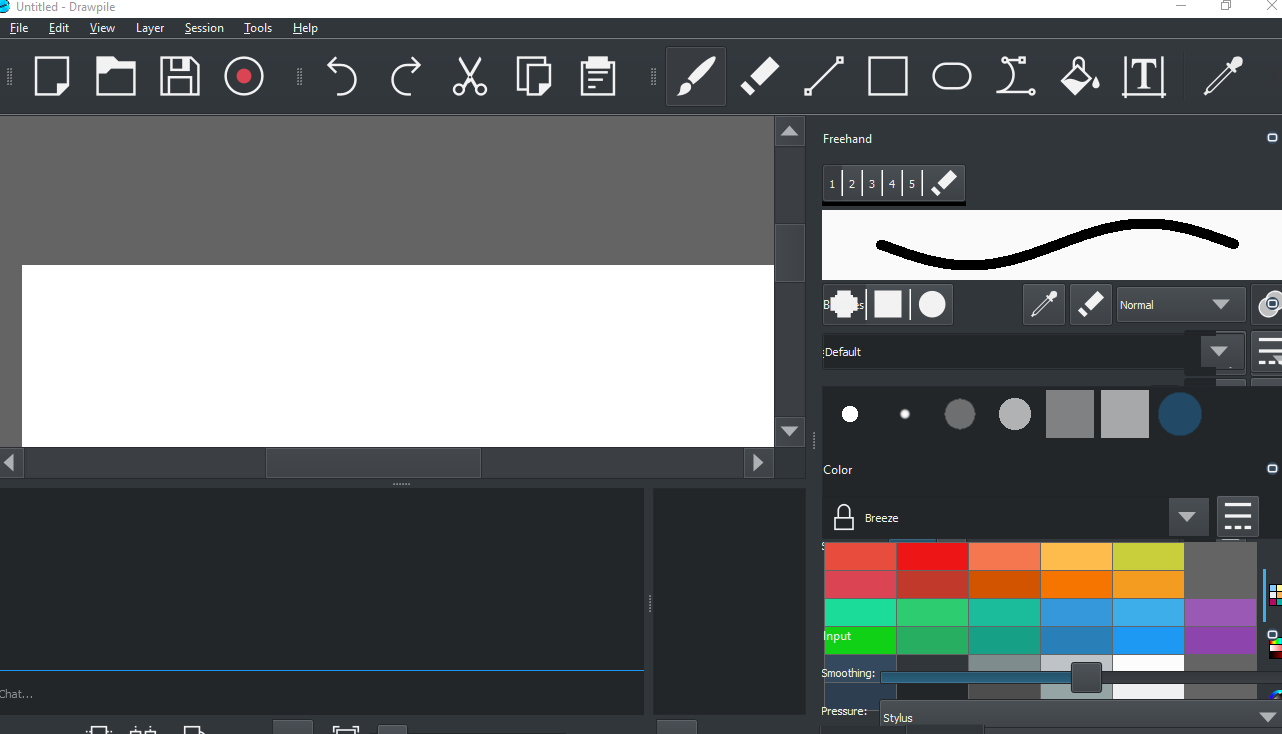

@callaa at one point had high DPI support. I'm not sure if this is an issue we can revisit here at some point, but it may be worth it. For right now I'm going to tag it as a support issue until Callaa chimes in on this.
Anyway, this is due to scaling in Windows 10. If you right click your desktop, go to display settings, and set scaling to a lower number (closer to 100% should work), it should fix the issue. Please note after making any changes, you may need to restart your computer for it to take effect.
If not, I think last time I saw this it was because there was an issue with one screen being much higher resolution than the other. If you can change the resolution of the screens to be closer, that might help. I can't tell you what settings to use though without getting to see your settings. I would suggest joining the Drawpile Discord server for more immediate help. The invite link is on the main website in the bottom left corner.

(I've taken over development on Drawpile, so I'm going through these tickets and organizing them.)
Duplicate of #674. Definitely still an issue we have to look into. Even more excitingly, it's broken in different ways on Qt5 and Qt6, so maybe we even get to fix it twice.
