

 downshift-js
Weird selectedItem duplication on Backspace
-
downshiftversion: 6.0.2 -
nodeversion: 12.16.3 -
npm(oryarn) version: 6.14.4
Relevant code or config
Examples at https://www.downshift-js.com/use-multiple-selection
What you did:
- Go to first example on https://www.downshift-js.com/use-multiple-selection
- Hold the mouse down on the selected item "Neptunium", drag the mouse down below the item, and release it
- Press backspace
What happened:
Instead of the item being deleted, the item is being duplicated in the selected items.
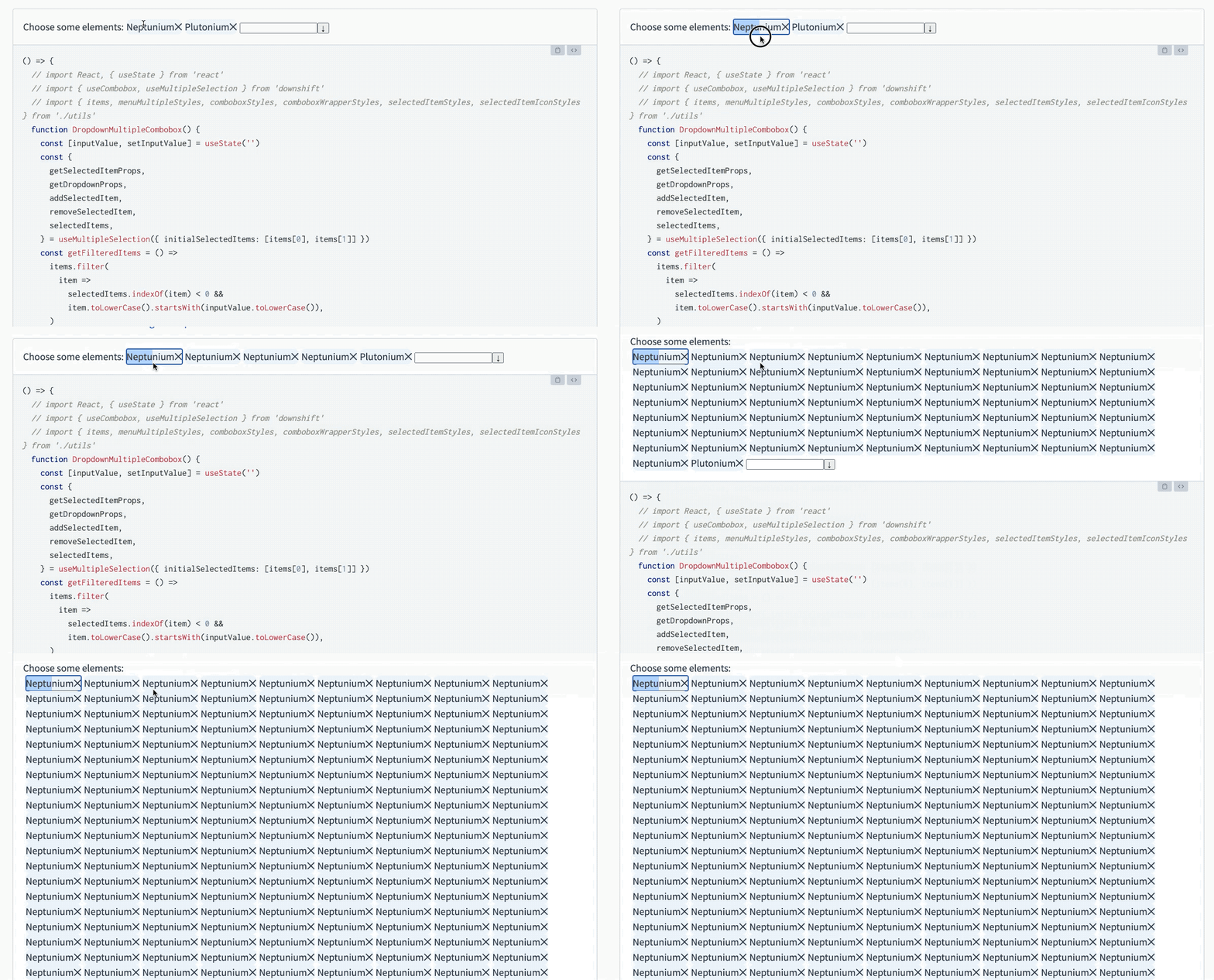
Note that I clicked backspace several times in the video.

Ouch.
Should be investigated, maybe something weird is done in the reducer, for the Backspace action. Can you provide a fix for it?💪

Hm, just as a wild guess, maybe the activeIndex is not being set correctly in that case, and is -1, and the backspace action does its thing which results in slice being called with -1. A failing unit test would be good for a start. Currently I‘m occupied, maybe in a few days.
https://github.com/downshift-js/downshift/blob/master/src/hooks/useMultipleSelection/reducer.js#L31
Yeah, maybe the onClick which would set the activeIndex does not trigger when doing mouse down on the item, but mouse up outside of the item.
https://github.com/downshift-js/downshift/blob/master/src/hooks/useMultipleSelection/index.js#L200
https://github.com/downshift-js/downshift/blob/master/src/hooks/useMultipleSelection/reducer.js#L11
I think a proper fix would introduce a new onFocus action on getSelectedItemProps that sets the activeIndex.
I don't think this is a normal action that can be taken by the user, so I would probably try to see if it can be fixed with the current state change types.
I fear it‘s not possible with the current actions.
SelectedItemClick is just not correctly modeling browser behavior. There would need to be an onFocus handler, at least I currently don‘t see another way to fix this.
Then let’s see you approach. We can talk more on the PR.
On Sun, 9 Aug 2020 at 19:31, fabb [email protected] wrote:
I fear it‘s not possible with the current actions.
SelectedItemClick is just not correctly modeling browser behavior. There would need to be an onFocus handler, at least I currently don‘t see another way to fix this.
— You are receiving this because you commented.
Reply to this email directly, view it on GitHub https://github.com/downshift-js/downshift/issues/1138#issuecomment-671072744, or unsubscribe https://github.com/notifications/unsubscribe-auth/ACWAZAAESQD7TT3646TYTRDR73FNRANCNFSM4PUOID4A .
The easiest thing to fix it on the client side is to add an onFocus handler and set the activeIndex manually:
{...getSelectedItemProps({selectedItem, index, onFocus: () => setActiveIndex(index)})}
https://codesandbox.io/s/usemultipleselection-fix-activeindex-on-focus-4xsms
To fix could be pulled into downshift, but as said it would be necessary to add a SelectedItemFocus event, and it could be problematic since it would not distinguish between focuses as side-effects of other actions.
Sorry, currently I don't have time to contribute more.
Had a similar issue but the onFocus trick did not solve it. In my case there was a dispatch of {type: __dropdown_click__, changes: {activeIndex: -1}} whenever clicking a selectedItems component. This is because I use Material-UI TextField has a dropdown with InputProps.startAdornment to store these components. The getInputProps(getDropdownProps({refKey: 'inputRef'}) is spread on InputProps. Hence the selectedItems components are nested in the subtree rooted at the <Input> component of the <TextField> and whenever one such component is clicked, the event first triggers setting activeIndex: clickedIndex correctly, then bubbles up and triggers setting activeIndex: -1. In some cases it prevents the user from focusing these components with a click, in other cases the activeIndex is not in sync with the browser focus state and pressing Delete or Backspace produces the duplication described above.
I could fix it by adding onClick: (e) => e.stopPropagation() on the selectedItems components. Not sure this is the best way to approach it. Another way is to spread getInputProps(getDropdownProps({...})) on the input component instead. Not sure what makes more sense.
