

 dotnet
Introduce InvokeAsync on Control
Rationale
With the arrival of the WebView2 control, which introduces APIs for WinForms which can only be called asynchronously and therefore need to be awaited, and also with the option from .NET 5 on to project UWP/WinUI APIs - many of which can also only be called asynchronously - there is also a new requirement to await methods, which can only be executed from the UI Thread.
The EnsureCoreWebView2Async method of the WebView2 control has this requirement for example. It can only be called from the UI thread. When the current thread is not the UI thread, then there is no easy way to call this method, because async methods are not compatible with the current Invoke method's signature to delegate calls to the UI thread.
Other scenarios are, when asynchronous methods like NavigateTo are signaling their completion by raising an event, and those methods - which also needs to be called of on the UI Thread - should be awaited e.g. via a TaskCompletionSource.
Proposed API
Add a method to Control with the following signatures:
public Task InvokeAsync(
    Func<Task> invokeDelegate,
    TimeSpan timeOutSpan = default,
    CancellationToken cancellationToken = default,
    params object[] args)
to invoke awaiting a method on the UI thread which doesn't return any results (so its return type is - because it's awaitable - of type Task), and...
public async Task<T> InvokeAsync<T>(
    Func<Task<T>> invokeDelegate,
    TimeSpan timeOutSpan = default,
    CancellationToken cancellationToken = default,
    params object[] args)
to return a result value.
Real World Sample
Consider in a typical WinForms LOB App DataBinding-Scenario, we have a couple of Extender methods for a business logic to aggregate reports (Revenue numbers), which extends BindingList:
// Sync version:
bindingList.AddCustomerReportItem(customerId)

// Async version:
bindingList.AddCustomerReportItemAsync(customerId)
Both methods need to be called on the UI Thread, since both are updating the UI via Binding. However, aggregating the result to generate a Report Item does take a while, since a lot of data has to be taken into account.
The typical Code-behind WinForms solution would look like this:
            // Simulate getting the Data from a Report engine,
            // and displaying them in the Grid via Binding.
            var bindingList = new BindingList<CustomerReportItem>();
            customerReportItemBindingSource.DataSource = bindingList;

            // We use the ReportEngine...
            var reportEngine = new ReportEngine();

            // ...register to be called back, when it's finished, and
            // update the UI inside it's EventHandler.
            reportEngine.ReportCompilationCompleted += (sender, eventArgs) =>
              {
                  foreach (var customerId in eventArgs.CustomerIds)
                  {
                      bindingList.AddCustomerReportItem(customerId);
                  }
              };

            // We're kicking of the Report compilation
            // and waiting for the result event to arrive.
            reportEngine.CompileReport();
The problem here: The code crashes with a Cross-Thread exception, because we're trying to add to a BindingSource, which causes the UI to get updated, but we're doing this in the EventHandler of ReportCompilationCompleted, and that's not raised on the UI Thread.
Note: This is not a stilted scenario. There are other events in real live scenarios, where this happens. WebView2.NavigateTo, Timer Ticks, EndInvokes in WinForm-Components which often raise events, Notification Events from UWP, etc.
So, what we can do in our case, is just marshal that call to the UI thread. But that does not help a lot, since the Task we're running on is utilizing the UI thread to full capacity. The App becomes unresponsive:
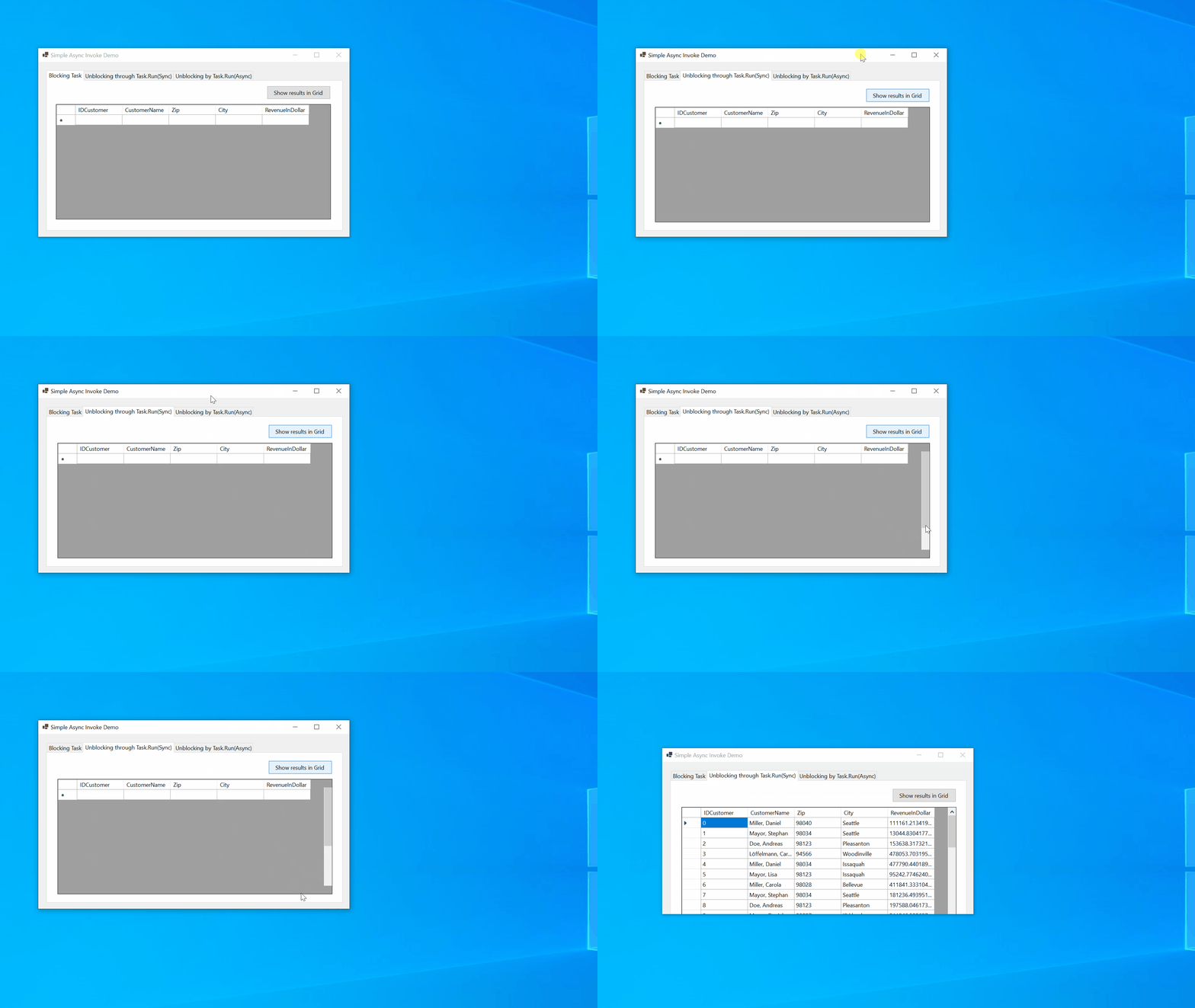
So, instead we could now use the Async version of AddCustomerReportItem in the EventHandler, like this:
    // ...register to be called back, when it's finished, and
    // update the UI inside it's EventHandler.
    reportEngine.ReportCompilationCompleted += async (sender, eventArgs) =>
    {
        foreach (var customerId in eventArgs.CustomerIds)
        {
            // OK, so this time: Let's Invoke that to marshal it
            // to the UI thread. But...
            await bindingList.AddCustomerReportItemAsync(customerId);
        }
    };
But again, if we do it, we're hitting the Cross-Thread Exception. And this is the Problem now:
We should be able to do the Invoke now just with the WinForms standard tools. The call would look like this:
    // ...register to be called back, when it's finished, and
    // update the UI inside it's EventHandler.
    reportEngine.ReportCompilationCompleted += async (sender, eventArgs) =>
    {
        foreach (var customerId in eventArgs.CustomerIds)
        {
            // OK, so this time: Let's Invoke that to marshal it
            // to the UI thread. But...
            await asyncControl.InvokeAsync(() => bindingList.AddCustomerReportItemAsync(customerId));
        }
    };
And the result would look like this:


Oh, and this is the implementation I did so far with which I used in the demo:
        private async Task<T> InvokeAsync<T>(
            Delegate invokeDelegate,
            TimeSpan timeOutSpan = default,
            CancellationToken cancellationToken = default,
            params object[] args)
        {
            var tokenRegistration = default(CancellationTokenRegistration);
            RegisteredWaitHandle? registeredWaitHandle = null;

            try
            {
                TaskCompletionSource<bool> taskCompletionSource = new();
                IAsyncResult? asyncResult = BeginInvoke(invokeDelegate, args);

                registeredWaitHandle = ThreadPool.RegisterWaitForSingleObject(
                    asyncResult.AsyncWaitHandle,
                    new WaitOrTimerCallback(InvokeAsyncCallBack),
                    taskCompletionSource,
                    timeOutSpan.Milliseconds,
                    true);

                tokenRegistration = cancellationToken.Register(
                    CancellationTokenRegistrationCallBack,
                    taskCompletionSource);

                await taskCompletionSource.Task;

                object? returnObject = EndInvoke(asyncResult);
                return (T)returnObject;
            }
            finally
            {
                registeredWaitHandle?.Unregister(null);
                tokenRegistration.Dispose();
            }

            static void CancellationTokenRegistrationCallBack(object? state)
            {
                if (state is TaskCompletionSource<bool> source)
                    source.TrySetCanceled();
            }

            static void InvokeAsyncCallBack(object? state, bool timeOut)
            {
                if (state is TaskCompletionSource<bool> source)
                    source.TrySetResult(timeOut);
            }
        }
    }
public Task InvokeAsync(
    Func<Task> invokeDelegate,
    TimeSpan timeOutSpan = default,
    CancellationToken cancellationToken = default,
    params object[] args)
The args make no sense, Func<Task> takes no arguments and if you pass anything but an empty array you'll get an exception (same for the other overload).
Also do you really want BeginInvoke behavior which always interrupts control flow (posting to the message loop) even if you are already on the UI thread? I mean its ok to do if you document it, people can do their own extension method which checks InvokeRequired just like they are doing currently. I only want to make sure its discussed which variant is expected to be the more common use case, immediate execution when already being on the UI thread, or always post like BeginInvoke.
If you divert from BeginInvoke behavior and execute the callback inline on the UI thread then you should also discuss returning ValueTask instead of class Task. I've not got any experience with ValueTask patterns so I'm just throwing this into the discussion for consideration not because its necessarily a good idea. (If you have BeginInvoke behavior and always post there is no point of ValueTask though).
Also (without seeing how the private InvokeAsync is called) I suspect this is an overly complex and probably bad approach to implement InvokeAsync, but shouldn't derail the API discussion, implementation can be discussed separately if desired. (For example I'm missing unrolling and awaiting of the Task returned by Func<Task> but maybe its done in the caller. Without having this the Task returned by InvokeAsync would complete before the async callback runs to completion.)
Cancellation also seems suspect
- do we really need both timeout and cancellation token? there exist timeout cancellation tokens. I suspect the API is driven by the implementation here, and the implementation may be particularly bad.
- the implementation of faking a cancellation/timeout after the callback started running seems questionable, I'm not aware of anything else in the framework doing this. As far as I'm aware cancellation is always done before the callback starts, once it starts the callback itself is responsible for observing cancellation. Faking early cancellation while the task still runs to completion in the background may cause issues.
Thats not to say cancellation isn't useful to have in this API, if you do BeginInvoke behavior of posting you may want to cancel your posted callback before it runs.

- The scenario makes sense
- @StephenToub should review this as he's working on adding support for timeout and cancellation token support as part of dotnet/runtime#47525
namespace System.Windows.Forms
{
    public partial class Control
    {
        public Task InvokeAsync(
            Func<Task> invokeDelegate,
            TimeSpan timeOutSpan = default,
            CancellationToken cancellationToken = default,
            params object[] args
        );
        public async Task<T> InvokeAsync<T>(
            Func<Task<T>> invokeDelegate,
            TimeSpan timeOutSpan = default,
            CancellationToken cancellationToken = default,
            params object[] args
        );
    }
}

Just skimming the post now...
Am I understanding correctly that the timeout and CancellationToken don't actually impact the execution of the invokeDelegate, rather they cause the returned task to transition to a completed state even when the invokeDelegate may still be executing?
If so, that's exactly what the new WaitAsync methods will do: https://github.com/dotnet/runtime/pull/48842 e.g. if there's an existing Task-returning InvokeAsync method, you wouldn't need these overloads, and could instead just do:
await InvokeAsync(() => ...).WaitAsync(cancellationToken, timeout);
That WaitAsync takes the task from the InvokeAsync and returns a task that also incorporates cancellation / timeout, e.g. if cancellation is requested, the task returned from WaitAsync will be canceled even though the task returned from InvokeAsync may still be running.

Oh, and this is the implementation I did so far with which I used in the demo:
Alternatively, I've been using the following version, modified to support timeOutSpan. I my experience, I never needed timeOutSpan, as CancellationToken was always good enough. Removing timeOutSpan could make it a bit shorter and perhaps a bit more performant, as the linked CancellationTokenSource would be gone too.
public static async Task<T?> InvokeAsync<T>(
    this Control @this,
    Delegate invokeDelegate,
    TimeSpan timeOutSpan = default,
    CancellationToken  = default,
    params object?[]? args)
{
    using var cts = CancellationTokenSource.CreateLinkedTokenSource(cancellationToken);
    if (timeOutSpan != default)
    {
        cts.CancelAfter(timeOutSpan);
    }

    var tcs = new TaskCompletionSource<T?>(TaskCreationOptions.RunContinuationsAsynchronously);
    @this.BeginInvoke(new Action(() =>
    {
        try
        {
            // don't invoke the delegate if cancelled
            cts.Token.ThrowIfCancellationRequested();
            tcs.TrySetResult((T?)invokeDelegate.DynamicInvoke(args));
        }
        catch(Exception ex)
        {
            tcs.TrySetException(ex);
        }
    }), null);

    using (cts.Token.Register(() => tcs.TrySetCanceled()))
    {
        return await tcs.Task;
    }
}
Edited: addressing the comments, here is an updated version that supports both regular and async delegates for invokeDelegate.

Alternatively, I've been using the following version
Contrary to the original method (where I couldn't see the caller) this is public, thus definitely broken, because it doesn't unwrap and await the task returned by Func<Task> or Func<Task<T>> but instead returns a Task<Task>
When passing an actual async function the Task returned by InvokeAsync completes before the invokeDelegate completes.
In other words, your InvokeAsync does not support async callbacks, it supports calling synchronous callbacks in an async way. While in isolation it may be valid its different from how the rest of the dotnet framework developed.
I believe you shouldn't be writing a catch-all method handling arbitrary delegates. While you could try inspecting the return type of the delegate and "guess" based on its type whether you have to await it, that only works for Task and falls short for other cases. ValueTask and custom implementations will again cause the same problem of completing before the callback completes.
The IMHO correct solution is to only accept Func<Task> and Func<Task<T>>, by forcing the delegate signature to return Task (instead of accepting arbitrary delegates) you ensure the user gets a compiler error instead of runtime bugs. He has then a simple way to fix this compile error, by marking his method async and doing an await if necessary. This will always convert his method into the proper Task-returning signature.
Contrary to the original method (where I couldn't see the caller) this is public, thus definitely broken, because it doesn't unwrap and await the task returned by
Func<Task>orFunc<Task<T>>but instead returns aTask<Task>
I guess I see what you mean. That version was for invoking synchronous delegates, and the real code accepts an Action (edited: Func<T?>), not an untyped Delegate:
static async Task<T?> InvokeAsync<T>(this Control @this, Func<T?> func, CancellationToken cancellationToken)
As for async lambdas, I use a different override (similar to how Task.Run does it):
public static async Task<T?> InvokeAsync<T>(
    this Control @this,
    Func<CancellationToken, Task<T?>> asyncFunc,
    CancellationToken cancellationToken = default)
{
    var tcs = new TaskCompletionSource<T?>(TaskCreationOptions.RunContinuationsAsynchronously);
    @this.BeginInvoke(new Action(async () =>
    {
        // we use async void on purpose here
        try
        {
            cancellationToken.ThrowIfCancellationRequested();
            tcs.TrySetResult((T?)await asyncFunc(cancellationToken));
        }
        catch (Exception ex)
        {
            tcs.TrySetException(ex);
        }
    }), null);

    using (cancellationToken.Register(() => tcs.TrySetCanceled()))
    {
        return await tcs.Task;
    }
}
The IMHO correct solution is to only accept Func<Task> and Func<Task<T>>, by forcing the delegate signature to return Task (instead of accepting arbitrary delegates) you ensure the user gets a compiler error instead of runtime bugs. He has then a simple way to fix this compile error, by marking his method async and doing an await if necessary. This will always convert his method into the proper Task-returning signature.
Totally agree and that's how I do it in my projects, following the pattern of many others existing APIs in .NET.
Edited, as a matter of fact, @KlausLoeffelmann's version throws for the following code due to the same reason:
private async void Form1_Load(object sender, EventArgs e)
{
    // we're on UI thread
    await Task.Run(async () =>
    {
        // we're on thread pool
        var res = await this.InvokeAsync<bool>(new Func<Task<bool>>(async () =>
        {
            // we're on UI thread
            await Task.Delay(5000);
            return true;
        }));

        // we're on thread pool again
        await Task.Delay(1000);
    });

    // back on UI thread
    MessageBox.Show("Done");
}
BeginInvoke is unaware of the fact that the delegate is async and returns to the caller before Task.Delay(5000) is completed. This of course is solved with a proper override like I mentioned in this post.
Contrary to the original method (where I couldn't see the caller) this is public, thus definitely broken, because it doesn't unwrap and await the task returned by
Func<Task>orFunc<Task<T>>but instead returns aTask<Task>When passing an actual async function the
Taskreturned byInvokeAsynccompletes before theinvokeDelegatecompletes.In other words, your
InvokeAsyncdoes not support async callbacks, it supports calling synchronous callbacks in an async way. While in isolation it may be valid its different from how the rest of the dotnet framework developed.
The original method seems to be broken too for async lambdas, as I've shown above. However, it's still possible to make it work for async lambdas disguised as untyped Delegates. It's a questionable design, but it's also the legacy of BeginInvoke.
Here's a take at that, it works for both regular and async delegates:
public static async Task<T?> InvokeAsync<T>(
    this Control @this,
    Delegate invokeDelegate,
    TimeSpan timeOutSpan = default,
    CancellationToken cancellationToken = default,
    params object?[]? args)
{
    using var cts = CancellationTokenSource.CreateLinkedTokenSource(cancellationToken);
    if (timeOutSpan != default)
    {
        cts.CancelAfter(timeOutSpan);
    }

    var tcs = new TaskCompletionSource<T?>(TaskCreationOptions.RunContinuationsAsynchronously);

    async void Invoker()
    {
        // async void makes sense here
        try
        {
            cts.Token.ThrowIfCancellationRequested();

            var result = invokeDelegate.DynamicInvoke(args);
            // if the result is a Task, await it
            if (result is Task task)
            {
                await task;
                tcs.TrySetResult(((Task<T?>)task).GetAwaiter().GetResult());
            }
            else
            {
                tcs.TrySetResult((T?)result);
            }
        }
        catch (Exception ex)
        {
            tcs.TrySetException(ex);
        }
    }

    @this.BeginInvoke(new Action(Invoker));

    using (cts.Token.Register(() => tcs.TrySetCanceled()))
    {
        return await tcs.Task;
    }
}
@weltkante
Also do you really want BeginInvoke behavior which always interrupts control flow (posting to the message loop) even if you are already on the UI thread?
Absolutely. One of the features I use Invoke for, and which I find super important in scenarios, where I want dedicatedly a method call to be getting event characteristics through scheduling it on the message queue. Even if not fired off from a different thread. I’ll add a rational for that as well in the nearer future, and I am really interested in a discussion about alternative approaches for those scenarios.
I am really interested in a discussion about alternative approaches for those scenarios.
await Task.Yield() will achieve the same thing and I personally prefer having it separate from InvokeAsync, but I'm not against keeping it in line with BeginInvoke and having users check InvokeRequired manually. Either way is fine, you always can implement the other semantic as extension method if you prefer it. I just want some discussion since from my perspective it feels like I want the inlined case more often, so getting other peoples perspective may be good.
// simplified pseudocode for how you would implement one if you have the other

// if InvokeAsync behaves as BeginInvoke as proposed you can check InvokeRequired
public static async Task InvokeAsync_Inline(Func<Task> callback)
{
  if (InvokeRequired)
    await InvokeAsync_Yield(callback);
  else
    await callback();
}

// the currently proposed semantic could be reimplemented as extension method if InvokeAsync would inline
public static async Task InvokeAsync_Yield(Func<Task> callback)
{
  if (!InvokeRequired)
  {
    await Task.Yield();
    await callback(); // since InvokeAsync_Inline(callback) would inline it anyways
  }
  else
  {
    await InvokeAsync_Inline(callback);
  }
}
If InvokeAsync does inline when already on the UI thread I would not expect people to write above extension method though, I'd expect people to explicitly call await Task.Yield(); if they want to interrupt the flow of execution. Its a bit like a less evil Application.DoEvents() (less evil because it forces the method to be async, making it clear to the caller that there is reentrancy)
I wonder if something like @kevingosse proposed in his article would allow us achieve the desired in a different way?

The linked article is more like vs-threading using the pattern await SwitchToMainThread() and await SwitchToThreadPool() (names changed for clarity)
This pattern means you explicitly "change" threads by awaiting a custom awaiter, which will either be a no-op if you are on the right thread, or suspend execution and resume it on the right thread (by posting to the SynchronizationContext, which is equivalent to a BeginInvoke).
Having explicit async-await thread switches can be nice for readability in some scenarios, but make it worse in others since there is a hidden implication of the "current thread type" you have to keep in your mind when reading the source. We've been using the vs-threading library ever since it was open sourced (works for both WinForms and WPF and also solves deadlock issues you'd have with naive implementation of such thread switches), but I believe this approach is orthogonal to a one-off InvokeAsync and both approaches have reasons to exist.
I wonder if something like @kevingosse proposed in his article would allow us achieve the desired in a different way?
That's a very interesting approach, thanks for the link. I personally like @kevingosse's initial idea, without the added AsyncMethodBuilder machinery:
private async Task UpdateControls()
{
    await Dispatcher.SwitchToUi();

    TextTime.Text = DateTime.Now.ToLongTimeString();
}
This kind of tells the intention right away, in a very readable way, IMHO. A similar API has been already proposed for .NET 6.0.
A potential problem I see with this is that we need to somehow remember the UI thread's task scheduler (TaskScheduler.FromCurrentSynchronizationContext). If we are already on a non-UI thread, and all we have is a Control object, the best thing we could then is to still use Control.Invoke to get it.
That said, a well-designed UI app should be updating the UI indirectly via a proper pattern (MVP/MVVM/MVU). So, we'd have a view model object, which could keep a references to the UI thread's task scheduler. That's where something like await uiTaskScheduler.SwitchTo() might be very useful.
A potential problem I see with this is that we need to somehow remember the UI thread's task scheduler
Only a problem if you want to build it as an external library, WinForms internally can have all the magic it wants, since it is providing the SynchronizationContext in the first place. That said BeginInvoke is a very cheap way to switch threads as long as you don't use the IAsyncResult (which is one reason why the implementation in the OP is bad). - In fact the SynchronizationContext and TaskScheduler use BeginInvoke for their implementation, so its the lowest primitive you can currently get.
However note that await control.SwitchToThreadAsync() (or whatever you want to name it) will have massively different semantics and programming styles than await control.InvokeAsync(... something to do ...):
await control.SwitchToThreadAsync()
- is a custom awaitable/awaiter, not a Task you can store
- lets you program in a "flow" programming style, not using delegates at all
- requires you to maintain a strong mental model of the current thread you are on (which can be difficult once your code spans multiple methods, but also make things readable when everything is one method - can be both good and bad depending on how you use it)
- you can already have something very close to this today (just not a method on
Control) by referencing Microsoft.VisualStudio.Threading nuget package. don't mind the "Visual Studio" in the name, its just that this is where it came from, its available to everyone now and is open source
control.InvokeAsync(async () => { ... })
- schedules an operation, awaiting it is optional
- basically a more modern variant of
BeginInvokethat can deal with async callbacks being passed in - you can await immediately, or launch multiple such operations and await later, or never await
- allows branching flow instead of forcing linear flow
- basically a more modern variant of
Like said above, I believe both approaches are valid, have their own advantages and can live alongside each other.
- you can already have something very close to this today (just not a method on
Control) by referencing Microsoft.VisualStudio.Threading nuget package. don't mind the "Visual Studio" in the name, its just that this is where it came from, its available to everyone now and is open source
Git Extensions has been using Microsoft.VisualStudio.Threading as well (https://github.com/gitextensions/gitextensions/pull/4601, thanks to @sharwell), but it required additional tweaks and plumbing (e.g. ControlThreadingExtensions and ThreadHelper), and then further more tweaks to work reliably in UI tests. Those aren't the most straight forward implementations, and likely a lot of (Windows Forms) developers will find those intimidating.
My main concern with the InvokeAsync proposal is the same concern I still have with the Git Extensions approach: it's not obvious how these methods should tie in with closing/disposing forms, and I'm not convinced they will make it any easier for developers to address those concerns.
I will say: once the plumbing for vs-threading is in place, the code using that approach is dramatically cleaner than code trying to use InvokeAsync-style approaches.

it's not obvious how these methods should tie in with closing/disposing forms, and I'm not convinced they will make it any easier for developers to address those concerns.
I think, the same concern applies to any async method which does anything on the UI thread.
I usually tackle this with the "main" cancellation token source which is triggered when the form is closing/disposing. With InvokeAsync, I imagine it could look like this:
async Task WorkAsync(CancellationToken outerToken, SomeForm form) {
    using var cts = CancellationTokenSource.CreateLinkedTokenSource(outerToken, form.MainToken);
    // ...
    await form.InvokeAsync(UpdateUiAsync, cts.Token);
    // ...
}

async Task UpdateUiAsync(CancellationToken token) {
    // e.g., we may need a delay for some debounce/throttle logic
    await Task.Delay(100, token); // this should throw if the form is gone
    UpdateSomeUI();
    token.ThrowIfCancellationRequested(); // this should throw if the form is gone now
    UpdateSomeOtherUI();
}
InvokeAsync should be passing a cancellation token to its callback, whether the callback is sync or async. That's what I proposed in this code snippet.
I believe it's a good practice to make cancellation as "all way down" propagating as async/await itself should be.
So, after a short email-exchange with @Pilchie, I tried the following based on a question he asked and I am wondering: what about this approach?
        public async Task InvokeAsync(
            Func<Task> invokeDelegate)
        {
            var asyncResult = BeginInvoke(invokeDelegate, args);
            _ = await Task<object>.Factory.FromAsync(asyncResult, EndInvoke);
        }
And, apart from the fact that discoverability of this as an alternative is obviously a problem, I am wondering: is it an alternative? What problems do you see here? If using this is OK, would we still need InvokeAsync?
So, after a short email-exchange with @Pilchie, I tried the following based on a question he asked and I am wondering: what about this approach?
@KlausLoeffelmann I don't think this is going to work well, for the same reason I brought up here.
BeginInvoke is unware of async callbacks. As far as BeginInvoke is concerned, the call is done when a Func<Task> delegate returns a Task, not when the Task it returns is completed. To illustrate the problem, using the version of InvokeAsync you proposed above:
await Task.Run(async () =>
{
    // we're on thread pool
    await control.InvokeAsync(new Func<Task<bool>>(async () => {
        // we're on UI thread
        await Task.Delay(1000);
        Console.WriteLine("Updating");
        this.Text = "Updated";
        throw new Exception("Oh no");
    }));
});
Console.WriteLine("Done");
The output will be:
Updating
Done
Updated
<an exception is thrown but goes unobserved and lost>
I'd expect:
Updating
Updated
<an exception is thrown and propagated outside>
One other point. If I'm not mistaken, the Factory.FromAsync(asyncResult, EndInvoke) approach still makes use of IAsyncResult.AsyncWaitHandle, which leads to the creation of a ManualResentEvent event and all the overhead of asynchronously waiting for it to be signaled.
I keep pitching the TaskCompletionSource-based approach I proposed in various forms in this thread. It doesn't relay upon AsyncWaitHandle.
Just to be clear, for semantics I expect control.InvokeAsync(callback) to behave exactly as Task.Run(callback) - just on the controls UI thread instead of the thread pool. That means the returned Task is used for observing the callbacks completion and result, including exceptions. Inventing new semantics just used by WinForms will be confusing to users.
Furthermore, don't be lazy and try to offload the implementation of InvokeAsync onto already existing primitives, WinForms doesn't have code that supports async/await (or even understands Task) so there is nothing you can offload onto. You can and should use BeginInvoke to switch threads (because as explained above its the lowest level primitive WinForms has) - but do not use the IAsyncResult in any form, allocating that ManualResetEvent is extremely expensive (it needs interop and has a finalizer) and will be noticeable since its done for every call. The IAsyncResult is a leftover for compatibility and should not be used in modern code.
Also do you really want BeginInvoke behavior which always interrupts control flow (posting to the message loop) even if you are already on the UI thread?
@weltkante Doesn't BeginInvoke get translated into an (asynchronous) Win32 PostMessage? (Why would that interrupt control flow, even if you are already on the UI thread?) Are you referring to the lack of an InvokeRequired check, and simply calling BeginInvoke with a delegate every time, regardless of whether or not we're already on the UI thread?

Doesn't BeginInvoke get translated into an (asynchronous) Win32 PostMessage?
yes it does
Why would that interrupt control flow, even if you are already on the UI thread?
because if you are on the UI thread, you will stop running your code and only resume once all other pending messages are processed
Are you referring to the lack of an InvokeRequired check, and simply calling BeginInvoke with a delegate every time, regardless of whether or not we're already on the UI thread?
I'm talking about the planned semantic of InvokeAsync. There's a design decision of whether InvokeAsync will immediately execute the callback when already on the UI thread (no BeginInvoke call, but invoke the callback immediately), or whether to always call BeginInvoke even if already on the UI thread. The latter will result in pausing the flow of execution in the async caller to await until the message queue is drained. (Even if its already drained it will bubble back to the message loop and may execute other code in the caller before the posted message is resuming execution.)
Like explained above you can create either version from the other and I wanted to start a discussion which one is the more commonly desired behavior and thus the desired "out of the box" experience.
As far as precedence goes:
-
WinFormsSynchronizationContext.Sendwill execute the callback immediately when already on the UI thread -
Control.BeginInvokewill always post to the message loop even if on the UI thread
My personal opinion is that executing the callback immediately is more natural for async/await code because
- its more performance if you do a lot of awaiting
- you don't have to explicitly check InvokeRequired (or write an extension method doing so) to gain that performance
- if you do want to interrupt control flow and drain the message loop you can
await Task.Yield()which already exists (this will do aSynchronizationContext.Postif you are on the UI thread which is equivalent to an unconditionalBeginInvokecall)
I wanted to start a discussion which one is the more commonly desired behavior and thus the desired "out of the box" experience.
In this light, I'd make InvokeAsync always async, regardless of whether it's already on the UI thread or not. Knowing it's always async is less cognitive load, especially given it's in the name of the method.
I think I've mentioned a few times already how JavaScript Promises always resolve asynchronously (even for something simple as await true), and that doesn't seem to be a problem in that ecosystem.
Knowing it's always async is less cognitive load, especially given it's in the name of the method.
Yes this is a significant argument that has to be weighted in, though a counterargument is that most other awaits you do will inline if its await-condition is aready fulfilled, so InvokeAsync would stand out and not fully integrate into the async/await world in order to be more in line with historic behavior. (I'm explicitly not judging here which is "better", leaving this to others, just presenting arguments).
though a counterargument is that most other awaits you do will inline if its await-condition is aready fulfilled
To counterargument that, WPF's Dispatcher.InvokeAsync is always async, even when called on the same Dispatcher thread :) It'd be great to have this behavior consistent with WinForms.
Edited, as a compromise, that behavior could be controllable by a flag arg of InvokeAsync, but I'd still make it on by default.
I am also in favor to have it always async, since this might be the expectation (the somewhat natural "stomach feeling/instinct" if the translation of "Bauchgefühl" makes any sense in English) of your typical WinForms Developer, who did not come in contact with too much async stuff until now.
Although I have to admit, if I wanted to enqueue a call back on the Message Queue, I can hardly think of any scenario, where I wanted to do this to call the Invokee asynchronously. I'd rather force a callback to become event characteristics, but with that, it's rather the normal Invoke you would use.
Edited, as a compromise, that behavior could be controllable by a flag arg of InvokeAsync, but I'd still make it on by default.
I'd rather have a fix, known pattern to check, if Invoke is required, and then leave it to the decision of the dev, if they want to use InvokeAsync or await the call on the same thread directly. I am not sure (again given the fact, that experiences might not be so many due to lack of options in the WinForms world), if too many options/combination are confusing and introduce more options for errors. On top, testing for "Am I on the UI thread?" is a pattern, that most WinForms devs know and use already.
The recommended practice in WinForms when mutating a Control looks like this:
if (textBox.InvokeRequired)
{
    textBox.BeginInvoke(new MethodInvoker(() =>
    {
        textBox.Text = "Hello World";
    }));

    return;
}

textBox.Text = "Hello World";
But, a lot of developers just skip checking InvokeRequired, and always use BeginInvoke, even if they're already on the UI thread:
textBox.BeginInvoke(new MethodInvoker(() =>
{
    textBox.Text = "Hello World";
}));
#4608 looks to improve this by allowing Invoke/BeginInvoke to pass an Action directly, rather than a Delegate, so if accepted, it would look like this:
textBox.BeginInvoke(() =>
{
    textBox.Text = "Hello World";
});
I don't know what the performance implications of checking/not checking if we're already on the UI thread are, but skipping the check and always using BeginInvoke is widely recommended (but, not saying it's necessarily correct), because BeginInvoke is going to PostMessage asynchronously to the Message Queue anyway (as opposed to Invoke, which is using SendMessage synchronously). Part of the reason it's widely suggested is also because it's repetitive boilerplate and calling a method on Control with a Delegate is cumbersome just to mutate a Property (which is why #4608 is being discussed).
I assume that Invoke is used by the framework to handle events internally, like closing a Window, calling to repaint, etc., (events which need to propagate up the Message Queue rapidly and/or be coalesced together), and because of that, it's synchronous nature and the risk synchronicity assumes, that developers should generally not be using it (at least for standard Control mutation purposes)—but I don't know if that's necessarily true or not for certain.
Also, new patterns encourage performing all UI updates on the UI thread (Tasks, Async/Await), but recognizing that it isn't always possible to be on the UI thread (and that exceptions exist), I wanted to suggest that whatever the implementation of InvokeAsync becomes, it should take into consideration and/or handle all of the above concerns:
- Do we need to check if we're on the UI thread or not?
- Is there a good reason for developers to be using Invoke (as opposed to BeginInvoke)? Is the recommendation that developers always use BeginInvoke, and Invoke is a framework implementation that is abstracted away and developers don't need to be concerned about it?
This is following the comments of @KlausLoeffelmann above: If we're going to provide a new option for WinForms developers, it should incorporate the best practices automatically (include InvokeRequired? Skip it? Always BeginInvoke?)—I think this would go a long way to aide clarity and provide a "this is the way forward" path.
But, a lot of developers just skip checking InvokeRequired, and always use BeginInvoke, even if they're already on the UI thread:
Not from my experience. What makes you assume this?
but skipping the check and always using BeginInvoke is widely recommended
Who recommends this and why and in what context? Can you point to a bunch of examples?
I assume that Invoke is used by the framework to handle events internally, like closing a Window, calling to repaint, etc.,
Can you elaborate why you assume this? I am having a hard time following you.
Also, new patterns encourage performing all UI updates on the UI thread...
What patterns are you talking about, and where do you get the information for those patterns.
Is there a good reason for developers to be using Invoke (as opposed to BeginInvoke)? Is the recommendation that developers always use BeginInvoke, and Invoke is a framework implementation that is abstracted away and developers don't need to be concerned about it?
I am not sure, if we are - how should I put this - on the same page with our understanding of when to use Invoke and BeginInvoke. Could I ask you the favor to read up on this, so we would be on the same page?
Not from my experience. What makes you assume this? Who recommends this and why and in what context? Can you point to a bunch of examples?
Microsoft's pages on Invoke and BeginInvoke don't include checking InvokeRequired in their example usage.
The first hits when searching for "Invoke vs. BeginInvoke" on StackOverflow lead to these pages, none of which check:
- What's the difference between Invoke() and BeginInvoke()
- Invoke and BeginInvoke
- What's the difference between InvokeAsync and BeginInvoke for WPF Dispatcher
- Dispatcher Invoke(…) vs BeginInvoke(…) confusion
Your initial proposal doesn't check it, either:
try
{
    ...
    IAsyncResult? asyncResult = BeginInvoke(invokeDelegate, args);
    ...
}
I assume that Invoke is used by the framework to handle events internally, like closing a Window, calling to repaint, etc.,
Can you elaborate why you assume this? I am having a hard time following you.
I believe that SendMessage calls with certain arguments are prioritized internally in the Windows Message Loop, like WM_PAINT and WM_QUIT. IIRC, when receiving some arguments like WM_PAINT, the Message Loop will scan the Message Queue and remove queued messages that are also WM_PAINT.
Invoke is to be used when the caller wants a message to propagate immediately, and will block until it does so—the concern is that in a multithreaded environment, numerous Invokes could cause deadlock on the UI thread.
I guess I was considering InokeAsync as a way of wrapping BeginInvoke into a Task, maybe I'm misunderstanding the usage. Is the suggestion that WinForms developers continue to use Invoke and BeginInvoke, and only use InvokeAsync in conjunction with async controls?
Also, new patterns encourage performing all UI updates on the UI thread...
What patterns are you talking about, and where do you get the information for those patterns.
TAP & Async/Await
Is there a good reason for developers to be using Invoke (as opposed to BeginInvoke)? Is the recommendation that developers always use BeginInvoke, and Invoke is a framework implementation that is abstracted away and developers don't need to be concerned about it?
I am not sure, if we are - how should I put this - on the same page with our understanding of when to use
InvokeandBeginInvoke. Could I ask you the favor to read up on this, so we would be on the same page?
Internally, the framework handles events, like closing a Window, right? The immediacy of that is handled by the framework as SendMessage (presumably) and it's handled quickly.
The question is based on whether the standard LOB WinForms application should bother themselves with Invoke when compared to BeginInvoke. BeginInvoke doesn't block, and messages get propagated (eventually), which is generally good enough (but obviously some situations will require Invoke.) Isn't that the point Jon Skeet makes in the first example here?
The most compelling argument for me on any threading API is this: if your code has a single-threaded UI and involves asynchronous code, it needs to be using Microsoft.VisualStudio.Threading for ease of ensuring correct behavior as the application is developed and maintained. Given that WinForms is a single-threaded UI, defining a new InvokeAsync API here would have exactly one outcome: it would be a new method to add to the list of "do not call" methods for correct asynchronous applications.