

 dotnet
dotnet sln add doesn't support shared projects
Describe the bug
We're currently building support scripts for our projects which download a part of a repository (which contains shared and "normal" c# projects) and then adds all those csproj and shproj files to the targeted visual studio solution using the dotnet sln add command.
All csproj projects are getting added succesfully whereas all shproj projects aren't. Doing the same in Visual Studio (via the IDE) the shproj projects are getting added.
The following error message appears:
Invalid project Path\XYZ.shproj. The imported project "C:\Program Files\dotnet\sdk\6.0.100\Microsoft\VisualStudio\v17.0\CodeSharing\Microsoft.CodeSharing.Common.Default.props" was not found. Confirm that the expression in the Import declaration "C:\Program Files\dotnet\sdk\6.0.100\Microsoft\VisualStudio\v17.0\CodeSharing\Microsoft.CodeSharing.Common.Default.props" is correct, and that the file exists on disk.
For every import statement, in the shproj file, we're getting somewhat the same error message.
When creating a new shared project in Visual Studio you get the following pre defined import statements:
  <Import Project="$(MSBuildExtensionsPath)\$(MSBuildToolsVersion)\Microsoft.Common.props" Condition="Exists('$(MSBuildExtensionsPath)\$(MSBuildToolsVersion)\Microsoft.Common.props')" />
  <Import Project="$(MSBuildExtensionsPath32)\Microsoft\VisualStudio\v$(VisualStudioVersion)\CodeSharing\Microsoft.CodeSharing.Common.Default.props" />
  <Import Project="$(MSBuildExtensionsPath32)\Microsoft\VisualStudio\v$(VisualStudioVersion)\CodeSharing\Microsoft.CodeSharing.Common.props" />
  <Import Project="$(MSBuildExtensionsPath32)\Microsoft\VisualStudio\v$(VisualStudioVersion)\CodeSharing\Microsoft.CodeSharing.CSharp.targets" />
I understand the cause since the values for the parameters MSBuildExtensionsPath and MSBuildExtensionsPath32 are different between MSBuild and dotnet.
dotnet resolves the paths to C:\Program Files\dotnet\sdk\6.0.100 whereas msbuild resolves them to C:\Program Files\Microsoft Visual Studio\2022\Preview\MSBuild\
It seems that dotnet sln add does validate the project before adding it to the solution if all import statements are valid.
Would it be possible to:
- Skip the validation?
- Feed in the parameters value
- dotnet sln add honors the target framework of the projects and falls back to msbuild (similar to dotnet build)
Is the concept of shared project being canceled from a dotnet core perspective?
Thanks in advance!
To Reproduce
- Open Visual Studio
- Create new solution
- Add shared project
- Save
- Open console
- Run dotnet sln remove path_to_shared_project
- Run dotnet sln add path_to_shared_project
Exceptions (if any)
See above
Further technical details
.NET SDK (reflecting any global.json): Version: 6.0.100 Commit: 9e8b04bbff
Runtime Environment: OS Name: Windows OS Version: 10.0.19043 OS Platform: Windows RID: win10-x64 Base Path: C:\Program Files\dotnet\sdk\6.0.100\
Host (useful for support): Version: 6.0.0 Commit: 4822e3c3aa
.NET SDKs installed: 6.0.100 [C:\Program Files\dotnet\sdk]
.NET runtimes installed: Microsoft.AspNetCore.App 6.0.0 [C:\Program Files\dotnet\shared\Microsoft.AspNetCore.App] Microsoft.NETCore.App 6.0.0 [C:\Program Files\dotnet\shared\Microsoft.NETCore.App] Microsoft.WindowsDesktop.App 6.0.0 [C:\Program Files\dotnet\shared\Microsoft.WindowsDesktop.App]
IDEs: VS 2022 Preview 17.1.0 Preview 1.1

MSBuild does not use the shproj file when it builds a project that references the shared project. Perhaps you could edit the shproj files in their original location and add some Condition attribute to the Import elements so that they take effect only in Visual Studio and not in dotnet sln add.

MSBuild does not use the shproj file when it builds a project that references the shared project. Perhaps you could edit the shproj files in their original location and add some
Conditionattribute to theImportelements so that they take effect only in Visual Studio and not indotnet sln add.
Thanks for the hint but that doesn't work. It needs to have some definitions from the .props/.targets file(s) because when adding Exists() conditions to the import statements it throws the following error.
Project 'path_to_project\XYZ.shproj' has an unknown project type and cannot be added to the solution file. Contact your SDK provider for support.
https://github.com/dotnet/sdk/issues/9497 mentions the ProjectTypeGuids and DefaultProjectTypeGuid properties. I wonder if defining one of those in the shproj file could avoid the "unknown project type" error.
We're one step closer but not there yet unfortunately.
I've added <ProjectTypeGuids>D954291E-2A0B-460D-934E-DC6B0785DB48</ProjectTypeGuids> to the shproj file.
Now dotnet sln add command adds build configurations settings in the solution for the shared projects:

VS now identifies the project as a shared project correctly but the shared project pops up as a configurable entry in the Configuration Manager although you shouldn't be able to do that.
Related source code:
https://github.com/dotnet/sdk/blob/a30e465a2e2ea4e2550f319a2dc088daaafe5649/src/Cli/dotnet/SlnFileExtensions.cs#L73-L82
But this won't honor shared projects then. An entry into the configuration section should only apply to non shared project projects.
Yeah, that part seems to need some changes.
I wonder what would be the right way for it to recognise shared project types that should not be built on their own: the shproj extension, the GUID, or something else?
A command-line option like --no-configurations might work too, if you are already distributing a script that runs dotnet sln add.
All viable options I guess but I would not spill internal logic (how shared projects are treated) externally as an option to the cli but that's imho...
Since configurations aren't necessary for shared projects a quick fix would be to validate the file extensions. Not the best solution imho but I don't see any definitions/mappings of type guids to project types which we could use to identify shared projects here.
Adding something like this to the SlnProject class:
public bool IsBuildConfigurationApplicable()
{
   return Path.GetExtensions(this._filePath) != ".shproj"
}
and then validate that in the SlnFileExtension like this:
if (slnProject.IsBuildConfigurationApplicable()) {
    slnFile.AddDefaultBuildConfigurations();

    slnFile.MapSolutionConfigurationsToProject(
        projectInstance,
        slnFile.ProjectConfigurationsSection.GetOrCreatePropertySet(slnProject.Id));
}
Hello folks, nice work in investigating this so far. To chime in some of the open questions:
- Shared projects as a concept haven't been ported to .NET/.NET Core - in general they were a Visual Studio concept. This is why you can see that the imports for the props and targets resolve from the Visual Studio directory rather than the .NET SDK directory.
- Even if we do unblock adding references to shared projects from the
dotnetCLI,dotnet buildanddotnet msbuildwill not be able to build projects that depend on those targets without additional work, because those targets aren't part of the SDK. Users that wish to be able to build these projects will need to add their ownImports of those props and targets before gestures likedotnet buildanddotnet msbuildhave any real possibility of success. (which also implies that you'd need VS installed, wouldn't be able to build on MacOS/Linux, etc)
All that being said, doing this kind of solution file manipulation via the dotnet sln commands is worth supporting.

Adding shared projects to a solution would be sufficient for now. We've tried dotnet sln add because this is the only option to manipulate the solution in an "official" way. The only additional work which needs to be done is to add import conditions if the files exists because without that the cli command will fail because it can't find the referenced files in the dotnet folder. VS doesn't add those conditions since the files exist per definition.
Regarding dotnet build won't work: It does actually.
 So I don't see an issue here.
So 2 things need to happen before you're able to use dotnet sln add with shared projects:
- Add import conditions if the file exists for the props and targets files
- Add
<ProjectTypeGuids>0004291E-2A0B-460D-934E-DC6B0785DB48</ProjectTypeGuids>to the shproj file - Until #22954 get's approved remove the build configuration from the solution (post
dotnet sln add)
What's interesting is that the ProjectTypeGuid can be ANY value. I tried adding "abc" and it still works (dotnet sln add and VS properly displays the shared projects). Also building the solution using dotnet build and in VS works succesfully.
I don't know how it works but dotnet build executes msbuild internally somehow when it's a non .net core project and msbuild honors the file extension rather then the project type guid.
That's actually a really surprising result, @01xOfFoo, but I'm glad that it does seem to be the case. I'm very curious about the mechanisms here and would like to investigate them further - do you have or know of sample code that I could use to investigate on my end? I want to check out binlogs so that I have a better understanding of how the SDK handles these projects today.
Sure @baronfel. I set up a small repo here.
Please validate the code by running dotnet build / open Visual Studio
Steps to reproduce:
-
dotnet sln remove .\SharedProject\ - Make a commit to see the changes which will be made by adding it back into the solution
-
dotnet sln add .\SharedProject\SharedProject.shproj - Remove the build configuration block from the solution
- Open VS / Run
dotnet build
Thank you for the quick response! In general I think we're going to want to approve #22954 (or something like it) as pre-work necessary to support more kinds of projects at the CLI level, even if full support in the SDK isn't quite there yet, but I want to confirm some details myself and discuss the support implication with the team before we go ahead much further.
Thank you for all of your work so far investigating, developing, and testing this scenario.
So I dug into the binlogs of your repro and found essentially what I expected: the fact that your sample builds via dotnet build is incidental - it doesn't actually do anything with the shared projects when built from the command line SDK. I do expect things to work inside Visual Studio and when building with msbuild.exe from a visual studio command prompt, as you've shown.
When I run dotnet build -bl to build the solution, and then look at the Evaluation node in the binary log via the MSBuild Structured Log Viewer, I see that only the csproj is being evaluated in this build.

This is because building a solution creates a metaproj that wraps invoking MSBuild on each project in the specific solution configuration being built - in this case Debug, which only contains the csproj. I assume in a normal developer setup, the .shproj would be a project reference of another project, so I added a ProjectReference item to the csproj.
When I run dotnet build -bl on the solution after this change, I start to see the .shproj being included in evaluation, because it's referenced by the .csproj.
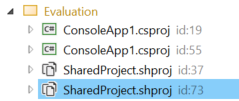
However, the evaluation of the .shproj shows us that the targets for it are not being included in the build:

This is what I expected to see. As a result, when we look at the Csc task that compiles the .csproj, we don't see any of the files from the shared project:

This made me think that we needed some kind of reference between the two. I did some digging, and a ProjectReference between the two doesn't work at all:
- adding a project reference directly results in build errors, because
- in .NET SDK MSBuild the shproj's targets can't be loaded
- in .NET Framework MSBuild the targets are loaded but error on a
Build
This made me look into how VS implements a 'reference', which ends up being the secret to this all:
<Import Project="..\SharedProject\SharedProject.projitems" Label="Shared" />
It's not a ProjectReference, it's just a simple Import of the shared items. When this is done, the build works as expected from both .NET SDK MSBuild and .NET Framework MSBuild, as well as Visual Studio.

Now, with all of my questions answered about how shared projects are incorporated, I think I'm perfectly fine with #22954, but we shouldn't expect any actual .shproj's to build under .NET SDK at this time, because they never were meant to build at all.
IIRC the shared project targets are not even included in Visual Studio Build Tools 2017 even though the Visual Studio 2017 IDE is able to add references to shared projects just fine. And this does not prevent the referencing projects from being built with Build Tools and using the shared source files. So there should be no problems with dotnet build either.
However, Visual Studio seems to keep track of which projects reference each shared project, and store this information into the solution file. If dotnet sln add does not know how to do that, will the missing information cause problems in the Visual Studio IDE?
@KalleOlaviNiemitalo a 'reference' to a shared project doesn't appear to be a reference like we normally think of them (i.e. PackageReference or ProjectReference). This is perhaps something that actual SDK support for shared projects might allow. Currently, in both VS and command-line builds, if you 'reference' a shared project via the following xml (demonstrated in the comment above), then VS will show the reference to the shared project, and commandline builds will work:
<Import Project="..\SharedProject\SharedProject.projitems" Label="Shared" />
This is not great UX from my perspective, because it's too non-standard. I'd prefer at some point to extend the SDK to allow
<ProjectReference Include="../SharedProject/SharedProject.shproj" />
and trust the SDK to
- not call the build target on the referenced shared project (because it's nonfunctional), and
- automatically delegate to the .projitems file as is done manually above
ProjectReference might make sense if the shared project has targets that you don't want to run simultaneously in more than one referencing project, e.g. because they would write to the same files. If the shared project only contains source files that are not modified at build time, then I think the current .projitems implementation is good enough and easy to understand.
Adding shared projects to a solution would be sufficient for now. We've tried
dotnet sln addbecause this is the only option to manipulate the solution in an "official" way. The only additional work which needs to be done is to add import conditions if the files exists because without that the cli command will fail because it can't find the referenced files in the dotnet folder. VS doesn't add those conditions since the files exist per definition.Regarding
dotnet buildwon't work: It does actually.So 2 things need to happen before you're able to use
dotnet sln addwith shared projects:
- Add import conditions if the file exists for the props and targets files
- Add
<ProjectTypeGuids>0004291E-2A0B-460D-934E-DC6B0785DB48</ProjectTypeGuids>to the shproj file- Until Skip adding build configurations for shared projects #22954 get's approved remove the build configuration from the solution (post
dotnet sln add)What's interesting is that the ProjectTypeGuid can be ANY value. I tried adding "abc" and it still works (
dotnet sln addand VS properly displays the shared projects). Also building the solution usingdotnet buildand in VS works succesfully.I don't know how it works but
dotnet buildexecutes msbuild internally somehow when it's a non .net core project and msbuild honors the file extension rather then the project type guid.
Are you able to get dotnet build working by creating a sln containing shproj using the 3 steps you mentioned?
I tried to dotnet build directly on a shproj and it wouldn't pass with exists() on 3 props and 1 target, wondering if there's a way to make it work directly without help of sln file.
