

 dotnet
ToolbarItems do not work correctly on Windows
Description
ToolbarItems are completely wrong on windows.
Consider this example with two primary and two secondary toolbar items:
    <ContentPage.ToolbarItems>
        <ToolbarItem Text="AAA" Order="Primary" />
        <ToolbarItem Text="BBB" Order="Primary" />
        <ToolbarItem Text="CCC" Order="Secondary" />
        <ToolbarItem Text="DDD" Order="Secondary" />
    </ContentPage.ToolbarItems>
The primary items are not displayed. Empty buttons without text are displayed instead (see screenshots). Moreover, there is a three dots button that is always displayed (even if there are no secondary items). After clicking on the three dots button, the texts for the primary items suddenly appear. This weird behavior makes primary toolbar items unusable on Windows.
Moreover, secondary items are also displayed incorrectly. When you click on the tree dots icon, a menu is opened but there are no texts inside! The text becomes only temporarily visible when you move mouse over it. The texts for other secondary items are still hidden. This makes also secondary toolbar items unusable on Windows.
The same project is displayed correctly on Android. This is a Windows-only issue.
Screenshots
Image 1: Primary items are not shown on Windows. Only empty buttons and a three dots button are displayed instead.
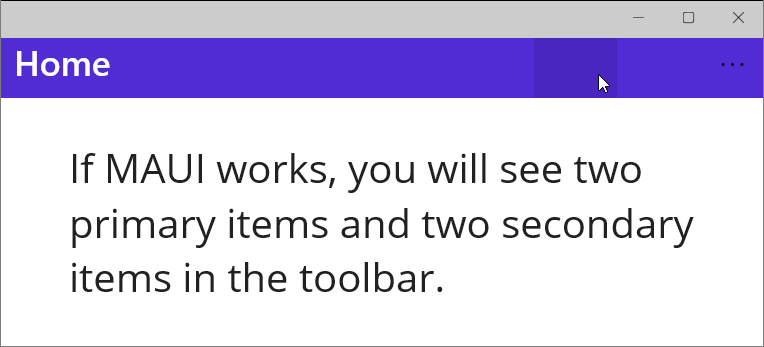
Image 2: Secondary buttons are not displayed correctly on Windows. The texts are invisible. It becomes visible only if you move the mouse over it.

Image 3: The primary toolbar items are displayed correctly on Android (with a slight exception that the three dots icon has a wrong color). A similar behavior is expected for Windows.
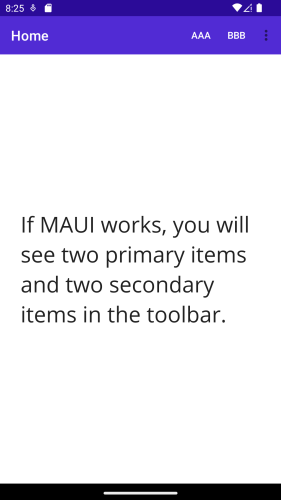
Image 3: The secondary toolbar items are displayed correctly on Android. The same behavior is expected for Windows.

Steps to Reproduce
- Create a new empty MAUI app and add a toolbar items to any page (or download the repro project https://github.com/holecekp/MauiBugToolbar)
- Run the project on Windows.
- You can see that the primary items not displayed correctly. Click on the three dots icon. You can see that the secondary items are also displayed incorrectly.
- Run the same project on Android. Everything is displayed correctly there.
Link to public reproduction project repository
https://github.com/holecekp/MauiBugToolbar
Version with bug
7.0 (current)
Last version that worked well
Unknown/Other
Affected platforms
Windows, I was not able test on other platforms
Affected platform versions
Windows 10
Did you find any workaround?
No workaround
Relevant log output
No response
