

 dotnet
Identity UserManager.AddToRoleAsync is querying the role with normalized name instead of the name column
Is there an existing issue for this?
- [X] I have searched the existing issues
Describe the bug
I created a role using the _roleManager.CreateAsync(adminRole), and I'm able read the role via await _roleManager.FindByNameAsync(RoleConstants.Admin), but getting exception that role does not exist when adding a user to the role by calling the await _userManager.AddToRoleAsync(adminUser, RoleConstants.Admin);
Checked the query for getting the role I realized that the method is querying against the normalized name. See query below:
 SELECT "r"."Id", "r"."ConcurrencyStamp", "r"."CreatedBy", "r"."CreatedOn", "r"."Description", "r"."LastModifiedBy", "r"."LastModifiedDate", "r"."Name", "r"."NormalizedName", "r"."TenantId"
      FROM "Role" AS "r"
      WHERE (("r"."TenantId" IS NULL) OR ("r"."TenantId" = @__ef_filter__TenantId_0)) AND ("r"."NormalizedName" = @__normalizedRoleName_0)
      LIMIT 2
Expected Behavior
The AddToRoleAsync method should query as the role manager find by name method, so that user can be added to a role without having to pass the normalized value.
Steps To Reproduce
var admin = await _userManager.FindByEmailAsync("[email protected]");
            if (admin==null)
            {
                admin = new SkoolzUser
                {
                    Active=true,
                    Email = "[email protected]",
                    EmailConfirmed=true,
                    UserName = "sysuser",
                };
                await _userManager.CreateAsync(admin, "password");
            }

            if (!await _userManager.IsInRoleAsync(admin, RoleConstants.Admin)) //Error here and below if this condition is not checked.
                await _userManager.AddToRoleAsync(admin, RoleConstants.Admin);
Exceptions (if any)
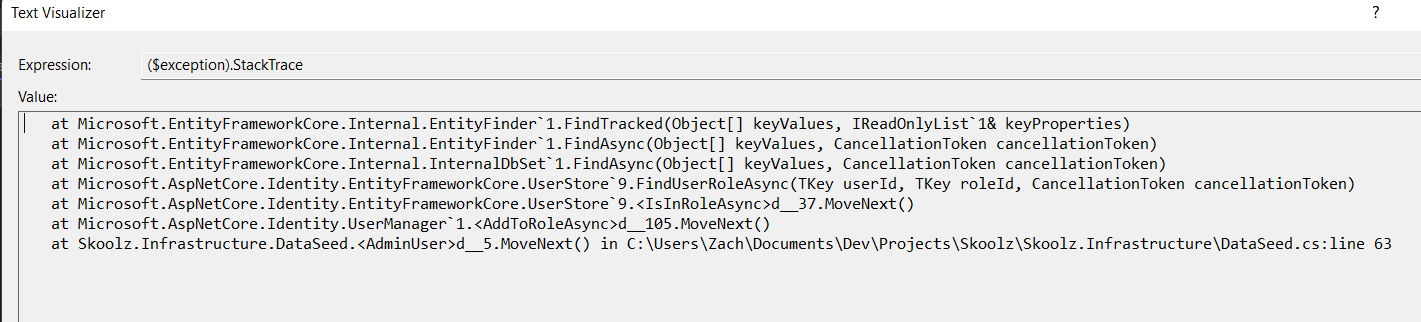
System.NullReferenceException: Object reference not set to an instance of an object.
at Microsoft.EntityFrameworkCore.Internal.EntityFinder1.FindTracked(Object[] keyValues, IReadOnlyList1& keyProperties)
at Microsoft.EntityFrameworkCore.Internal.EntityFinder1.FindAsync(Object[] keyValues, CancellationToken cancellationToken) at Microsoft.EntityFrameworkCore.Internal.InternalDbSet1.FindAsync(Object[] keyValues, CancellationToken cancellationToken)
at Microsoft.AspNetCore.Identity.EntityFrameworkCore.UserStore9.FindUserRoleAsync(TKey userId, TKey roleId, CancellationToken cancellationToken) at Microsoft.AspNetCore.Identity.EntityFrameworkCore.UserStore9.IsInRoleAsync(TUser user, String normalizedRoleName, CancellationToken cancellationToken)
at Microsoft.AspNetCore.Identity.UserManager`1.IsInRoleAsync(TUser user, String role)
at Skoolz.Infrastructure.DataSeed.AdminUser() in C:\Users\Zach\Documents\Dev\Projects\Skoolz\Skoolz.Infrastructure\DataSeed.cs:line 66
at Skoolz.Infrastructure.DataSeed.Initialize() in C:\Users\Zach\Documents\Dev\Projects\Skoolz\Skoolz.Infrastructure\DataSeed.cs:line 37
.NET Version
6.0.400
Anything else?
No response

So usually roleManager.Create will do the normalization of the role name for you, the question is why its not able to find the role with the normalized role name in your db?

Hi @sodiqyekeen. We have added the "Needs: Author Feedback" label to this issue, which indicates that we have an open question for you before we can take further action. This issue will be closed automatically in 7 days if we do not hear back from you by then - please feel free to re-open it if you come back to this issue after that time.

@HaoK
So usually roleManager.Create will do the normalization of the role name for you, the question is why its not able to find the role with the normalized role name in your db?
I am able to get the role through the role manager find by name method but every access via the user manager is failing with this exception

This issue has been automatically marked as stale because it has been marked as requiring author feedback but has not had any activity for 4 days. It will be closed if no further activity occurs within 3 days of this comment. If it is closed, feel free to comment when you are able to provide the additional information and we will re-investigate.
See our Issue Management Policies for more information.
This issue has been automatically marked as stale because it has been marked as requiring author feedback but has not had any activity for 4 days. It will be closed if no further activity occurs within 3 days of this comment. If it is closed, feel free to comment when you are able to provide the additional information and we will re-investigate.
See our Issue Management Policies for more information.