
Microsoft.Maui.Graphics

Microsoft.Maui.Graphics copied to clipboard
 dotnet
[Bug] Windows, WinForms: RestoreState does not work as expected
Description
I created custom IDrawable class in order to draw on Canvas. I attached it to GraphicsView in both Maui App and WinForms App.
Under Maui it works correctly, but under WinForms the drawing seems to be incorrect.
Steps to Reproduce
- Start VS2022 preview
- Create the WinForms App under dotnet6
- Add reference to Microsoft.Maui.Graphics.GDI.Winforms project. This project is still not published as NuGet so you have to clone it directly from GitHub and add reference manually.
- Add reference to Microsoft.Maui.Graphics NuGet (Version="6.0.101-preview.11.758) or alternatively clone the project from GitHub.
- Create
Drawableclass as specified below and attach it toGraphicsView.
public class Drawable : IDrawable
{
    public void Draw(ICanvas canvas, RectangleF dirtyRect)
    {
        RectangleF r = new RectangleF(0, 0, 100, 20);
        for (int i = 0; i < 4; i++)
        {
            canvas.SaveState();
            canvas.Translate(25, 25);
            canvas.RestoreState();

            canvas.DrawRectangle(r);
        }
    }
}
Expected Behavior
- Because
Translate()is betweenSaveState()andRestoreState(), it should have no influence on drawn rectangles. - All rectangles shall be drawn in the same place.
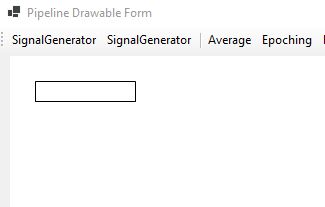
Actual Behavior
-
RestoreState()seems to do nothing - Consecutive translations are not reset and they accumulate -> Rectangles are drawn translated one after another
- if you comment
RestoreState()->//RestoreState()the drawing is not affected by the change asReset()would do nothing
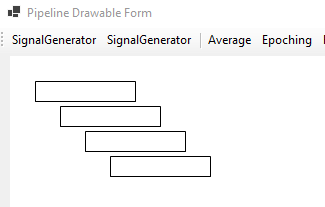
Additional Info
I use exactly the same Drawable class in Maui under Windows and it works correctly. Maybe the fact that Maui is using Microsoft.Graphics.Win2D under the hood and WinForms uses System.Drawing.Graphics makes a difference?
