

 doorstop-dev
Child links don't show when published if items are in the same document
Hi and thanks for the great tool!
We're trialling using doorstop and came across this strange behaviour when linking items within a single document.
It appears that linking between items in a single document works, but only the parent link is shown when publishing a report on the requirements.
For example, using the following commands:
doorstop create SRD ./reqs
doorstop add SRD
doorstop add SRD
doorstop link srd001 srd002
doorstop publish srd
Produces the following output:
1.0     SRD001

        Parent links: SRD002

1.1     SRD002
Note that SRD002 does not have a 'Child links' list.
Looking through the source code, this appears to be because of a check in item.py:
https://github.com/doorstop-dev/doorstop/blob/5a074ad3918216e8cd956464119092b330612f87/doorstop/core/item.py#L730
Which, if I understand it correctly, means that only child links will be found if the child is in a child document to the parent's item.
If I manually remove this check then everything works as I'd expect it to but it does beg a few questions:
- Why is that check there? Is it not valid to have links between requirements within the same document?
- If it is not valid to have links between requirements within the same document, should the tool not allow this to happen in the first place?
As it stands, this is quite confusing to me, so I'd appreciate any feedback. Happy to contribute some code to use my expected behaviour either as default, or through a configurable setting.

If it is not valid to have links between requirements within the same document, should the tool not allow this to happen in the first place?
I'm leaning toward a "yes" on this, but I'll let others weigh in.

I'd lean towards allowing this. Imagine a single requirements document which breaks down higher level objectives.
1.0 SRD001
  Do X, Y and Z?

1.1 SRD002
  Do X

1.2 SRD003
 Do Y

1.3 SRD 004
 Do Z
Maybe X, Y, and Z have a single test but the implementation needs three different implementation tasks. Or maybe X, Y, and Z are competing constraints and need to be tested together.

I would not put too much policy into the tool and allow document internal links.

Feel free to submit a patch with that check removed to see if it has any unintended consequences.
Feel free to submit a patch with that check removed to see if it has any unintended consequences.
Thanks, started working through a patch and realised (through running the tests) that making this change will break the concept of how traceability currently works.
The current 'row based' traceability works if links between requirements within the same document are not permitted, but maybe is not so suitable if this constraint is lifted.
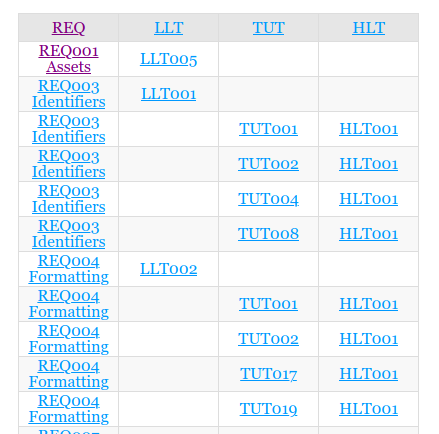
What would others think of changing this to be more of a tree-like structure? Happy to try to knock something together though I fear that executing the visualisation of the tree might be the trickiest part. :)
@samvrlewis @jacebrowning could it not just be a bigger matrix where REQ*, LLT*, TUT*, HLT* (concatenated) make up both rows and columns? Then an "x" in any particular spot would mean that there is a link between that (row, col).

IMHO (automotive):
normative requirements must form a tree.
The document tree doesn't fit the bill. Since plantuml can be used a tree should be easy to do:
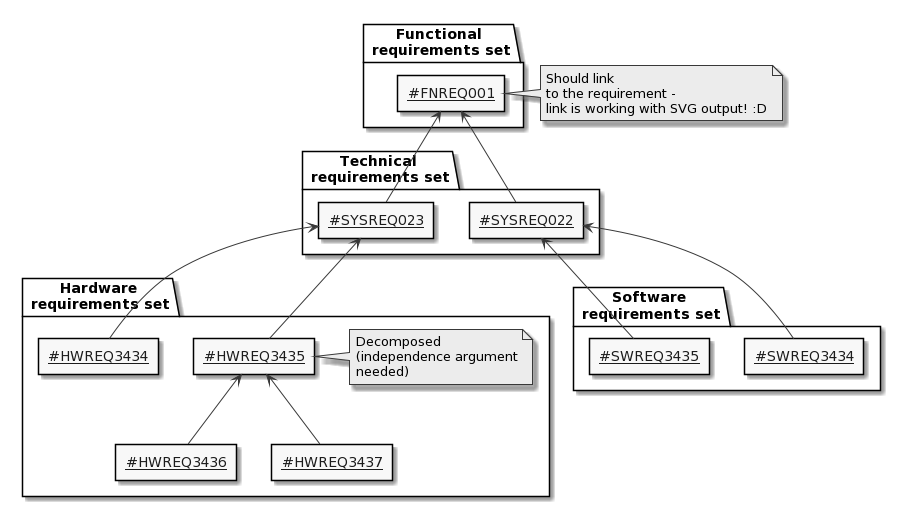 --> plantUML link
parent requirements in the same document should be allowed but a circular dependency should be forbidden. I don't get the need to have parents in a separate document.

@sevendays I agree that the structure of the requirements (left side of the V) should follow that tree requirement. However, what about if we would like to model a hierarchical element to the verification / tests on the right side of the V at the same time? E.g., the fact that a SW-VER may have both the SW-RS and SYS-VER as parents? It seems like Doorstop does not allow to establish this structure currently.
Let me make a distinction between verification and validation:
- verification specification is child of previous requirements: you need to (specify how to) verify that the new level is a correct implementation of the parent level (e.g. you're designing the right thing)
- validation specification is child of same-level requirements: you need to (specify how to) test the product to see if its requirements are satisfied (e.g. you're building things in the right way)
That said, my structure would look like this (HW left out for clarity):