

 docsifyjs
Upon invoking Quick Start local C++ Workflow, Ensures That Lists are Structured Correctly.
Environment Details:
OS version: Version 22H2 (OS Build 22610.1) Microsoft Edge version: Version 101.0.1210.47 (Official build) (64 bit)
Repro steps:
- Open URL: https://zorana-jankovic.github.io/example/#/
- Navigate to the "first level child" control under first level and activate it.
- Now use f12 to inspect and observe the issue.
Actual Result:
lists are structured incorrectly.
Expected Result:
Ensures that lists are structured correctly
Screenshot Attachment:




Hi @msftedad
Please let us know your plans on fixing this bug so that our team will regress and close it which makes the product compliant.

Hi @trusktr & @sy-records ,
Here the issue is - the list items which are from docsify component are having direct child items to the list, which are not allowed to be inside the "li" elements

Bug that is reported is accessibility bug. The way that nesting the list in sidebar now works is:
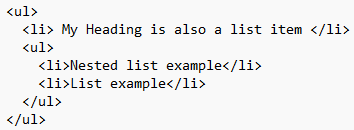
The problem is that the direct child of <ul> element shouldn't be another <ul> element (which is rule defined for making a list with a good structure, with a purpose to help users with disabilities), as then when an assistive technology encounters a list that is structured like that it might respond in an unexpected way.
The problem could be solved by enclosing this nested <ul> with <li> element:
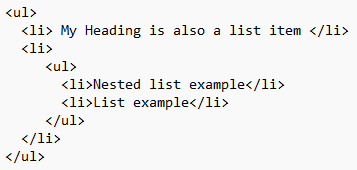
Accessibility Insights for Web can be used to test accessibility.
