

 docsifyjs
Served file not exactly the same when downloaded certain files running local server
Bug Report
Steps to reproduce
This is my case:
- Create an encrypted file. I use EncryptPad for this with the first Lorem Ipsum paragraph in it.
- Add it to your docsify project (I add it in /static/files/lorem-ipsum.epd)
- Add a link to that file in a markdown file (I do this with
[test](/static/files/lorem-ipsum.epd ':ignore') - Run the local server with
docsify serve .
What is current behaviour
The original file in /static/files/lorem-ipsum.epd and the downloaded file (when clicked in the link) are not the same. In my case the original has 340 bytes and the downloaded one has 628 bytes.
The big problem is that now I can't decrypt the file anymore.
What is the expected behaviour
The expected behaviour is that both files (original one and downloaded one) should be exactly the same.
In order to test if this was a bug or not I tried a few things:
- Serve with
python -m http.serverinstead ofdocsify serve .: it loaded the docs correctly, and the downloaded file was exactly the same as the original. - Manually creating a html file with the code generated by docsify
<a href="/static/files/lorem-ipsum.epd" target="_blank" rel="noopener">test</a>and opening it directly with the browser: it downloads the file properly. - Running with server for SSR
docsify start .: it downloads the file properly.
So based on this, I think that the expected behaviour should be to download the file properly when running a local server. Maybe someone can tell me why this happens and that it's not a bug. I will appreciate any response.
Other relevant information
-
[x] Bug does still occur when all/other plugins are disabled?
-
Your OS: WSL2 (Ubuntu)
-
Node.js version: 17.2.0
-
npm/yarn version: npm 8.1.4
-
Browser version: Firefox 95.0.1; Chrome 96.0.4664.110.
-
Docsify version: 4.4.3
-
Docsify plugins: None.
Please create a reproducible sandbox

Mention the docsify version in which this bug was not present (if any)
None

I attach the test encrypted file if you want to test it without having to create one encrypted file. Just in case you want to do further test with that file, the password is lorem ipsum.
lorem-ipsum.zip
That doesn't seem like a Docsify issue. I don't think Docsify would modify any file from the server, it only renders markdown files to HTML.
Maybe it has to do with the server settings in your server? What server are you using?
(I will try your demo a little later)

I'm not using any server, while I am writing documentation I only run docsify serve .. I don't think it's a major issue since it works as expected with docsify start ., but I just wanted to warn of this possible bug.
Maybe it's not a bug of docsify, and it is a bug of node server. Unfortunately I don't have enough technical knowledge about node to know.
I'm not sure what the difference between server.js and start.js in the cli is that causes this, but the SSR part of start.js isn't even running.
I'm pretty sure the problem I am experiencing is the same/related.
When I try to serve up any kind of archive file (tar, zip, 7zip etc), if I click the link to download through the browser, then I get an error message like below when I try to open the downloaded file:
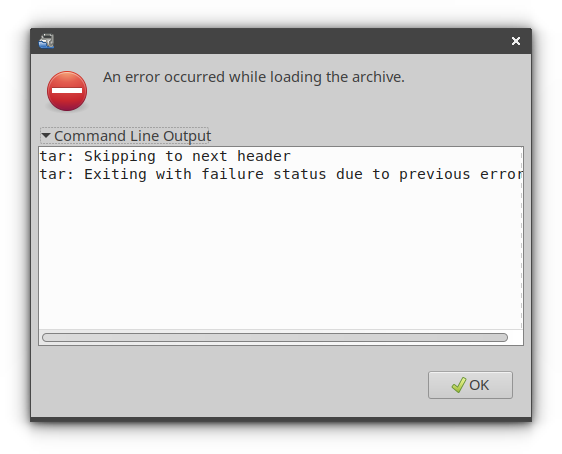
However, if I right click the link within docsify, and then pass it to wget, then the file downloads correctly and I can open it.
An example link would be:
* [Demo code](/assets/demoCode.tar ':ignore')
Is this a mimetype issue or something?
