

 docker
Docker Desktop cannot start on mac M1 chip
- [Yes ] I have tried with the latest version of Docker Desktop
- [ No] I have tried disabling enabled experimental features
- [ Yes] I have uploaded Diagnostics
- Diagnostics ID: 5ACAD9DC-D2E4-4C66-B300-F06D6D30257E/20220121023559
Expected behavior
The docker desktop should start correctly.
Actual behavior
When I install the docker at first, it runs smoothly. And later, I change the CPU resource from 6 core to 10 core, the docker desktop cannot run and it show the message The docker desktop is stopped.
I tried to re-install it and it doesn't work for me. The troubleshoot function is still not working and any operation has no effect.
The docker desktop is repeated from starting to stopped
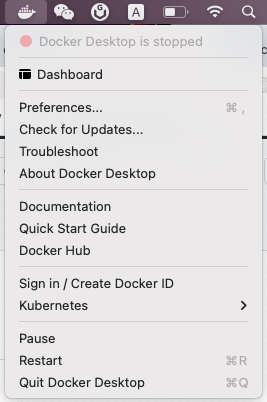
Information
- macOS Version: 12.0.1
- Intel chip or Apple chip: Apple M1 Pro
- Docker Desktop Version: 4.4.2
Output of /Applications/Docker.app/Contents/MacOS/com.docker.diagnose check
Steps to reproduce the behavior
- Install Docker desktop.
- Change the resource CPU from 6 core to 10 core.

Can confirm, this exact thing happened to me. Even uninstalling and purging all configs doesn't seem to help.

As a workaround, I figured out that the configs are stored here:
~/Library/Group Containers/group.com.docker/settings.json
Switching back to 6 CPUS via key:
{
...
  "cpus": 6,
...
}
resolved the issue for me temporarily
Thanks a lot to @b-studios for the workaround, as I had to re-install and wipe Docker Engine twice (btw, simple re-install does not work, you gotta follow advices here + manual sudo su -> cd / && find . -name '*docker*' -or -name '*Docker*' 2>&1 >out and inspecting the files, drove me crazy) before I found this issue
I'n my vain attempts to improve I/O performance for my local environment, I played around with different configurations, and can confirm that changing CPU from 6 to 10 completely breaks Docker for Mac.
It is broken both in 4.3.2 (that my colleague has and experiences less problems) and the latest version as well.
I have MBP 2021 M1 Pro if it matters.

As a workaround, I figured out that the configs are stored here:
~/Library/Group Containers/group.com.docker/settings.jsonSwitching back to 6 CPUS via key:
{
...
  "cpus": 6,
...
}
resolved the issue for me temporarily
Thanks, this fixed my issue, I switched to 10 cpu two days ago and been trying to fix it since, could not find the settings and re-installing wouldn't fix

By the way, switching to 6 (from the default 4) cores has dramatically worsened my performance. I believe it is related to the issue outlined here: https://github.com/docker/roadmap/issues/142#issuecomment-772732443. I switched back to 1 CPU and my local setup (quite a hefty one) finally worked on par (and in some aspects better) than MBP 2019 with i5 :D
Thanks! Got the same trouble yesterday, didn't know it was related to the new resources config I set. Worked for me:
- uninstall with AppCleaner
- reboot
- re-install
- change
settings.jsonto"cpus":8
Hope this will be fixed soon!

Had this same issue, I set my cpus to 9, out of 10. Changing it to 6 fixed the loop. Why would this be happening though, very confused.

I have the same issue, changing CPU's started a reboot loop for Docker Desktop

I'm having the same issue where the docker engine oscillates between "starting" and "stopped". I am however on an Intel Mac. Changing CPU from 10 to 6 didn't help. The crash loop seems to be triggered by me updating Docker Desktop to 4.4.2 (73305).
Update: Rebooting my Mac fixed the issue.


I have tried all of the suggestions on here, as well as other threads and still cannot get docker desktop to start up, forever stuck on docker engine is starting. Am on an M1 macbook. Have abandoned Docker Desktop as it just doesn't work, I've spent over 3 full work days trying to make it work and in the end installed colima as a workaround...

Can not start Docker on MacBook Pro 16 with M1 Max chip. "Whale menu" does not appear on top, but some process is running as I see through Activity Monitor. Changing settings in settings.json does not help. This happens right after installation. UI does not appear at all.

This happened to me when I tried to disable gRPc FUSE (related #5240) and after trying every single tip on every issue relating to starting failures, the solution was to obliterate everything, restart, and cross my fingers.
rm -rf ~/Library/Caches/com.docker.docker
rm -rf ~/.docker
rm -rf ~/Library/Group Containers/group.com.docker

This happened to me when I tried to disable gRPc FUSE (related #5240) and after trying every single tip on every issue relating to starting failures, the solution was to obliterate everything, restart, and cross my fingers.
rm -rf ~/Library/Caches/com.docker.docker
rm -rf ~/.docker
rm -rf ~/Library/Group Containers/group.com.docker

open --background -a Docker
I played with the resource allocation menu yesterday and now I can't get docker to get passed 'Docker Desktop is Starting'..... deleting all the old configs and installing from scratch isnt helping i straight up cant do my job now. thanks docker

This happened to me when I tried to disable gRPc FUSE (related #5240) and after trying every single tip on every issue relating to starting failures, the solution was to obliterate everything, restart, and cross my fingers.
rm -rf ~/Library/Caches/com.docker.docker
rm -rf ~/.docker
rm -rf ~/Library/Group Containers/group.com.docker

open --background -a Docker
I just ran into this today as well and these instructions are what finally worked for me. Thanks @philsturgeon 👍

same issue! Had to go back to docker 4.5.0, check (enable) gRPc FUSE and install 4.6.1

This happened to me when I tried to disable gRPc FUSE (related #5240) and after trying every single tip on every issue relating to starting failures, the solution was to obliterate everything, restart, and cross my fingers.
rm -rf ~/Library/Caches/com.docker.docker
rm -rf ~/.docker
rm -rf ~/Library/Group Containers/group.com.docker

open --background -a Docker
I just ran into this today as well and these instructions are what finally worked for me. Thanks @philsturgeon 👍
This saved my day!

same issue in fresh install for mac mini M1, downgrade to Docker 4.5.0 from 4.7 fixed the problem.


FYI after a long session, the appcleaner way worked for me as well. Probably some leftover, undeletable config got in the way.

This happened to me when I tried to disable gRPc FUSE (related #5240) and after trying every single tip on every issue relating to starting failures, the solution was to obliterate everything, restart, and cross my fingers.
rm -rf ~/Library/Caches/com.docker.docker
rm -rf ~/.docker
rm -rf ~/Library/Group Containers/group.com.docker

open --background -a Docker
Running the above, and restarting the PC, works fine.

Same situation to
Can not start Docker on MacBook Pro 16 with M1 Max chip. "Whale menu" does not appear on top, but some process is running as I see through Activity Monitor. Changing settings in settings.json does not help. This happens right after installation. UI does not appear at all.
With a small difference, UI is loaded but constatly stopping or starting.
Also noticed that cpus set to 5 in ~/Library/Group\ Containers/group.com.docker/settings.json
{
...
  "cpus": 5,
...
}
Downgrading to 4.5.0 fixed the issue.
Has no effect neither. Same effect when cleaning cache...
Turns out in my case the culprit was turned on VPN in network settings on mac settings, disabling it solve the endless starting issue.

I fixed, my step: 1. uninstall Docker 2. rm -rf Library/Group\ Containers/group.com.docker rm -rf Library/Containers/com.docker.docker rm -rf Library/Application\ Support/Docker\ Desktop 3. brew install --cask docker

Having same issue. all steps above (and previous issue tracker where completely uninstall docker and reinstall) did not work. fortunately diagnos button works "0DE2584C-17A4-4359-9A11-365C5C43E538/20220915081442" It worth mentioning that even in troubleshoot mode, I cannot click reset to factory or uninstall button. they all do no reaction.

Hey guys, I tried all the fixes above and it still didn't work for me. The docker desktop app was starting on what seemed to be an infinite loop.
What did work was the following:
I ran /Applications/Docker.app/Contents/MacOS/Docker from terminal while having docker desktop open, this made the engine start and docker dektop run normally.
Intuitively something was wrong with communication between terminal and docker, permissions? Could be, although upon installation an advanced authorisation was required but for the helper.
I then disabled integrated terminal and a Mac Authorisation request to docker access terminal popped up.
After authorising, closed down docker and restarted it, and everything worked fine without need to run the '/Applications/Docker.app/Contents/MacOS/Docker' command in terminal. Switched back integrated terminal on, closed and reopened and all still working fine.
Sum up:
- ran '/Applications/Docker.app/Contents/MacOS/Docker' from terminal while docker desktop open.
- Switched integrated terminal off
- Authorised docker to terminal
- Restarted Docker
- Everything working well
Re switching integrated terminal purely optional from my POV.
Hope this helps anyone!! Cheers!

Hi @JPBedran I got same problem on mac pro M1
ran '/Applications/Docker.app/Contents/MacOS/Docker' from terminal while docker desktop open.
Switched integrated terminal off // <=== mean close terminal ?
Authorised docker to terminal // <== How to authorised docker from terminal ?
Thanks!

~/Library/Group Containers/group.com.docker/settings.json
"cpus": 8,
Thanks, I fixed

Hi @JPBedran I got same problem on mac pro M1
ran '/Applications/Docker.app/Contents/MacOS/Docker' from terminal while docker desktop open.
Switched integrated terminal off // <=== mean close terminal ?
Authorised docker to terminal // <== How to authorised docker from terminal ?
Thanks!
Hey @natuan62
Hope you got it by now, but just saw this. If you didn't, I switched the integrated terminal off in the docker settings and then switched it back on, in those steps the Mac auth to terminal should pop up. Let me know!
Cheers!
I experienced an issue similar to this, except Docker Desktop indicated that the engine was running. Turns out, the socket for the docker container was stored in the ~/.docker/run/docker.sock, so I had to symLink it to /var/run/docker.sock to get things working again.
FWIW here are the things I tried before doing ☝🏽
- Restarting Docker desktop (doesn't work)
- Resetting docker to factory settings (doesn't work)
- Clean/Purged data (didn't work)
- Many of the solutions from above
- Restart the computer
- Pray
- Contemplate career choices
Honestly, this issue has taken at least a year off my life expectancy, please fix this.
