

 docker
Improve Dev Environment wizard build log UI
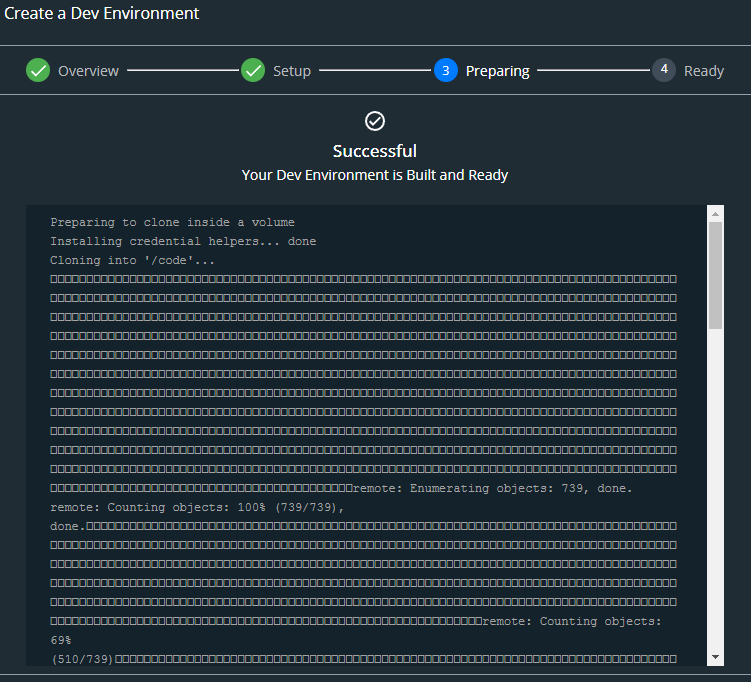
Tell us about your request When building a new dev environment, the build log for the container(s) is streamed into the wizard UI. As it stands currently (on Windows 10 at least), a large amount of it comprises of undisplayable characters (presumably from progress bars etc), and it also does not scroll as new information is added like a terminal would - so it's easy to miss silent errors that occur in the build.
Would it be possible to either render correctly or filter out the undisplayable characters, and also have the log run in 'tail mode' (this could be an option)?
Which service(s) is this request for? Docker Desktop dev environments UI
Tell us about the problem you're trying to solve. What are you trying to do, and why is it hard? As a Docker Desktop dev environment user, I would like to clearly see and monitor the build logs for my dev environment containers, so that I can spot any errors or warnings that were not picked up by the wizard.
Are you currently working around the issue? Scrolling and ignoring box characters
Additional context
Example:

Hi @Phuurl, thank you for the feedback on Dev Envs. We'll look at this enhancement and keep you posted.

The fix to remove the box characters and have the automatic scrolling is completed. I will let you know once it has been officially released.