

 docker
Dev Environments Not detecting the tools
Describe the bug A clear and concise description of what the bug is.
To Reproduce Steps to reproduce the behavior:
- Go to '...'
- Click on '....'
- Scroll down to '....'
- See error
Expected behavior A clear and concise description of what you expected to happen.
Screenshots If applicable, add screenshots to help explain your problem.
Desktop (please complete the following information):
- OS: [e.g. iOS]
- Version [e.g. 22]
Version of Docker Desktop:
You can find the version by clicking on the About Docker Desktop menu
(paste your output here)
Additional context Add any other context about the problem here.
Dev Environments feature in docker not detecting the tools required. I have all the 3 tools (git, VS code & remote container extension for Vs code) installed to create the Dev Environments but it is still showing me an option to install.
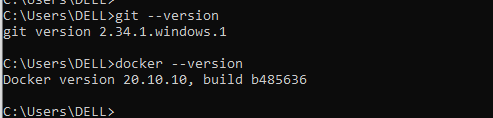


If you refer above image git is detecting in cmd also but not in docker.

Hey @msoni1369, can you provide the version of Docker Desktop you are running? (You can find the version by clicking on the About Docker Desktop menu).
Could you also give us a diagnostics ID? here are the instructions on how to do this: https://docs.docker.com/desktop/windows/troubleshoot/#diagnose-and-feedback

Hello Felipe,
I have also attached the picture stating the version of docker in the issue. Please find it below.
[image: image.png]
On Tue, Nov 30, 2021 at 1:31 PM Felipe Cruz Martinez < @.***> wrote:
Hey @msoni1369 https://github.com/msoni1369, can you provide the version of Docker Desktop you are running? (You can find the version by clicking on the About Docker Desktop menu).
— You are receiving this because you were mentioned. Reply to this email directly, view it on GitHub https://github.com/docker/dev-environments/issues/76#issuecomment-982376058, or unsubscribe https://github.com/notifications/unsubscribe-auth/AJZSWNSCPSNY2GC7MLEA633UOSAETANCNFSM5JA5VOSQ .
@msoni1369 That's the version of the Docker Engine, we'd need to know the version of Docker Desktop, e.g. 4.3.0 (71414)
Hello Felipe,
Got it !!
The docker desktop version is 4.2.0(70708)
On Tue, Nov 30, 2021 at 2:40 PM Felipe Cruz Martinez < @.***> wrote:
@msoni1369 https://github.com/msoni1369 That's the version of the Docker Engine, we'd need to know the version of Docker Desktop, e.g. 4.3.0 (71414)
— You are receiving this because you were mentioned. Reply to this email directly, view it on GitHub https://github.com/docker/dev-environments/issues/76#issuecomment-982430810, or unsubscribe https://github.com/notifications/unsubscribe-auth/AJZSWNSXZRHRRMHTOODKOWTUOSIINANCNFSM5JA5VOSQ .
I'm encountering the same issue. I have Git, VS Code, and VS Code Remote Containers Extension all installed. My version of Docker Desktop is 4.3.1 (72247).

Bump, I'm experiencing the same issue with Docker Desktop 4.9.1 (81317) and git version 2.36.1, when creating the dev enviroment VSCode and VSCode Remote Containers Extension is being recognized but not "Git"
I've tried these steps but didn't worked: Removing and Re-installing docker desktop Reinstalling Git using Brew
Edit: I'm using MacOS Monterey 12.4 with M1 Chip

I'm experiencing this issue as well with Docker Desktop 4.10.1 (82475) and Git version 2.37.1.windows.1 Like TheMehranKhan, VSCode and VSCode Remote Containers Extensions are both being recognized, but not git
I've tried uninstalling and re-installing Git as the documentation suggested, this did not work I verified that the path to Git was correct in both the system and my personal PATH, and moved both up in the path hierarchy
I'm using Windows 10 Home Version 21H2

I am encountering same issue as @TheMehranKhan and @krashr-ds. Git can not be detected by docker desktop.
Docker Desktop version: v4.15.0 MacOS: 11.7.1


I am having this issue with Docker Desktop 4.29.0. In the Dev Environments (Beta) I have selected "Run a single container", and chosen an Existing Git Repo (https://github.com/dockersamples/single-dev-env) and Visual Studio Code. I am on a Mac-intel (Sonoma 14.4.1) with git installed, but I cannot create the Dev Environment because it does not see that git is installed. The install button just takes me to git-scm webpage. Below is my diagnostic ID.
0EE1878E-2601-413D-84B9-26A98FCBCA03/20240410000046
