

 docker
Error invoking remote method 'dev-envs-backend' when click on "Open in VSCode"
Describe the bug
Got a red error message when I try to "open in VSCode" : Error invoking remote method 'dev-envs-backend': Error: {"Message":"Get \"http://%2F%2F.%2Fpipe%2Fdocker_engine/v1.41/containers/json?all=1&filters=%7B%22label%22%3A%7B%22com.docker.devenvironments.name%3Dsingle-dev-env-keen_lehmann%22%3Atrue%7D%7D&limit=0\": context canceled"}
To Reproduce Steps to reproduce the behavior:
- Open Docker Desktop
- Choose "Dev Environments (Preview)"
- Click "START" on single-dev-env line
- Wait for container running
- Click "OPEN IN VSCODE" button on the running container
Expected behavior
- VScode is opened with the code from the container.
Screenshots

Desktop (please complete the following information):
- Windows 10 Entreprise 21H1 (OS build 19043.1083) 64-bit
- Docker Desktop 3.5.2
Additional context Similar to https://github.com/docker/dev-environments/issues/28 but not the same error message.

Hey @slecache thanks for opening this,
We have identified the problem and are working on a fix.
Even though the error message is not the same this is a duplicate of #28, I'll keep this one open just in case.
Would you be OK if we sent you a build with a fix for this sometime next week?

@slecache if you have more feedback or would be interested in talking about what you would like to see in the product with the team drop me an email on [email protected] and we can setup a call :)

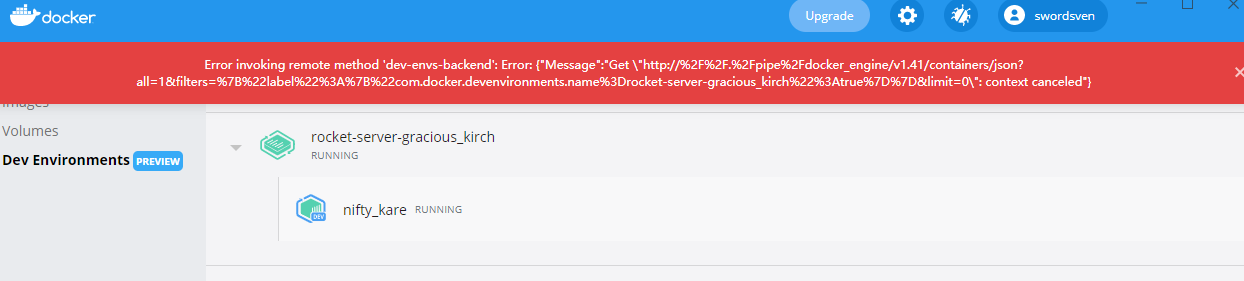 I have the similar problem with this
@slecache @SwordSven we just released a new version of Docker Desktop that should fix this issue, can you upgrade Docker Desktop (Menu Check for Updates) and check that we can close this issue?

@slecache @SwordSven
Did you had time to check if the issue is fixed or not?
By the way we just released a new version 4.2.0 of Docker Desktop with some improvements in Dev Environments
I am no longer unable to start an existing Dev Env or even delete it. "Start" does nothing. And "Delete" displays a timeout error on "tcp 192.168.99.100:2376"
I have the same error with the CLI when I am in Git Bash but not in WSL Ubuntu.
Do you have the same behavior with a fresh new Dev Env? How old are your existing Dev Env? Few minutes, hours, days, weeks?
It has existed for many weeks. I will try to reset all my Docker Desktop installation.