

 docker
Docker Desktop Fails to Start Daemon
Description
So im trying to run docker through docker desktop. When I first start docker desktop it hangs on the loading docker daemon, ive left it for an hour today over lunch and it made no progress.
Additionally, when I check the docker service, it is running!
I can run docker run hello-world from the command line, but neither the docker desktop or VSCode are happy that they are connected to the docker daemon:
I have tried a full clean reinstall of docker, but once again im looking at the same error. My Remote - Development extension is up to date and using the defaults.
As a note, I have used my "normal" setup for work without failure for weeks, yet today Docker decided enough was enough.
Reproduce
Attempting to connect to the container on VSCode or starting Docker Desktop.
Starting Docker Desktop hangs indefinitely
VSCode spits out this error :
Expected behavior
VSCode to connect to the container, Docker Desktop to actually launch properly
docker version
joshnoa@joshnoas-thinkpad:~$ docker version
request returned Internal Server Error for API route and version http://%2Fhome%2Fjoshnoa%2F.docker%2Fdesktop%2Fdocker.sock/v1.24/version, check if the server supports the requested API version
Client: Docker Engine - Community
 Cloud integration: v1.0.33
 Version:           24.0.2
 API version:       1.43
 Go version:        go1.20.4
 Git commit:        cb74dfc
 Built:             Thu May 25 21:51:00 2023
 OS/Arch:           linux/amd64
 Context:           desktop-linux
docker info
oshnoa@joshnoas-thinkpad:~$ docker info
Client: Docker Engine - Community
 Version:    24.0.2
 Context:    desktop-linux
 Debug Mode: false
 Plugins:
  buildx: Docker Buildx (Docker Inc.)
    Version:  v0.10.5
    Path:     /usr/lib/docker/cli-plugins/docker-buildx
  compose: Docker Compose (Docker Inc.)
    Version:  v2.18.1
    Path:     /usr/lib/docker/cli-plugins/docker-compose
  dev: Docker Dev Environments (Docker Inc.)
    Version:  v0.1.0
    Path:     /usr/lib/docker/cli-plugins/docker-dev
  extension: Manages Docker extensions (Docker Inc.)
    Version:  v0.2.19
    Path:     /usr/lib/docker/cli-plugins/docker-extension
  init: Creates Docker-related starter files for your project (Docker Inc.)
    Version:  v0.1.0-beta.4
    Path:     /usr/lib/docker/cli-plugins/docker-init
  sbom: View the packaged-based Software Bill Of Materials (SBOM) for an image (Anchore Inc.)
    Version:  0.6.0
    Path:     /usr/lib/docker/cli-plugins/docker-sbom
  scan: Docker Scan (Docker Inc.)
    Version:  v0.26.0
    Path:     /usr/lib/docker/cli-plugins/docker-scan
  scout: Command line tool for Docker Scout (Docker Inc.)
    Version:  v0.12.0
    Path:     /usr/lib/docker/cli-plugins/docker-scout

Server:
ERROR: request returned Internal Server Error for API route and version http://%2Fhome%2Fjoshnoa%2F.docker%2Fdesktop%2Fdocker.sock/v1.24/info, check if the server supports the requested API version
errors pretty printing info
Diagnostics ID
6e2a6abb-3398-4e5e-acea-e1c2c829c473/20230621162756
Additional Info
No response

I also see the same issue, using the same Ubuntu version. I ran
sudo apt-get install ~/Downloads/docker-desktop-4.20.1-amd64.deb
Please advise
 Version:    24.0.2
 Context:    default
 Debug Mode: false
 Plugins:
  buildx: Docker Buildx (Docker Inc.)
    Version:  v0.10.5
    Path:     /usr/lib/docker/cli-plugins/docker-buildx
  compose: Docker Compose (Docker Inc.)
    Version:  v2.18.1
    Path:     /usr/lib/docker/cli-plugins/docker-compose
  dev: Docker Dev Environments (Docker Inc.)
    Version:  v0.1.0
    Path:     /usr/lib/docker/cli-plugins/docker-dev
  extension: Manages Docker extensions (Docker Inc.)
    Version:  v0.2.19
    Path:     /usr/lib/docker/cli-plugins/docker-extension
  init: Creates Docker-related starter files for your project (Docker Inc.)
    Version:  v0.1.0-beta.4
    Path:     /usr/lib/docker/cli-plugins/docker-init
  sbom: View the packaged-based Software Bill Of Materials (SBOM) for an image (Anchore Inc.)
    Version:  0.6.0
    Path:     /usr/lib/docker/cli-plugins/docker-sbom
  scan: Docker Scan (Docker Inc.)
    Version:  v0.26.0
    Path:     /usr/lib/docker/cli-plugins/docker-scan
  scout: Command line tool for Docker Scout (Docker Inc.)
    Version:  v0.12.0
    Path:     /usr/lib/docker/cli-plugins/docker-scout

Server:
ERROR: Cannot connect to the Docker daemon at unix:///var/run/docker.sock. Is the docker daemon running?
errors pretty printing info```

Hey bud, I never got to the bottom of this and ended up reinstalling my OS in order to actually remove all of the docker artefacts.
Did you add any directories in Resources -> File Sharing? If so, does the path to the directories is of an unmounted drive? I was able to solve this error on my machine, along with the "Starting Docker Desktop" infinitely issue, after mounting the drives I specified in File Sharing Hopefully Docker Desktop will be updated in the future to include an informational message when Docker is not starting.

I'm having the same issue on Ubuntu 22.04 LTS in WSL2
Client: Docker Engine - Community Version: 24.0.6 Context: default Debug Mode: false Plugins: buildx: Docker Buildx (Docker Inc.) Version: v0.11.2-desktop.4 Path: /usr/local/lib/docker/cli-plugins/docker-buildx compose: Docker Compose (Docker Inc.) Version: v2.21.0-desktop.1 Path: /usr/local/lib/docker/cli-plugins/docker-compose dev: Docker Dev Environments (Docker Inc.) Version: v0.1.0 Path: /usr/local/lib/docker/cli-plugins/docker-dev extension: Manages Docker extensions (Docker Inc.) Version: v0.2.20 Path: /usr/local/lib/docker/cli-plugins/docker-extension init: Creates Docker-related starter files for your project (Docker Inc.) Version: v0.1.0-beta.7 Path: /usr/local/lib/docker/cli-plugins/docker-init sbom: View the packaged-based Software Bill Of Materials (SBOM) for an image (Anchore Inc.) Version: 0.6.0 Path: /usr/local/lib/docker/cli-plugins/docker-sbom scan: Docker Scan (Docker Inc.) Version: v0.26.0 Path: /usr/local/lib/docker/cli-plugins/docker-scan scout: Command line tool for Docker Scout (Docker Inc.) Version: 0.24.1 Path: /usr/local/lib/docker/cli-plugins/docker-scout
Server: ERROR: request returned Internal Server Error for API route and version http://%2Fvar%2Frun%2Fdocker.sock/v1.24/info, check if the server supports the requested API version errors pretty printing info

This is also happening to me, while using docker-compose on Windows 11, not sure what other information might be needed to help solve this issue


Hi all, thought id update you on this thread. I have no found a working solution, i found it much easier to move off docker desktop entirely and migrate to docker cli and docker registry.
In order to move off docker desktop i did have to reinstall ubuntu tho, which is ovbiously not ideal.
I was having the Internal server error for version API 1.24 mentioned in the issue description. I did docker version to find out that the API version is 1.43 so there was a mismatch which means something was not updated.
I made sure to update all the packages with sudo apt update and sudo apt upgrade and I did systemctl --user restart docker-desktop and now it works and no more errors.

Same problem on Windows 11, and seeing same API version issue like @asitanc , I am using latest docker desktop version 4.25.0
[Edit]: Resolved it by enabling beta feature - Use Containerd.


I was having the Internal server error for version API
1.24mentioned in the issue description. I diddocker versionto find out that the API version is1.43so there was a mismatch which means something was not updated.I made sure to update all the packages with `sudo apt update` and `sudo apt upgrade` and I did `systemctl --user restart docker-desktop` and now it works and no more errors.
The same here but I'm using Windows so what are the proper commands to solve this!!


I was having the Internal server error for version API
1.24mentioned in the issue description. I diddocker versionto find out that the API version is1.43so there was a mismatch which means something was not updated.sudo apt updateandsudo apt upgradeand I didsystemctl --user restart docker-desktopand now it works and no more errors.The same here but I'm using Windows so what are the proper commands to solve this!!
Did you find any solution for this commands?

I was having the Internal server error for version API
1.24mentioned in the issue description. I diddocker versionto find out that the API version is1.43so there was a mismatch which means something was not updated.I made sure to update all the packages with `sudo apt update` and `sudo apt upgrade` and I did `systemctl --user restart docker-desktop` and now it works and no more errors.

What commands did you run on Mac to update the API? I'm in the same situation.


Same issue, also API version 1.43.
$ docker version
request returned Internal Server Error for API route and version http://%2Fhome%2Fuser%2F.docker%2Fdesktop%2Fdocker.sock/v1.24/version, check if the server supports the requested API version
Client: Docker Engine - Community
 Cloud integration: v1.0.33
 Version:           24.0.7
 API version:       1.43
 Go version:        go1.20.10
 Git commit:        afdd53b
 Built:             Thu Oct 26 09:07:41 2023
 OS/Arch:           linux/amd64
 Context:           desktop-linux


Ultimately, @jhmin-kk99, it seems my issue was a mix of Gnome and disk space. Now things are working as expected again
I was having the Internal server error for version API
1.24mentioned in the issue description. I diddocker versionto find out that the API version is1.43so there was a mismatch which means something was not updated.I made sure to update all the packages with `sudo apt update` and `sudo apt upgrade` and I did `systemctl --user restart docker-desktop` and now it works and no more errors.

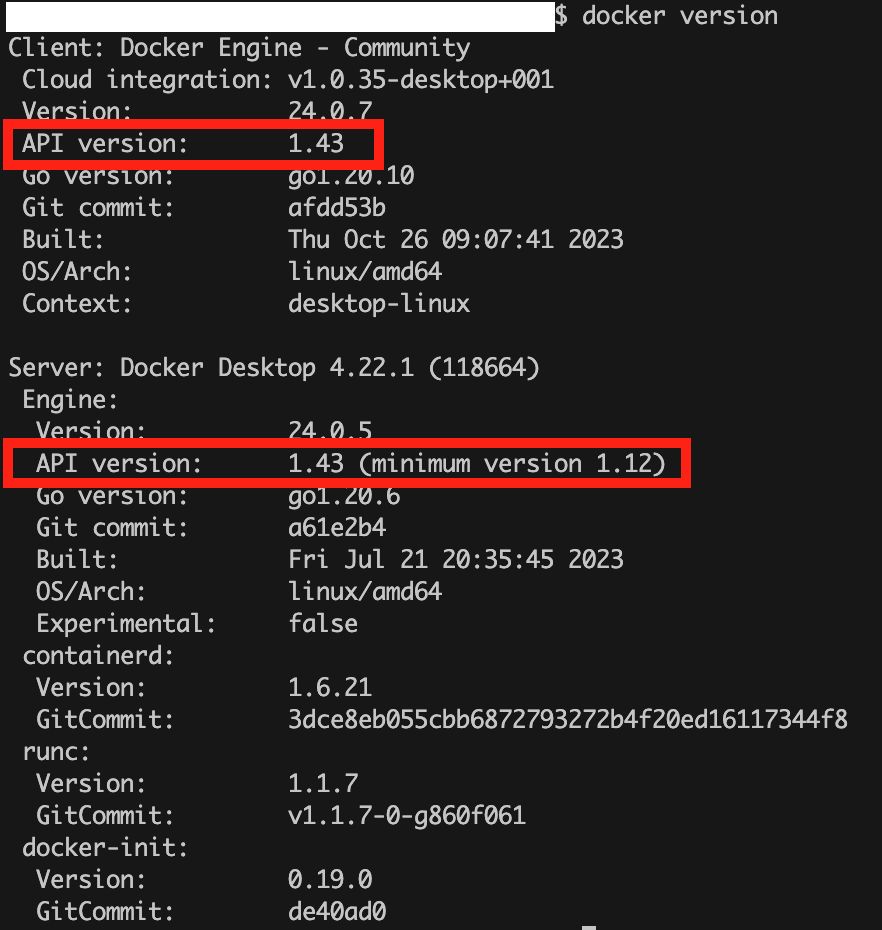
I have the same issue on Macos, and I searched Docker Desktop's Documentation, found that I can force Docker API version by defining a global variable DOCKER_API_VERSION in .zshrc file, like this:
export DOCKER_API_VERSION='1.43'
So I wrote it into zshrc and restarted terminal to run a testing command docker ps to check the result, and it appeared like this:
In the screenshot, you can see the API version mentioned in the error message and listed in the
docker version command response are the same "v1.43", but unfortunately it is still unable to work normally.


I was having the Internal server error for version API
1.24mentioned in the issue description. I diddocker versionto find out that the API version is1.43so there was a mismatch which means something was not updated.sudo apt updateandsudo apt upgradeand I didsystemctl --user restart docker-desktopand now it works and no more errors.What commands did you run on Mac to update the API? I'm in the same situation.
same issue, I installed wrong a linux-version container on my mac. When I tried to delete that container, first it proped up the same error message as you guys had, then I restarted docker desktop and managed to delete that container before it automatically restarted. Everything is normal then

I got the same error,
Error popup
and also I see on my docker desktop this screenshot.

