

 dinofizz
client identified not found
Hello, I am trying to configure everything and I am running into this error..
pi@raspberrypi:~ $ ./player -uri spotify:album:3oyu7chRauu88JYPYfFB55 2020/07/04 15:24:01 client identified by spotifyd not found
Here is my yaml contents with the username and pw scrubbed.
pi@raspberrypi:~/diskplayer $ cat diskplayer.yaml spotify: callback_url: http://localhost:8080/callback device_name: spotifyd client_id: xxxx client_secret: 0xxxx recorder: folder_path: /tmp filename: diskplayer.contents server_port: 3000 token: path: ./token.json
Any ideas?

pi@raspberrypi:~ $ cat mount.log Sun 05 Jul 2020 11:59:16 AM CDT Start. Sun 05 Jul 2020 11:59:16 AM CDT Media change detected on device /dev/sda sda 8:0 1 1.4M 0 disk Sun 05 Jul 2020 11:59:16 AM CDT Device exists on machine. Sun 05 Jul 2020 11:59:16 AM CDT Mounting device /dev/sda to /media/floppy. Started unit media-floppy.mount for mount point: /media/floppy 2020/07/05 11:59:19 client identified by diskplayer not found Stopped unit media-floppy.mount for mount point: /media/floppy Sun 05 Jul 2020 11:59:19 AM CDT End.
I too am getting this error, need to dig deeper and see if I can run it verbosely to see where its looking for the client EDIT:
Ok so maybe the Spotify wrapper isn't passing the required info which would return the empty string that throws the error. I'll start digging there.

Hi - I myself have not setup the Diskplayer in a few weeks now, but I will find some time this weekend to walk through it again and see what's missing.

Hi - I myself have not setup the Diskplayer in a few weeks now, but I will find some time this weekend to walk through it again and see what's missing.
Oh wow, cool.
I know you aren't actively supporting the project, I was just posting my own troubleshooting for others who may be looking here.
I've narrowed it down to:
playerID := diskplayerId(&ds, n)
	if playerID == "" {
		return fmt.Errorf("client identified by %s not found", n)
	}
Which points us to:
func diskplayerId(ds *[]spotify.PlayerDevice, n string) spotify.ID {
	for _, d := range *ds {
		if d.Name == n {
			return d.ID
		}
	}

	return ""
}
I don't see anything in "https://github.com/zmb3/spotify" about a "spotify.PlayerDevice" which could be an issue (Maybe they renamed that bit?) But that would easily explain why we are getting a null value returned instead of the actual ID
Edit: Found a Type in Spotify/Player.go But that's it so far, I'll dig more when I get home to see where this type is actually used.
Which Points us to something outside the project, I Forked so I could set up a dev environment and try and poke at this, but man would it help to have insight from the OD.
Hi @afritsch89 @chrfrancis , I've run through the setup on my Pi again and it is working, but I did notice that the README is missing the steps involved relating to Spotifyd.
Can you try the following:
- Install the spotifyd binary for you platform of choice: https://github.com/Spotifyd/spotifyd/releases
- Create a config file at
/etc/spotifyd.confand include the following:
[global]
username = YOUR_SPOTIFY_USERNAME_OR_EMAIL_ADDRESS
password = YOUR_SPOTIFY_PASSWORD
device_name = YOUR_SPOTIFY_DEVICE_NAME
I'm not entirely sure what one would place there if you authenticate via Facebook or some other identity provider. I vaguely recall being able to setup a password from the Spotify account page: https://www.spotify.com/account/
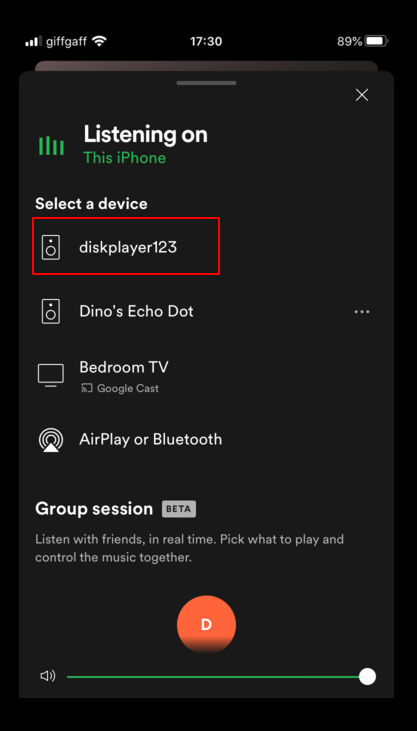
The device name above should match what you have set in the diskplayer.yaml file. I have device_name: diskplayer123
Then run spotifyd and make sure that it can connect to Spotify. I recommend running Spotifyd as a service (https://github.com/Spotifyd/spotifyd#running-as-a-system-service)
I see the following logs when I run sudo systemctl status spotifyd.service which tell me that I am connected to Spotify:
spotifyd.service - A spotify playing daemon
   Loaded: loaded (/etc/systemd/system/spotifyd.service; disabled; vendor preset: enabled)
   Active: active (running) since Mon 2020-08-03 17:15:04 BST; 13min ago
     Docs: https://github.com/Spotifyd/spotifyd
 Main PID: 1755 (spotifyd)
    Tasks: 3 (limit: 2200)
   Memory: 11.2M
   CGroup: /system.slice/spotifyd.service
           └─1755 /usr/bin/spotifyd --no-daemon

Aug 03 17:15:04 diskplayer spotifyd[1755]: 16:15:04 [INFO] Loading config from "/etc/spotifyd.conf"
Aug 03 17:15:04 diskplayer spotifyd[1755]: 16:15:04 [INFO] Using software volume controller.
Aug 03 17:15:04 diskplayer spotifyd[1755]: 16:15:04 [INFO] Connecting to AP "gew1-accesspoint-b-kwbv.ap.spotify.com:443"
Aug 03 17:15:05 diskplayer spotifyd[1755]: 16:15:05 [INFO] Authenticated as "2387645dfsdfshdjga239487" !
Aug 03 17:15:05 diskplayer spotifyd[1755]: 16:15:05 [INFO] Using alsa sink
Aug 03 17:15:05 diskplayer spotifyd[1755]: 16:15:05 [INFO] Country: "US"
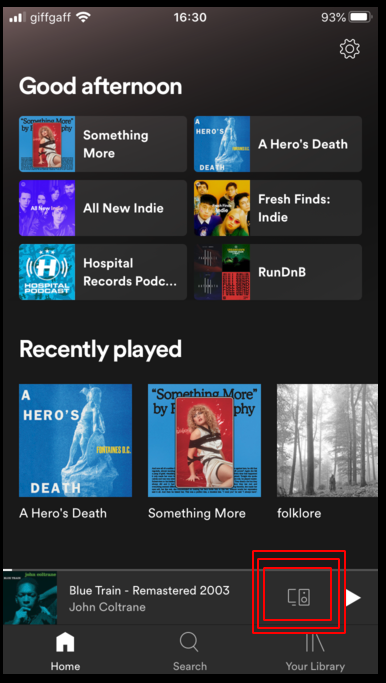
You should also be able to see the device show up in the Spotify desktop or mobile app as a playable device:
If you have everything running like this you should be able to issue play commands successfully:
./player -uri spotify:album:3oyu7chRauu88JYPYfFB55
Let me know if this helps at all?
Hi @afritsch89 @chrfrancis , I've run through the setup on my Pi again and it is working, but I did notice that the README is missing the steps involved relating to Spotifyd.
Can you try the following:
* Install the spotifyd binary for you platform of choice: https://github.com/Spotifyd/spotifyd/releases

* Create a config file at `/etc/spotifyd.conf` and include the following:
[global] username = YOUR_SPOTIFY_USERNAME_OR_EMAIL_ADDRESS password = YOUR_SPOTIFY_PASSWORD device_name = YOUR_SPOTIFY_DEVICE_NAMEI'm not entirely sure what one would place there if you authenticate via Facebook or some other identity provider. I vaguely recall being able to setup a password from the Spotify account page: https://www.spotify.com/account/
The device name above should match what you have set in the
diskplayer.yamlfile. I havedevice_name: diskplayer123Then run spotifyd and make sure that it can connect to Spotify. I recommend running Spotifyd as a service (https://github.com/Spotifyd/spotifyd#running-as-a-system-service)
I see the following logs when I run
sudo systemctl status spotifyd.servicewhich tell me that I am connected to Spotify:spotifyd.service - A spotify playing daemon Loaded: loaded (/etc/systemd/system/spotifyd.service; disabled; vendor preset: enabled) Active: active (running) since Mon 2020-08-03 17:15:04 BST; 13min ago Docs: https://github.com/Spotifyd/spotifyd Main PID: 1755 (spotifyd) Tasks: 3 (limit: 2200) Memory: 11.2M CGroup: /system.slice/spotifyd.service └─1755 /usr/bin/spotifyd --no-daemon Aug 03 17:15:04 diskplayer spotifyd[1755]: 16:15:04 [INFO] Loading config from "/etc/spotifyd.conf" Aug 03 17:15:04 diskplayer spotifyd[1755]: 16:15:04 [INFO] Using software volume controller. Aug 03 17:15:04 diskplayer spotifyd[1755]: 16:15:04 [INFO] Connecting to AP "gew1-accesspoint-b-kwbv.ap.spotify.com:443" Aug 03 17:15:05 diskplayer spotifyd[1755]: 16:15:05 [INFO] Authenticated as "2387645dfsdfshdjga239487" ! Aug 03 17:15:05 diskplayer spotifyd[1755]: 16:15:05 [INFO] Using alsa sink Aug 03 17:15:05 diskplayer spotifyd[1755]: 16:15:05 [INFO] Country: "US"You should also be able to see the device show up in the Spotify desktop or mobile app as a playable device:
If you have everything running like this you should be able to issue play commands successfully:
./player -uri spotify:album:3oyu7chRauu88JYPYfFB55Let me know if this helps at all?
Well, I feel dumb...
Though missing from the README, I do recall this being in your blog post...
I will give this a go when I get home, I'm sure it will do the trick.
And would fall in line with the errors I semi backtracked.
Though I'd still like to start picking up GO. Gotta branch out from Python eventually :) I'll let you know how the changes go!
Hi @afritsch89 @chrfrancis , I've run through the setup on my Pi again and it is working, but I did notice that the README is missing the steps involved relating to Spotifyd.
Can you try the following:
* Install the spotifyd binary for you platform of choice: https://github.com/Spotifyd/spotifyd/releases

* Create a config file at `/etc/spotifyd.conf` and include the following:
[global] username = YOUR_SPOTIFY_USERNAME_OR_EMAIL_ADDRESS password = YOUR_SPOTIFY_PASSWORD device_name = YOUR_SPOTIFY_DEVICE_NAMEI'm not entirely sure what one would place there if you authenticate via Facebook or some other identity provider. I vaguely recall being able to setup a password from the Spotify account page: https://www.spotify.com/account/
The device name above should match what you have set in the
diskplayer.yamlfile. I havedevice_name: diskplayer123Then run spotifyd and make sure that it can connect to Spotify. I recommend running Spotifyd as a service (https://github.com/Spotifyd/spotifyd#running-as-a-system-service)
I see the following logs when I run
sudo systemctl status spotifyd.servicewhich tell me that I am connected to Spotify:spotifyd.service - A spotify playing daemon Loaded: loaded (/etc/systemd/system/spotifyd.service; disabled; vendor preset: enabled) Active: active (running) since Mon 2020-08-03 17:15:04 BST; 13min ago Docs: https://github.com/Spotifyd/spotifyd Main PID: 1755 (spotifyd) Tasks: 3 (limit: 2200) Memory: 11.2M CGroup: /system.slice/spotifyd.service └─1755 /usr/bin/spotifyd --no-daemon Aug 03 17:15:04 diskplayer spotifyd[1755]: 16:15:04 [INFO] Loading config from "/etc/spotifyd.conf" Aug 03 17:15:04 diskplayer spotifyd[1755]: 16:15:04 [INFO] Using software volume controller. Aug 03 17:15:04 diskplayer spotifyd[1755]: 16:15:04 [INFO] Connecting to AP "gew1-accesspoint-b-kwbv.ap.spotify.com:443" Aug 03 17:15:05 diskplayer spotifyd[1755]: 16:15:05 [INFO] Authenticated as "2387645dfsdfshdjga239487" ! Aug 03 17:15:05 diskplayer spotifyd[1755]: 16:15:05 [INFO] Using alsa sink Aug 03 17:15:05 diskplayer spotifyd[1755]: 16:15:05 [INFO] Country: "US"You should also be able to see the device show up in the Spotify desktop or mobile app as a playable device:
If you have everything running like this you should be able to issue play commands successfully:
./player -uri spotify:album:3oyu7chRauu88JYPYfFB55Let me know if this helps at all?
You can mark this issue closed.
Best part? I think it was covered in a previous issue that I didn't even see before. (I'm not a smart man jenay.)
But this is the exact fix thank you so much!!
Next is wrapping up the hardware, my build is using a pi zero W and an old external floppy drive(With a USB adapter) it will just be a single box with power and audio coming out of the back (maybe I'll do an sd extension but meh)