digitalbazaar
Pem private key sha256 digest signature
Hi.
I'm trying to sign a string with SHA256 using a Private Key in PEM format, but I keep getting a different output than expected.
My goal is to produce the same output as
cat fileWithStringToSign.txt | openssl dgst -sha256 -sign $PEMFILE | openssl enc -base64 -A
My code is as follows:
var stringToSign = "blah blah";
var pem = '-----BEGIN PRIVATE KEY----- MIIEvQIB...';
var privateKey = forge.pki.privateKeyFromPem(pem);
var md = forge.md.sha256.create();
md.update(string); //I also tried md.update(string, 'utf8')
var signature = privateKey.sign(md);
return forge.util.encode64(signature);
Any help would be highly appreciated.

The following seems to work:
Make a key:
openssl genpkey -algorithm RSA -out key.pem
t.js
const forge = require('node-forge');
const fs = require('fs');

const stringToSign = fs.readFileSync('in.txt');
//const pem = '-----BEGIN PRIVATE KEY----- MIIEvQIB...';
const pem = fs.readFileSync('key.pem');
const privateKey = forge.pki.privateKeyFromPem(pem);
const md = forge.md.sha256.create();
md.update(stringToSign); //I also tried md.update(string, 'utf8')
const signature = privateKey.sign(md);
console.log(forge.util.encode64(signature));
t.sh:
#!/bin/sh
echo "openssl:"
cat in.txt | openssl dgst -sha256 -sign key.pem | openssl enc -base64 -A
echo
echo "node:"
node t.js
Test it:
sh t.sh

@davidlehn I copied your code as is, and still got different output:
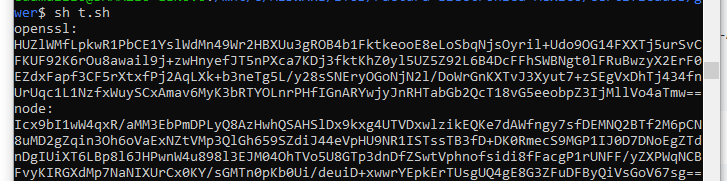
Except I used other .pem
Is there anyone supporting this issue? I get the same one, the signature generate from forge code is different from the signature generate from online web.

To help you guys figure out what's going on here, we need to be able to replicate the issue. Do you have example private keys (please generate new throwaway ones) where this problem occurs? What version of openssl are you using? What happens if you run the openssl command twice? Do you get a different signature result from openssl?
If your version of openssl is using RSASSA-PSS (a probabilistic signing scheme) by default or if your private key PEM expresses RSASSA-PSS as a preferred algorithm in the metadata, then you'll get a different signature result every time.
You can force openssl to use RSASSA-PSS like this:
cat in.txt | openssl dgst -sign key.pem -sigopt rsa_padding_mode:pss | openssl enc -base64 -A
If you run that twice, you'll see that openssl gives you two different results. Note that forge also supports RSASSA-PSS (see the README for example usage), so feel free to use that if you prefer. It is, in fact, a more secure scheme (but sometimes less compatible) than RSASSA-PKCS1-v1_5. But do keep in mind, every time you sign you'll get a different signature... because it's a probabilistic scheme that involves random data.

rsa_pss_saltlen:len For pss mode only this option specifies the salt length. Two special values are supported: -1 sets the salt length to the digest length. When signing -2 sets the salt length to the maximum permissible value. When verifying -2 causes the salt length to be automatically determined based on the PSS block structure.
refer: https://www.openssl.org/docs/man1.0.2/man1/pkeyutl.html

@edamazzio were you able to figure this out?
@davidlehn I have a similar requirement but I'd like to use this
echo "text" | openssl dgst -sha256 -binary -sign private_key.pem | openssl enc -base64 -A
instead of the above command (the only difference being the use of the -binary option)
Any help is appreciated! Thanks!