

 diegomura
Copy-paste issue for registered font
Describe the bug Copy-paste is not working correctly for the PDFs generated with the registered font.
To Reproduce
I was generating PDF files using react-pdf/renderer
Registered the font like this:
Font.register({ family: 'Gelasio-Regular', src: __dirname + '/Gelasio-Regular.ttf' });
But when copy-paste the content of the PDF file, it is not coming correctly.
Here is the generated PDF file: test.pdf
When copy-pasting the content, I am getting like this:
Oce
Downloaded the font Gelasio-Regular.ttf file from: https://fonts.google.com/specimen/Gelasio
Other information
- React-pdf version: 2.1.1

Hi, same problem. Copying some words, the characters are changed. Same problem if trying to search the text within the pdf.


I'm using custom font Noto-Sans and see no issue with the latest version 3.0.0
+1 to seeing this issue generating a pdf. Using the Roboto font from Google. Tried upgrading to React-PDF 3.0.0 and got the latest version of the font

Yeah. Tested with latest version with Noto Sans SC local font and this issue can be reproduced.
Issue can be reproduced with the following fonts: Nunito, Montserrat, NotoSans and Roboto
No problem if using Raleway or JosefinSans
My React-PDF version is 2.1.0
I'm facing the same issue with Arial. And after extensive tests, we found out that the problem is restricted to Arial Regular (weight 400) and Arial Bold (weight 700). Other font weights registered in the application, like 300, 500 & 900, works fine! The example below illustrates this, where the first row of content uses font weight 500, the second one 700 and the third one uses regular 400:
Copying content from:
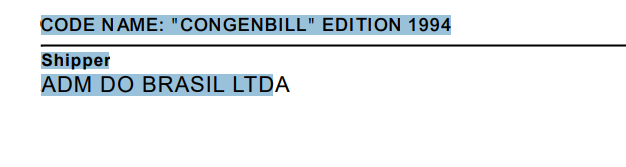
Output when pasting it somewhere else:
CODE NAME: "CONGENBILL" EDITION 1994
1Shiipe
:AD AM 2º:OS/ /IA:
With that figured out, we tried to find the font in some other source or CDN but we got the same result for both TTF and WOFF format.
In addition, we faced the same behavior from version 2.3 thru 3.0 of @react-pdf/renderer.

I'm facing the same issue using Google NotoSansTC Font.
@react-pdf/renderer version: 3.0.0
Both Chinese & non-Chinese characters are copied as wrong text.
I have tried the birdfont and fontforge workaround, but non of them completely works for me.
Importing & exporting the font using fontforge fixes part of the issue, most of the characters can be copied correctly, but some glyphs cannot display as usual anymore.

We're having this same issue with Google Outfit. We only have Latin characters in our pdf. Both copy-paste and search show the same errors, e.g. "specific" becomes "specixc". If we generate the PDF from a different source (Figma), it does not have this error. The fontforge fix did not work.
I can provide PDFs and/or example code if requested.

FYI, if this is more important than the appearance of your text, I would advise removing the custom font altogether as it seems to solve the issue. In my case, it was because I'm using this for a resume that is often consumed by algorithms.

Our team recently make some progress on this problem. Hope that our experience can help.
When embedding a Type 0 font into a PDF, there are two main methods for generating Unicode mappings for glyphs: bfrange and bfchar. These methods are used to specify how character codes map to Unicode character codes.
Example using bfrange:
4 beginbfrange
<00> <26> <00>
<61> <7d> <61>
endbfrange
Example using bfchar:
8 beginbfchar
<815c> <815c>
<eb63> <eb63>
endbfchar
React-pdf uses the bfrange method in its toUnicodeCmap function to generate these mappings (which comes from pdfkit). While this works well in most PDF viewing software like Adobe Reader and Mozilla's PDF.js, it encounters issues when viewed in Chrome's built-in PDF viewer. Specifically, the texts can sometimes appear normally but copied as gibberish, especially when the PDF contains a large amount of text.
To resolve this issue, re-implement the toUnicodeCmap method to use bfchar encoding instead of bfrange. This change successfully resolved the gibberish text issue when viewing the PDF in Chrome.
The fonts we use to test include Noto Sans Traditional Chinese and DFKai-SB.
The greatest benefit of solving this problem is that we can use google's font directly (without any tweaks by fontforge) and reduce network traffic of our servers :D

@victorfu Can you please share the rewritten method? I'm running into the same issue but I'm unfamiliar with pdf cmaps and encoding.

@victorfu Can you please share the rewritten method? I'm running into the same issue but I'm unfamiliar with pdf cmaps and encoding.
@peilong-du check this pull request https://github.com/diegomura/react-pdf/pull/2408
@victorfu Can you please share the rewritten method? I'm running into the same issue but I'm unfamiliar with pdf cmaps and encoding.
@peilong-du check this pull request #2408
Thanks!!! I've been able to build and create a patch-package for this issue which is a lifesaver because I'm using it to build my resume and ATS software would read it wrong.

Do we have an ETA on when the next release is gonna be after the pull request is merged?
@irian-codes I'm using this in a resume builder that i use for my own resume. Can you share the patch-package you built?
Update: Nevermind. After some digging, I was able to use patch-package to patch it myself with #2408 .

