

 dense-analysis
Errors for other files are not handled for clangcheck
Information
IMHO lines with errors and warning were not marked due to incorrect ../../ path handle.
VIM version NVIM v0.2.3-564-g6452831
Operating System: Red Hat Enterprise Linux Server release 6.5 (Santiago)
:ALEInfo
 Current Filetype: cpp
Available Linters: ['clang', 'clangcheck', 'clangtidy', 'cppcheck', 'cpplint', 'g++']
  Enabled Linters: ['clangcheck']
 Linter Variables:

let g:ale_cpp_clangcheck_executable = '/opt/llvm/x86_64/3.8.0/bin/clang-check'
let g:ale_cpp_clangcheck_options = ''
 Global Variables:

let g:ale_echo_cursor = 1
let g:ale_echo_msg_error_str = 'Error'
let g:ale_echo_msg_format = '%code: %%s'
let g:ale_echo_msg_warning_str = 'Warning'
let g:ale_enabled = 1
let g:ale_fix_on_save = 0
let g:ale_fixers = {}
let g:ale_keep_list_window_open = 0
let g:ale_lint_delay = 200
let g:ale_lint_on_enter = 0
let g:ale_lint_on_save = 1
let g:ale_lint_on_text_changed = 'never'
let g:ale_linter_aliases = {}
let g:ale_linters = {'cpp': ['clangcheck']}
let g:ale_open_list = 0
let g:ale_set_highlights = 1
let g:ale_set_loclist = 1
let g:ale_set_quickfix = 0
let g:ale_set_signs = 1
let g:ale_sign_column_always = 0
let g:ale_sign_error = '>>'
let g:ale_sign_offset = 1000000
let g:ale_sign_warning = '--'
let g:ale_statusline_format = ['%d error(s)', '%d warning(s)', 'OK']
let g:ale_warn_about_trailing_whitespace = 1
  Command History:

(executable check - success) /opt/llvm/x86_64/3.8.0/bin/clang-check
(finished - exit code 1) ['/bin/bash', '-c', '''/opt/llvm/x86_64/3.8.0/bin/clang-check''  ''/home/user/src/main.cpp'' -p ''/home/user/compile_commands.json''']

<<<OUTPUT STARTS>>>
 ../src/main.cpp.:13:2: error: invalid preprocessing directive
#iinclude <glo_def.h>
 ^
1 error generated.
Error while processing ../src/main.cpp.
<<<OUTPUT ENDS>>>
What went wrong
Line with error was not marked
Reproducing the bug
init.vim
let g:ale_linters = {
      \   'cpp': ['clangcheck'],
      \}

let g:ale_lint_on_text_changed = 'never'
let g:ale_cpp_clangcheck_executable = '/opt/llvm/x86_64/3.8.0/bin/clang-check'
let g:ale_cpp_clangcheck_options=''
let g:ale_c_build_dir='path/to/dir'
Steps for repeating the bug:
1.Open file. 2.Lead to the error in a code. 2.Save it. 3.ALEInfo shows where is error, but line was not pointed out. ;(

Maybe someone have some idea for workaround for this issue? My all paths in ALEinfo output start with ../../../ . Thanks in advance!
This can probably be fixed by changing the working directory, resolving the relative paths, and setting the filename key on the loclist items like other linters.

Thank you for response. Sadly change working dir did not help. My compile_commands.json looks like:
        arguments: [
            c++,
            -c,
            -Wp,-MD,/home/user/src/main.o.d,
            ... a lot of flags ...
           ../main.cpp
         ],
         directory : /home/user/src,
         file : ../main.cpp
Changed dir to /home/user/src did not helped.
When I changed file from ../main.cpp to /home/user/main.cpp then at ALEInfo says compile command not found
I do not understand second step
... and setting the filename key on the loclist items like other linters. ;/
Could you explain me what I should do ?
Maybe delete ../ and concatenation /home/user/ to path could help,
but I cannot find place at code where I could do it.
Thanks a lot ;)
I meant that the command ALE runs for clangcheck needs to be changed so it runs cd with the direction containing the file, and the function for handling the error output needs to be changed to include the filename.
Could you tell name of function that handle path from error output? :P I am not familiar with ALE project, but I will be ;)
EDIT: I found that file -> gcc.vim xD
Hi All, my workaround for that issue is: autocmd BufEnter * let g:filePathForAle = expand('%:p') -> in vimrc let l:item['filename'] = g:filePathForAle -> in gcc.vim
I reopened this issue. This is a bug someone will have to fix in the linter. Check out ale_linters/go/gobuild.vim for an example of how to handle this.
I've spent some time trying to recreate this issue, using the above conditions to recreate from @LKlemens and I have not been able to recreate this. It would appear this issue has either been fixed in ALE or clang-check.
See screenshot:
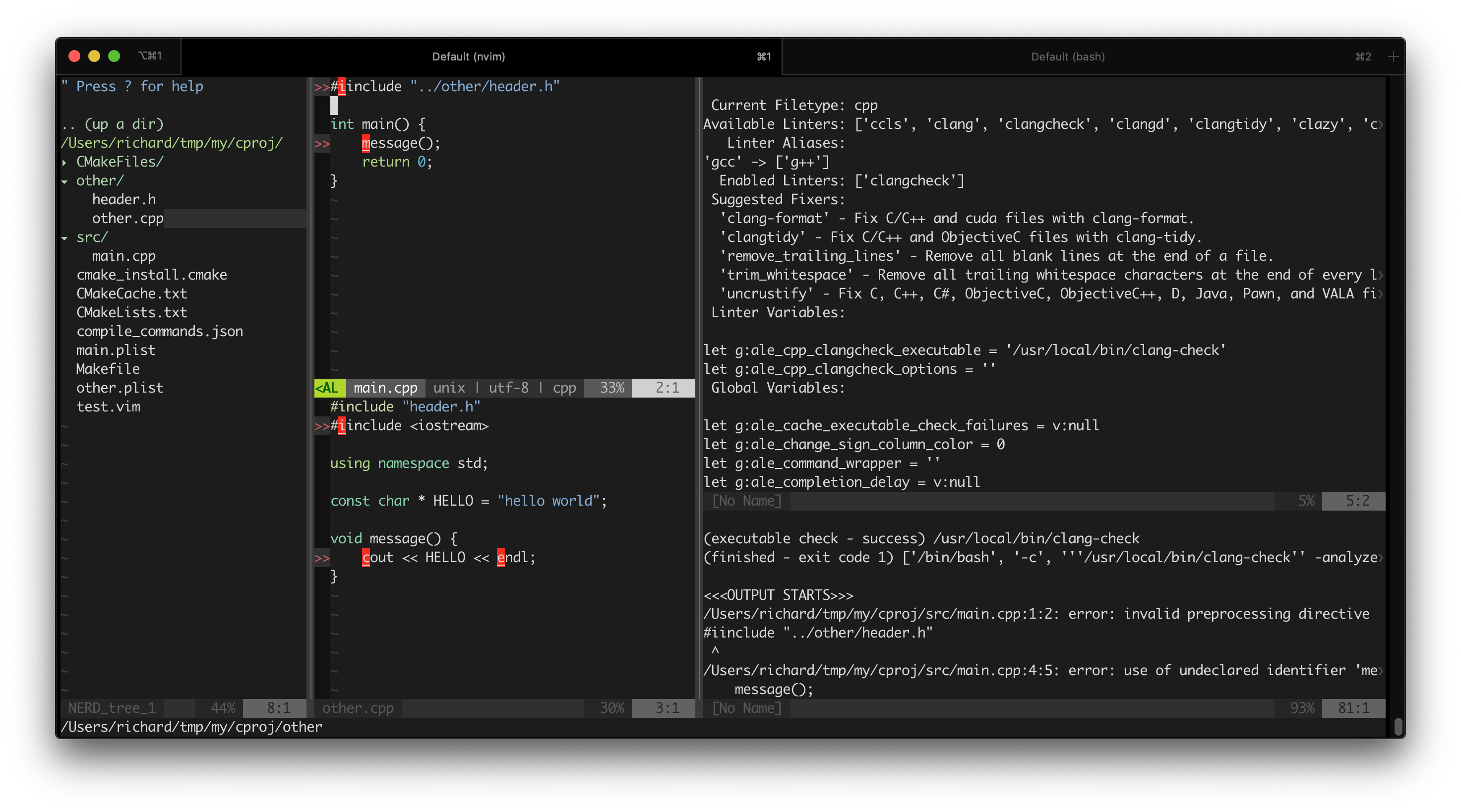
My suggestion is we close this unless objections from @LKlemens or @w0rp ?

Hi @richyfish,
Thank you for taking care of this problem 👍
I don't know if issue is solved, and I have no way to check it because I don't work in company where problem occurs.
But there is not problem with #include "../file" but relatives path in ale plugin.
I used ale with compile_commands.json where was relative paths to cpp/hpp files, with these ones ale didn't show any errors visually.
I found critical var where these relative paths stored, and I changed it to absolute.
That var is let l:item['filename'] in ./autoload/ale/handlers/gcc.vim and I expand path "../../file.cpp" to absolute "/home/user/project/src/file.cpp".
I guess to reproduce it, is necessary have project with makefiles write in special way that compile_commands.json produced from these makefiles has relative paths to cpp files.
For instant:
compile_commands.json
 arguments: [
            c++,
            -c,
            -Wp,-MD,/home/user/src/main.o.d,
            ... a lot of flags ...
           ../file2.cpp
         ],
         directory : /home/user/src,
         file : ../file.cpp
and ALEinfo shows in ../file.cpp:12 is an error, but line 12 in vim was not marked.
PS
In your example ALEinfo shows /Users/richard/tmp/my/cproj/src/main.cpp:1:2: error : ..., so I think your project based on absolute paths only. `include "../path.cpp" is relative, but error output from g++/clang still has only absolute paths in your example project.