

 delegateas
Should the type of ValidTo not be a string in dt_customerpriceagreements?
Describe the bug When I try to call Xrm.update and want to update ValidTo, it says that the type should be a Date. The problem is that the server is expecting an Edm format, so I get an error.
To Reproduce Steps to reproduce the behavior:
- Try to update the ValidTo field of a record in dt_customerpriceagreements
Screenshots

Environment
- Tool version: 4.43


Haha, it is funny to look back at this issue. I clearly didn't understand XDT that well back then (or CRM for that matter).
I can't remember this issue fully but I think the problem was caused using the .getAttribute('blabla').getValue() syntax and XDT told me that I got a Date object back, but it was actually a string value. So that is why the error said String '...' was not recognized as a valid Edm.Date. Meaning, I actually inputted a string but XDT promised me a Date object - and that is the issue.
I am currently on another project, so I can't even find the code again and show it for reproducing purposes. I remember a colleague had the same issue and I will ask him if he can remember where he encountered the issue to provide a good example here.
It could actually be that the issue is two-fold. I believe ValidTo, which I am refering to, is a custom Date field that XDT thinks should be given a Date object when using Xrm.update, but should have been given a string - implying that @mkholt is correct to say that this issue is also related to #174.
Here are some pictures from my colleage to support the issue.
He first needed to query a record from the opportunitygroups entity:
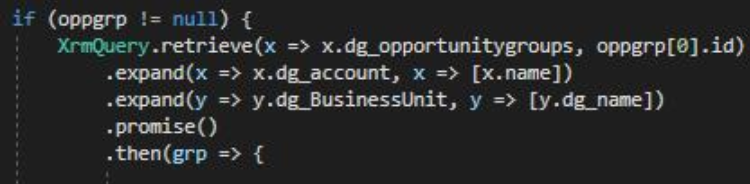
and then later he uses a field from grp called dg_contratend which is of type Date only and XDT falsly tell him that it is a Date object, but it is a string. Hence the needed castings:

- Had to cast it to
anybefore it was allowed to cast it tostring
My guess is that you get a date object when you call getValue on an attribute on a form. However, you get a date string back when you call the web api. Therefore, we need to generate two result typings, one for the form and one for the web api

That is a very good guess! :) Thanks for the comment Magnus ;)