

 deepch
Please help me!
Hi, I'am test accessing the stream with the VLC Player
 but it's not connect, and show "WritePacket WebRTC Client Offline"
it's Prompt in google chrome browser
but it's not connect, and show "WritePacket WebRTC Client Offline"
it's Prompt in google chrome browser
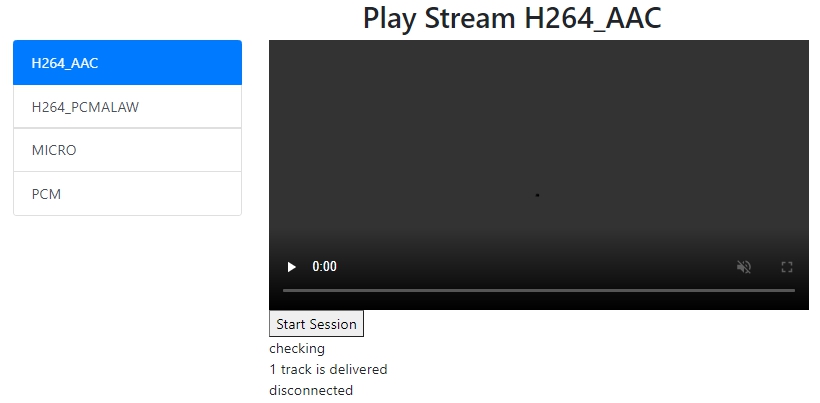


your chrome client not send ack or offline.maybe you should check connection.


According to the log, your browser is not connected during peerconnection. Maybe your browser can't directly access the server. HTTP requests are forwarded through a gateway, right?

Hi, @vdalex25 and @danbao12138 Thanks for your reply.
there any messages in the chrome console
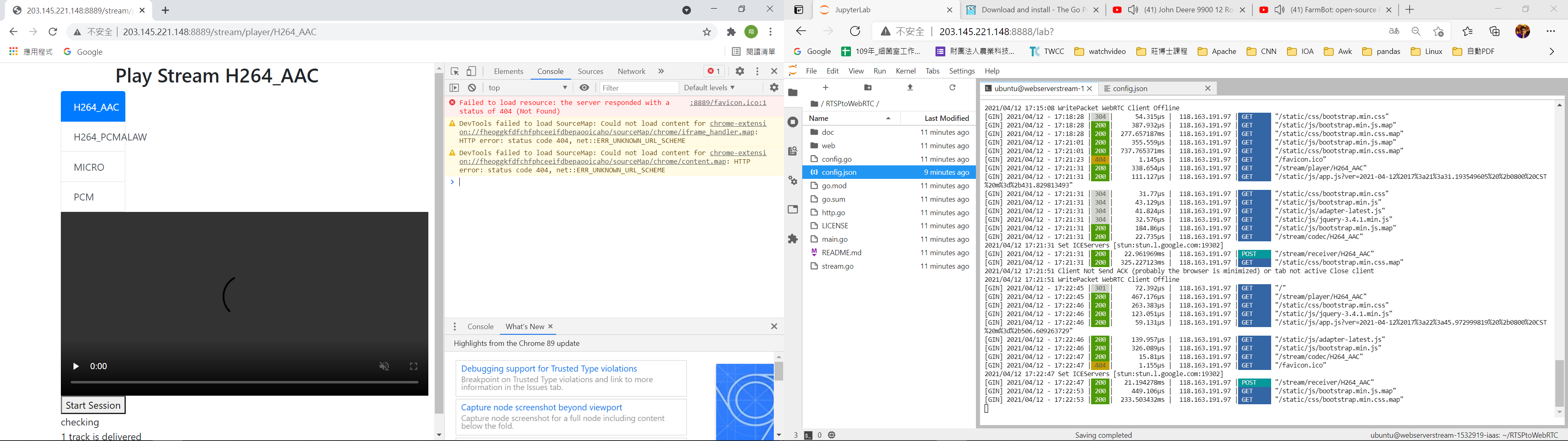 How to solve the problem, thank you
Hi, @vdalex25 Thanks for your reply.
access to the stream
http://203.145.221.148:8889/
the rtsp link is rtsp://wowzaec2demo.streamlock.net/vod/mp4:BigBuckBunny_115k.mov (config.json)

I decode the SDP information transmitted from your server as follows:
v=0 o=- 8728092438092258758 1618222107 IN IP4 0.0.0.0 s=- t=0 0 a=fingerprint:sha-256 2D:15:D8:0C:DF:5C:67:5B:BB:5C:70:97:B8:B9:F3:3C:E4:B2:1C:8B:DD:5A:0A:5E:89:8F:A0:02:B4:68:7D:DD a=group:BUNDLE 0 1 m=video 9 UDP/TLS/RTP/SAVPF 120 124 121 125 126 127 97 98 c=IN IP4 0.0.0.0 a=setup:active a=mid:0 a=ice-ufrag:BXVABQqhriChTOAO a=ice-pwd:WTbqtUvhCDlAcKefIDcUyTEWRMLMqIaV a=rtcp-mux a=rtcp-rsize a=rtpmap:120 VP8/90000 a=fmtp:120 max-fs=12288;max-fr=60 a=rtcp-fb:120 nack a=rtcp-fb:120 nack pli a=rtcp-fb:120 ccm fir a=rtcp-fb:120 goog-remb a=rtcp-fb:120 transport-cc a=rtpmap:124 rtx/90000 a=fmtp:124 apt=120 a=rtpmap:121 VP9/90000 a=fmtp:121 max-fs=12288;max-fr=60 a=rtcp-fb:121 nack a=rtcp-fb:121 nack pli a=rtcp-fb:121 ccm fir a=rtcp-fb:121 goog-remb a=rtcp-fb:121 transport-cc a=rtpmap:125 rtx/90000 a=fmtp:125 apt=121 a=rtpmap:126 H264/90000 a=fmtp:126 profile-level-id=42e01f;level-asymmetry-allowed=1;packetization-mode=1 a=rtcp-fb:126 nack a=rtcp-fb:126 nack pli a=rtcp-fb:126 ccm fir a=rtcp-fb:126 goog-remb a=rtcp-fb:126 transport-cc a=rtpmap:127 rtx/90000 a=fmtp:127 apt=126 a=rtpmap:97 H264/90000 a=fmtp:97 profile-level-id=42e01f;level-asymmetry-allowed=1 a=rtcp-fb:97 nack a=rtcp-fb:97 nack pli a=rtcp-fb:97 ccm fir a=rtcp-fb:97 goog-remb a=rtcp-fb:97 transport-cc a=rtpmap:98 rtx/90000 a=fmtp:98 apt=97 a=extmap:3 urn:ietf:params:rtp-hdrext:sdes:mid a=ssrc:1571828422 cname:pion-rtsp-video a=ssrc:1571828422 msid:pion-rtsp-video pion-rtsp-video a=ssrc:1571828422 mslabel:pion-rtsp-video a=ssrc:1571828422 label:pion-rtsp-video a=msid:pion-rtsp-video pion-rtsp-video a=sendrecv a=candidate:3725878780 1 udp 2130706431 192.168.211.3 49808 typ host a=candidate:3725878780 2 udp 2130706431 192.168.211.3 49808 typ host a=candidate:384879717 1 udp 1694498815 203.145.221.148 49825 typ srflx raddr 0.0.0.0 rport 49825 a=candidate:384879717 2 udp 1694498815 203.145.221.148 49825 typ srflx raddr 0.0.0.0 rport 49825 a=end-of-candidates m=application 9 UDP/DTLS/SCTP webrtc-datachannel c=IN IP4 0.0.0.0 a=setup:active a=mid:1 a=sendrecv a=sctp-port:5000 a=ice-ufrag:BXVABQqhriChTOAO a=ice-pwd:WTbqtUvhCDlAcKefIDcUyTEWRMLMqIaV
Your server is deployed in a LAN with IP 192.168.211.3, and your HTTP requests is forwarded through 203.145.221.148 server. Your browser is not connected during peerconnection, because your ice-candidate is wrong.
a=candidate:384879717 2 udp 1694498815 203.145.221.148 49825 typ srflx raddr 0.0.0.0 rport 49825
Your question is the same as #73
In fact, if the author can solve issue #77 or #73, he can also solve this problem.
I also have a solution. You need to change some code. You can modify its SDP information, change 192.168.211.3 to 203.145.221.148 , and then map the port used by peerconnection to the host.