
uni-ui

uni-ui copied to clipboard
 dcloudio
关于 from 表单 无法校验的问题
环境:
uni-ui: 1.4.14 vue: 3.2.33
问题代码:
- 使用 uni-ui 提供的 uni-easyinput 发现无法进行校验
<template>
     <uni-forms ref="baseForm" :modelValue="baseFormData" :rules="customRules" label-width="80" label-align="right">
        <uni-forms-item :label="`${requestLabel}事由:`" name="reason">
                <uni-easyinput type="textarea" v-model="baseFormData.reason" placeholder="事由" />
         </uni-forms-item>
    </uni-forms>
    <button @click="submit" :loading="loading">提交</button>
</template>
<script setup lang="ts">
const baseFormData = reactive<workAttendanceAddDTO>({
  attendanceType: 0, // 申请类型
  projectCode: '',
  approvalEmployeeCode: '', // 审批人code
  approvalEmployeeName: '', // 审批人
  attendanceTimeStart: '',
  attendanceTimeEnd: '',
  reason: '',
});
const customRules = {
  reason: {
      rules: [
        {
          required: true,
          errorMessage: '事由不能为空',
        },
      ],
    }
}
// 提交
function submit() {
  baseForm.value
    .validate()
    .then(async (res: workAttendanceAddDTO) => {
      const { code } = await workAttendanceAdd(res);
      if (code == 0) {
        // 在C页面内 navigateBack,将返回A页面
        uni.navigateBack({
          delta: 1,
        });
      }
    })
    .catch((err: any) => {
      console.log('err', err);
    });
}
</script>
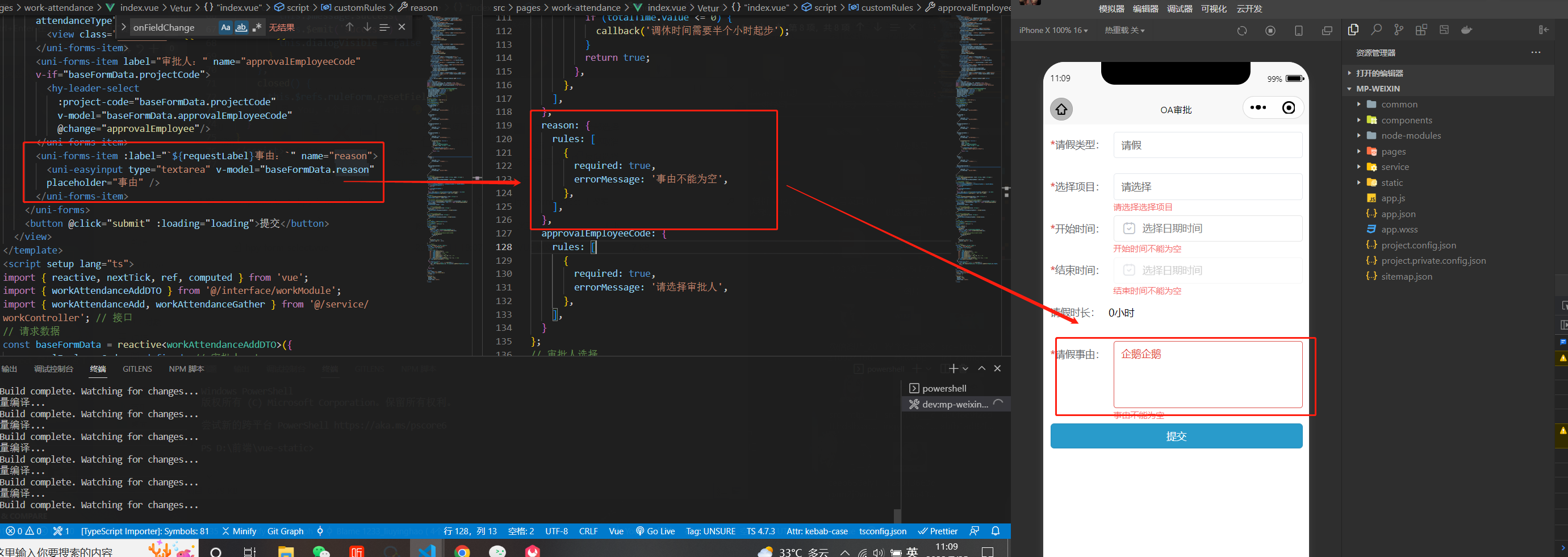
再点击的时候无法触发校验,效果如下:
- 自定义校验组件无法触发校验效果:使用
onFieldChange或者setValue都无法触发正确的校验效果 自定义组件(下拉选择):
<template>
  <view class="picker" @click="open">
    {{ activeTitle }}
  </view>
  <view
    class="overlay"
    :class="!show && 'hide'"
    @touchmove.prevent
  >
  <view v-show="show" class="picker-box" :class="[showCloseBtn && 'show-btn', show ? 'fade-Up' : '']">
    <view class="main-desc picker-title">
      {{ title }}
      <uni-icons type="closeempty" size="14" @click="close"></uni-icons>
    </view>
    <view class="picker-list">
      <view
        v-for="item in props.list"
        :key="item[props.valueKey]"
        class="list-item"
        :class="{ 'active': modelValue == item[props.valueKey] }"
        @click="change(item)"
      >
          <slot :item="item">
          {{ item[props.valueLabel] }}
          </slot>
      </view>
    </view>
    <slot name="bottom">
    </slot>
  </view>
  </view>
</template>

<script setup lang="ts">
import { computed, ref, inject } from 'vue';
const  props = defineProps({
  title: {
    type: String,
    default: '请选择',
  },
  list: {
    default: () => new Array<any>(),
  },
  modelValue: {
    type: [Number, String],
    default: undefined,
  },
  immediate: {
    type: Boolean,
    default: true,
  },
  showCloseBtn: {
    type: Boolean,
    default: true,
  },
  // 返回值
  valueKey: {
    type: String,
    default: 'value',
  },
  // 显示值
  valueLabel: {
    type: String,
    default: 'text',
  },
});
const emits = defineEmits(['update:modelValue', 'change']);
// 兼容form 表单
const form = inject<any>('uniForm', null);
const formItem = inject<any>('uniFormItem', null);
// 计算值
const activeTitle = computed(() => {
  const patch = props.list.find(v => props.modelValue === v[props.valueKey]);
  return patch ? patch[props.valueLabel] : '请选择';
});

// 处理点击弹幕
const show = ref(false);

function open(){
  show.value = true;
}
function close(){
  show.value = false;
}

// 事件触发
const change = (data: any) => {
  emits('update:modelValue', data[props.valueKey]);
  emits('change', data);
  if (props.immediate) {
    show.value = false;
  }
  if (form && formItem) {
    // console.log(formItem);
    const { name } = formItem;
    console.log(name);
    // formItem.onFieldChange(name, data[props.valueKey]);
    formItem.setValue(name, data[props.valueKey]);
  }
};
</script>

<style lang="scss" scoped>
@keyframes faseDown {
  from {
    -webkit-transform: translate3d(0, 0, 0);
    transform: translate3d(0, 0, 0);
  }

  to {
    -webkit-transform: translate3d(0, 100%, 0);
    transform: translate3d(0, 100%, 0);
  }
}

@keyframes fadeUp {
  from {
    -webkit-transform: translate3d(0, 100%, 0);
    transform: translate3d(0, 100%, 0);
  }

  to {
    -webkit-transform: translate3d(0, 0, 0);
    transform: translate3d(0, 0, 0);
  }
}

@keyframes height {
  from {
    max-height: 0;
  }

  to {
    max-height: 900rpx;
  }
}

.picker {
  display: flex;
  align-items: center;
  padding: 0 10px;
  height: 35px;
  border-radius: 4px;
  border: 1px solid #E4E7ED;
  color: #666;
  font-size: 14px;
}


.picker-box {
  transition: height 1s;
  border-radius: 8px 8px 0px 0px;
  background: #fff;
  z-index: 1001;
  position: fixed;
  overflow: hidden;
  width: 100%;
  max-height: 900rpx;
  left: 0;
  bottom: 0;
  color: #2f3437;

  &.fade-Up {
    animation-name: fadeUp;
    animation-duration: 0.3s;
  }

  &.fase-down {
    animation-name: faseDown;
    animation-duration: 0.3s;
  }

  &.show-btn {
    padding-bottom: 130rpx;
  }

  .picker-title {
    padding: 10px;
    font-weight: bold;
    border: 1px solid #f2f2f2;
    display: flex;
    justify-content: space-between;
  }

  .picker-list {
    padding: 0 10px;
    max-height: 300px;
    overflow-y: auto;

    .list-item {
      display: flex;
      justify-content: space-between;
      align-items: center;
      font-size: 14px;
      padding: 10px 0;
      color: #606266;

      &:not(:last-child) {
        border-bottom: 1px solid #f2f2f2;
      }

    }
    .active {
      color: #299bcb;
    }
  }
}
.overlay {
  z-index: 999;
  position: fixed;
  left: 0;
  top: 0;
  width: 100vw;
  height: 100vh;
  background: rgba(0, 0, 0, 0.5);
  transition: all 1s;
  &.hide {
    display: none !important;
  }
}
</style>


baseFormData 是在那里定义的 ? 父组件·中定义的
const baseFormData = reactive<workAttendanceAddDTO>({
  attendanceType: 0, // 申请类型
  projectCode: '',
  approvalEmployeeCode: '', // 审批人code
  approvalEmployeeName: '', // 审批人
  attendanceTimeStart: '',
  attendanceTimeEnd: '',
  reason: '',
});
