

 dc-js
dc-js
row chart unable to recover from NaNs
I have used the same code but the expected result is different for 2 different set of d3.js
1st version: d3.js: 5.15.0 dc.js: 3.2.1 crossfilter.js: 1.3.7
result:
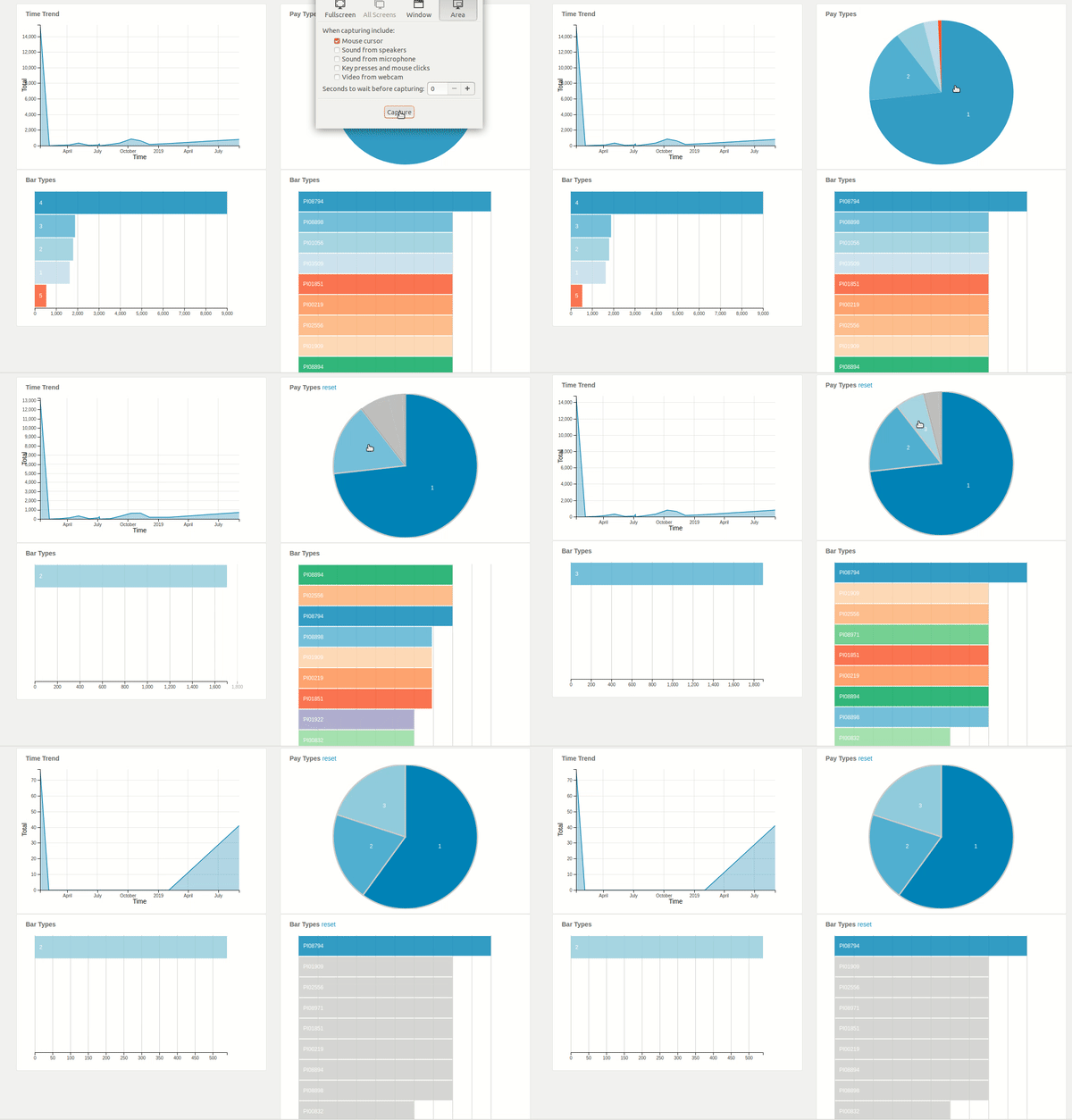
2nd version: d3.js: 3.4.1 dc.js: 2.0.0-dev crossfilter.js: 1.3.7
result:

As you can see in the first version when I click on the pie chart elements only one of the bar is showing which is wrong. I want it to be like 2nd version.
Even though the code is the same only some syntax is different. I don't know why there is much difference in the output.

I guess something must be misconfigured about the keys for your pie or first row chart, but I'd need to see running examples to figure out what is going wrong here. Can you provide a fiddle of the one that isn't working right?
I don't know of any bugs in dc.js that would cause this, more likely it is how the crossfilter dimensions & groups, and the dc.js key accessors, are set up.

Your crossfilter initialization code and data is exactly the same for both versions?
There is no need to create a fiddle for the dc@2 version, the bug in the dc@3 version should be clear.
My guess is that it could have to do with changes to the cap mixin. You could try bumping dc.js to @2.1.10 in the dc@2 version - 2.0.0-dev is very, very old. If it also fails with 2.1.10 you could try removing the .cap(N).
These are totally just guesses, so yes, a fiddle would be helpful.
But how to upload a csv file in jsfiddle? Yes code and data are almost same.
Trying plunkr but getting run.plnkr.co/:1 Failed to load resource: the server responded with a status of 413 (Request Entity Too Large)
Maybe your csv is too large for plunkr. You could try using just part of the data - this bug will probably still show up.
my file is 15.2 kB rest are js files reductio.js, dc.js, d3.js and crossfilter.js
I dunno. You definitely need to be able to provide a running example to get help on js & css problems, so it's good to learn how to use these sites if it seems tedious at first.
It might be a silly question. I have created the dashboard there don't know how to share. getting Could not save gist error.

Great, I think you just need to save the bl.ock and then copy and paste the URL.
You said the CSV is just 15k? Should be fine, I don't get why both plunkr and blockbuilder failed.
If the problem is the JS files you could link to them on a CDN instead of uploading them.
See this block for example: https://blockbuilder.org/gordonwoodhull/bcf9eaa0bfc2c84373cffac06d5755e5
finally : https://blockbuilder.org/ninjakx/302eaacb0a333e67c46c55dd60d27811
The problem is that when there are no values in the bin, reductio's .max() will return undefined and your value accessor turns this into NaN:
            .valueAccessor(function(p) {
                return parseFloat(p.value.max);
            })
And then it seems that the row chart is unable to recover - it is probably trying to animate from NaN, but once you do any calculation on NaN you just get NaN.
I think the row chart should coerce NaN to zero, but a quick fix for you is
            .valueAccessor(function(p) {
                return parseFloat(p.value.max) || 0;
            })
Working fork of your bl.ock: https://blockbuilder.org/gordonwoodhull/1810fd6b223bea5cbb98da06ee2a8b96
then why was it working perfectly for the 2nd version. code was same though.
Like I said, the row chart probably should correct NaN to zero, and it probably was doing that in version 2.0.0-dev, which was more than 5 years ago.
If I find time to fix the bug I’ll also try to figure out when it changed. It is likely that d3@3 was correcting the bad value and d3@4 does not - I’ve seen some stuff like that.
The workaround is ok but I still think dc.js should deal with this better. Reopening.
Ran into this issue as well. The code that sizes the bar elements in the chart cannot calculate a transition value once it becomes NaN. I modified dc.js to catch this case and return 0.
dc.transition(rect, _chart.transitionDuration(), _chart.transitionDelay())
  .attr('width', function (d) {
  var val = Math.abs(rootValue() - _x(_chart.cappedValueAccessor(d)));

  if (isNaN(val))
    val = 0;

    return val;
  })
  .attr('transform', translateX);
