

 davepwsmith
Problem with the zotpick-scannable-cite app
This almost works for me. Sorry, I'm no coder but here goes:
Using Zotero 5.0.96.1 (latest), Scrivener 3.2.2 (latest), M1 Mac Big Sur 11.2.2 (latest).
The zotpick-scannable-cite applescript (launched from the menu bar, for example) works perfectly but the app doesn't. I've tried the freshly downloaded version of the app from github and also tried saving the applescript as an application using Script Editor. I have pointed Scrivener to it (command-y in citation preferences). The app launches, brings Zotero to the front and I can choose a reference. When I click OK, it just sends me back to Zotero proper. It doesn't switch back to Scrivener and enter the citation. I've been into Security and Privacy System Preference and addressed all the permissions, I think, as I had a few errors reports initially: not allowing key strokes etc.
The pandoc for Scrivener app seems to work fine.
This might be user error so apologies if this is the case.

Plot thickens.
I tried the older version and it worked once. Then it reverted to keystrokes not being allowed. It's like it needs to be removed and added back in Security and Privacy after each use.
No clue if this is it, but sometimes I find that having an app launched by an indirect method doesn’t trigger the right security warning. Maybe run the AppleScript directly and see if you get prompted to allow it? Or is it sitting unchecked in the Security pref pane?

The applescript works fine on its own, triggered indirectly or directly. It's the app that's not right and I've gone through all the variations of Security settings, I think. It's all checked in the pref pane. No big problem really. I've set up a shortcut (using a Quick Action in Automator) to launch the applescript, which achieves the same thing.
OK, I tried this myself (not a Scrivener user). I downloaded the app, set the Zotpick AppleScript app as my citation manager, and tried to insert a citation with cmd-Y. The Zotpick dialog popped up fine and I could select a work. Then I got the security query which I ok'ed.
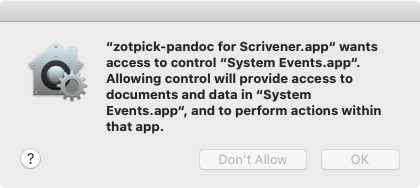
Then I got a message saying the app wasn't authorized to do keystrokes, but immediately under that was another security dialog that sent me to the Security prefs pane to check off the app in the accessibility section.
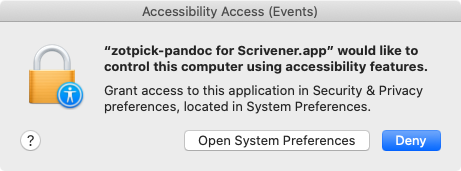
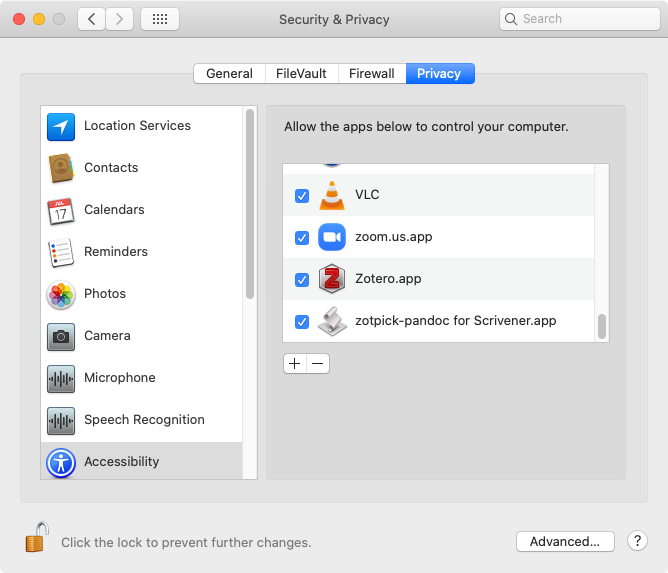
After I did this, I went back to Scrivener, and tried to insert another citation. It worked fine. Quit it. Re-opened, and inserted another citation with no problem.
Yes, I did all that too. And actually the pandoc script and app work as they should. It's just the scannable cite app that doesn't work. It just sends me back to Zotero instead of inserting the citation. No error reports or popups.
I had the same problem as Ronaldroy. I fixed it by doing two things.
- Since I just wanted this to work with Scrivener, I changed the script so that instead of figuring out the frontmost app it just used Scrivener. On my machine, that part of the script had been generating the script itself as the frontmost app.
(So the line setting appName now reads:
set appName to "Scrivener"
- I was still having trouble with the accessibility permission. I unchecked and rechecked the box. That seems to have fixed it and it now works as it is supposed to.
Hope this help.

Thanks, I've tried that and get the following dialogue:
Problem Could not get the name of the frontmost application.
However, after clicking OK, the script runs properly.
So, I just removed the line: display alert "Problem" message "Could not get the name of the frontmost application." error number -128 Saved as an app and all seems to work now. Is this a bad idea? I've never written an applescript or any code for that matter. I'm pretty good at copy and paste though!
What's strange to me is that the original applescript works perfectly but when saved as an app, it stalls in Zotero.
AppleScript is pretty intuitive and with this the worst thing that can happen is it won’t work; can’t hurt anything. Good luck.
On 9 Mar 2021, at 21:51, ronaldroy [email protected] wrote:
What's strange to me is that the original applescript works perfectly but when saved as an app, it stalls in Zotero.
— You are receiving this because you commented. Reply to this email directly, view it on GitHub, or unsubscribe.
@Dmw-pixel The scrivener app does just that, it sets the appName to "Scrivener". If you're seeing it set the app name to frontmost app, you're not using the Scrivener-specific version. I see that there's no scannable-cite version for Scrivener, so if that's what you mean, I've just posted one!
Let me know how it goes, please.
Brilliant, thanks!
On 11 Mar 2021, at 17:40, John Muccigrosso @.***> wrote:
@Dmw-pixel The scrivener app does just that, it sets the appName to "Scrivener". If you're seeing it set the app name to frontmost app, you're not using the Scrivener-specific version. I see that there's no scannable-cite version for Scrviener, so if that's what you mean, I've just posted one!
— You are receiving this because you were mentioned. Reply to this email directly, view it on GitHub, or unsubscribe.
I be stoopid. Where is it?
In the code section.
EDIT: Oh, wait, you're right. It didn't get uploaded to the server. Hmmm. Let me look at that. I'm guessing it's a stupid git mistake I'm making.