

 datamade
Challenge solution - Ahmad Zaki
DataMade Parserator Challenge Solution
Hi DataMade Team,
My name is Ahmad, and I work at the New York City Council. Welcome to my code challenge solution! 👋
At the City Council, I frequently engage in civic projects like your team do. These projects often involve making calls to public APIs and displaying the returned data on interactive Leaflet maps. This challenge was a delightful experience, and I thoroughly enjoyed working on it.
Overview
The challenge was both fun and educational. Below is a summary of what I accomplished during this project:
Demo: Handling Various Address Entry Scenarios
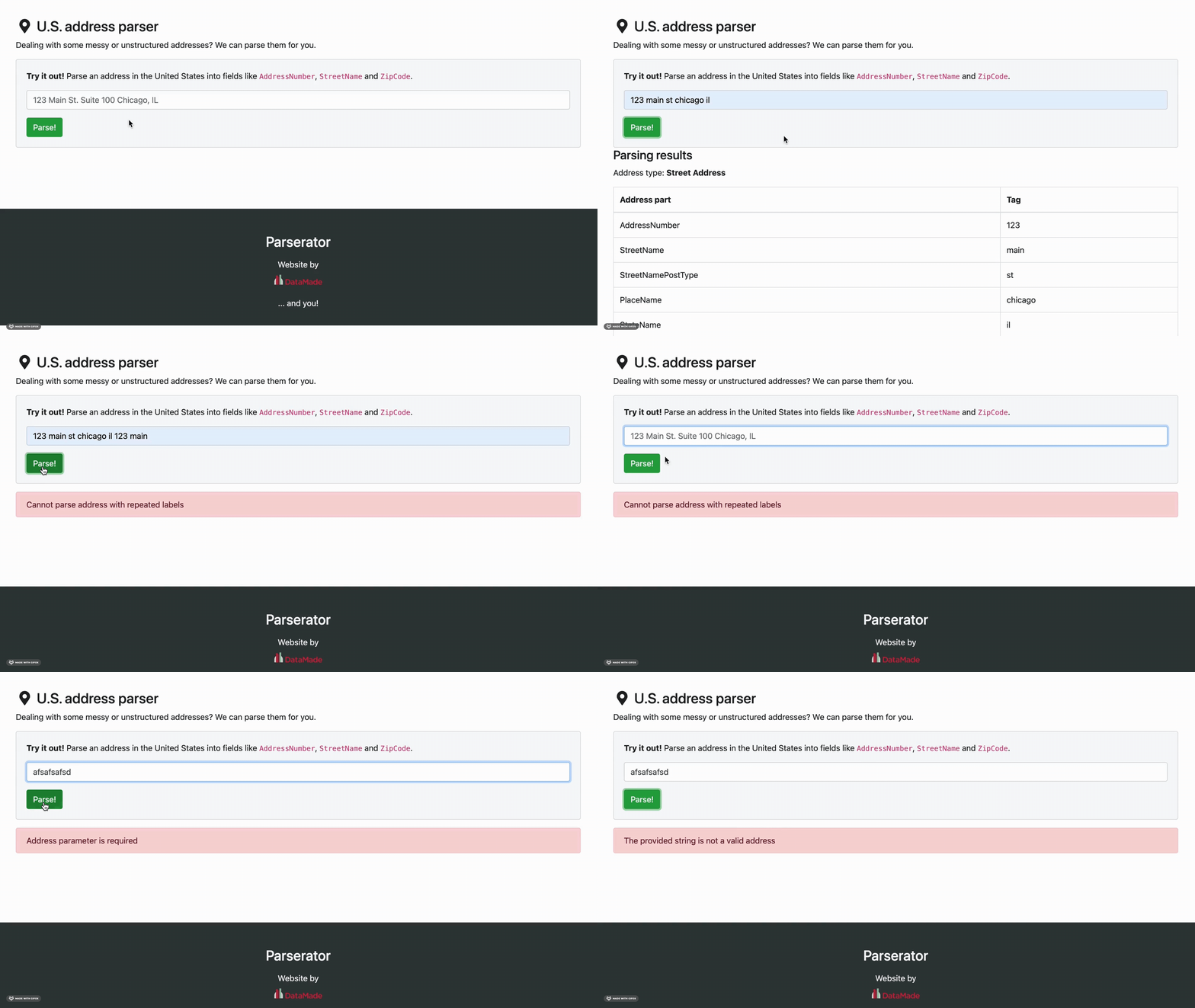
Accomplishments
Backend Development
Implemented the parse Method:
- Used
usaddressto parse address strings into components. - Handled various edge cases including repeated address labels and invalid addresses.
Enhanced Error Handling:
- Implemented specific error responses for unparseable addresses and repeated labels.
- Ensured the API returns meaningful error messages to guide the user.
Frontend Development
Wired Up the Form:
- Connected the form to the backend API using JavaScript.
- Ensured the form sends address data to the API and receives the parsed components.
Displayed Results and Errors:
- Implemented dynamic display of parsed address components.
- Handled and displayed error messages directly on the frontend to enhance user experience.
Docker File
Docker Setup:
- Used Docker and Docker Compose for containerized development and testing.
- Ensured smooth setup and teardown of the application environment.
- Integrated ESLint for JavaScript linting.
- Added npm installation and ESLint setup in the Dockerfile.
Testing
Added Unit Tests:
- Created unit tests to ensure the API returns correct responses for valid and invalid addresses.
- Verified that error messages are returned appropriately for different failure cases.
Passed All Tests:
- Successfully passed all unit tests and ESLint checks.
- Python linting passed! 👍
- JavaScript linting passed! 👍
-
tests/test_views.py::test_api_parse_succeedsPASSED -
tests/test_views.py::test_api_parse_raises_errorPASSED
Installation Instructions
Development requires a local installation of Docker and Docker Compose. These are the only two system-level dependencies you should need.
Once you have Docker and Docker Compose installed, build the application containers:
docker-compose build
Next, run the app:
docker-compose up
The app will log to the console, and you should be able to visit it at http://localhost:8000.
You can run the tests using Docker:
docker-compose -f docker-compose.yml -f tests/docker-compose.yml run --rm app
Test Cases and Expected Output
Test Case 1: Valid Address
Input:
123 main st chicago il
Expected Output:
{
    "address_components": {
        "AddressNumber": "123",
        "StreetName": "main",
        "StreetNamePostType": "st",
        "PlaceName": "chicago",
        "StateName": "il"
    },
    "address_type": "Street Address"
}
Test Case 2: Repeated Address
Input:
1123 main st chicago il 123 main st
Expected Output:
{
    "error": "Cannot parse address with repeated labels"
}
Test Case 3: Invalid Address
Input:
asdsadfdsaf
Expected Output:
{
   "error": "The provided string is not a valid address"
    },
Test Case 4: Empty Address
Input:
""
Expected Output:
{
   "error": "Address parameter is required"
    },
This project involved recreating the address parsing functionality of DataMade's Parserator service. Key tasks included implementing the parsing logic, enhancing error handling, wiring up the frontend form to the backend API, and ensuring comprehensive testing with unit tests.
So excited and looking forward to your feedback! Thank you!
