

 darktrojan
Not working anymore since Thunderbird 78.4.0 Update
Is this add-on still in developement and are you planning to make it work on the latest Thunderbird version?
Thanks.

same here, win10 78.4.0 (64-bit)
Open With is incompatible with Thunderbird 78.4.0.


same here, macOS 10.14.6
same here, win10 78.4.0 (64-bit)
Open With is incompatible with Thunderbird 78.4.0.

This issue is also in process in #281, please see/add your comment there ;o)

Please check out the new VERSION_7.2.3. Now it works in Thunderbird 78+ (tested on TB 78.5.1 on macOS 11).
Hooray and lots of thanks for @darktrojan !!!


Still not working, Thunderbird 78.5.1, MacOSX 10.14.6
- No output for "chmod +x open_with_mac.py; ./open_with_mac.py install"
- Test install in plugin config panel respond with no success
- Find Browser won't work, non of my 5 Browser was found (Chrome, Firefox, Opera, Safari, Edge).
I also had an issue with the new version 7.2.3 today on a computer with TB 78.5.1 and macOS 10.15.6.
It seems that open_with_mac.py install creates the JSON file in Library/Application\ Support/Thunderbird/NativeMessagingHosts but my Thunderbird on Catalina expects the file in Library/Mozilla/NativeMessagingHosts. So I needed to move the file:
mv Library/Application\ Support/Thunderbird/NativeMessagingHosts Library/Mozilla/
I also had an issue with the new version 7.2.3 today on a computer with TB 78.5.1 and macOS 10.15.6.
Same with TB 84.0b3 (64-Bit) on macOS 10.14.6 (18G2022).
It seems that
open_with_mac.py installcreates the JSON file inLibrary/Application\ Support/Thunderbird/NativeMessagingHostsbut my Thunderbird on Catalina expects the file inLibrary/Mozilla/NativeMessagingHosts. So I needed to move the file:mv Library/Application\ Support/Thunderbird/NativeMessagingHosts Library/Mozilla/
It's ~/Library... both instances. But still: thanks for the Tip!

Looks like i don't have this folder, "~/Library/Application Support/Thunderbird/NativeMessagingHosts". After manuelly created it and reinstalled, Plugin-check was successful and all Browsers except MS Edge were correctly found and added into the Browser list. And then it works just like the old days again.
Win10 78.5.1 (64-bit) - openwith v7.2.3
~~v7.2.3 still does not work on Win10 78.5.1 (64-bit)~~
cd C:\Users\ebal\AppData\Local\Programs\Python\Python39\

python.exe c:\Users\ebal\Downloads\tmp\open_with_windows.py install
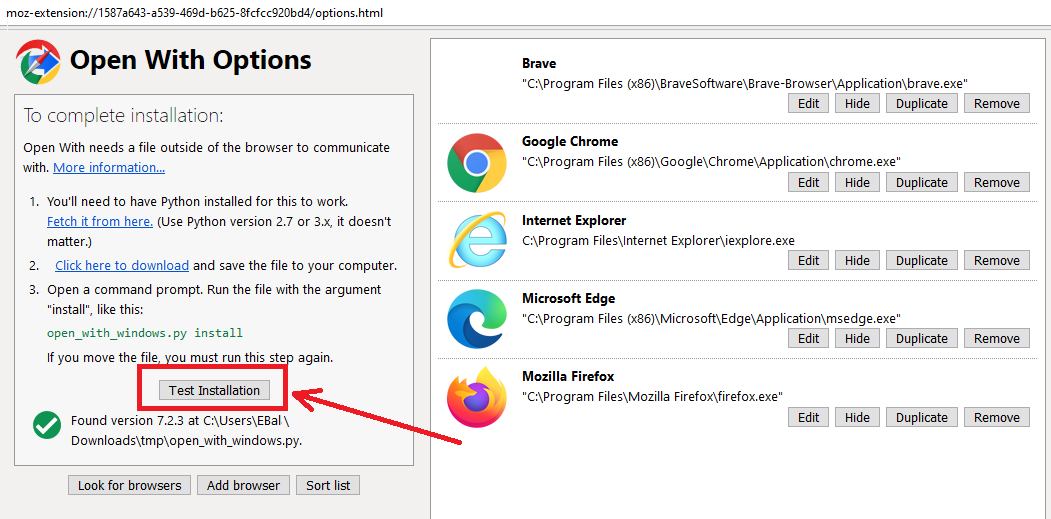
Hello - I got the addon halfway to work in Thunderbird 78.6.1 Portable. Find below my "history" and a question on how to proceed.
After an update of Thunderbird Portable "Open With" did not work any more.
TB said that the addon would not work with my TB version. Searching for an update of the addon by means of the ⚙-symbol did not yield any results.
I searched here, but the above solutions were not suitable for me.
Then I uninstalled the addon and got the latest version from:
https://addons.thunderbird.net/de/thunderbird/addon/open-with/
I downloaded it to the dir E:\PortableApps\ThunderbirdPortable\Data\plugins\webextension and installed it manually "from file" via the ⚙-symbol.
After the first restart of TB, it had disappeared. I retried, and restarted TB.
Then it was still there (YES!), without links to the browsers.
I added Opera manually via the addon settings tool of TB.
When I rightclick on a link now, Opera is offered by the addon. -- > HALF WAY SUCCESS
New Problem: Nothing happens when I click it. Just nothing at all.
Then I found the note in the addon options that I need a python installation and the script.
So I installed Python from their website: python-3.9.1-embed-amd64.
I downloaded the script to my pc.
I executed the script together with the install parameter as indicated. I got an error message:
>>> E:\PortableApps\ThunderbirdPortable\App\Bin\open_with_windows.py install [NEWLINE] File "<stdin>", line 1 [NEWLINE] SyntaxError: unexpected character after line continuation character
I guess this a real bloody beginner's problem?! Does anybody have a clue what the next step on this mission has to be?
Thx for your advice! :-)
